
News
How to Succeed at LinkedIn Search Ranking, Even if You’ve Failed in the Past

Jan
Why You’re Not Being Found on LinkedIn (and How to Fix It)
How to Rank on LinkedIn Search Results starts with understanding that LinkedIn functions as a search engine with over 1 billion members. Most professionals simply do not appear when their ideal clients, partners, or recruiters search for their expertise.
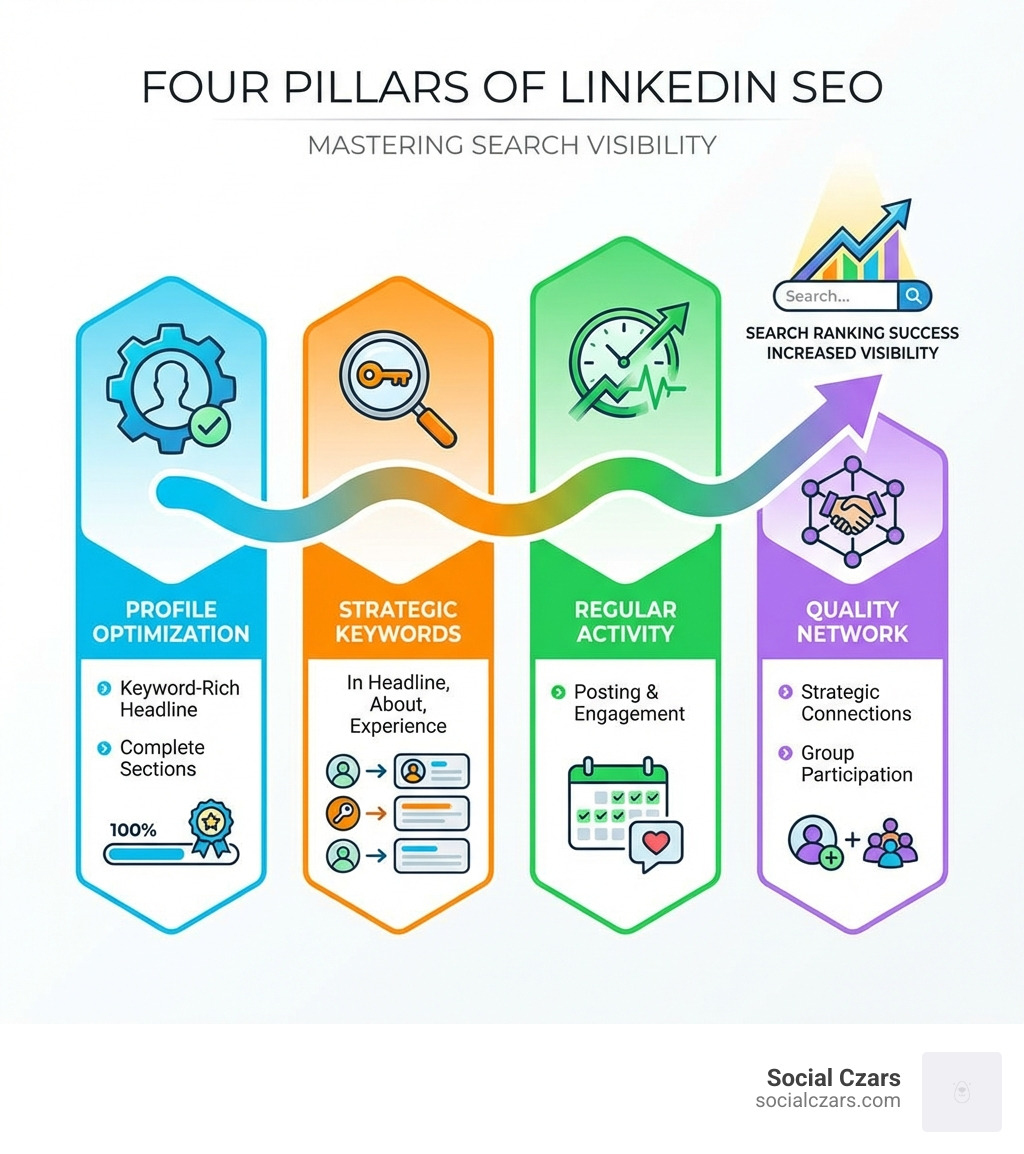
Quick Answer: To rank on LinkedIn search results, you must:
- Optimize your headline and About section with industry-specific keywords
- Complete every profile section to achieve All-Star status (LinkedIn users with complete profiles get more weekly views)
- Post valuable content consistently (several times per week; 1–2 times per day can be ideal for growth)
- Build strategic connections and engage with your network regularly
- Use a custom URL with relevant keywords
- Encourage recommendations and endorsements for social proof
- Participate in LinkedIn Groups to increase visibility
If recruiters, clients, or partners search for someone with your skills but you are buried on page three, you might as well be invisible. The algorithm personalizes results based on keywords, network connections, engagement signals, and profile completeness.
Unlike Google SEO, LinkedIn search heavily weights who you are connected to and how recently you have interacted with your network. Your Social Selling Index (SSI) score influences your reach and visibility in search.
The encouraging part: LinkedIn SEO follows a predictable pattern. Get the fundamentals right, and you can see your profile rise in search results within weeks.
I’m John DeMarchi, and I’ve helped high-profile executives and VIPs optimize their LinkedIn presence as part of comprehensive reputation management strategies at Social Czars. Mastering How to Rank on LinkedIn Search Results has been essential for clients who need to control their professional narrative and ensure they are found by the right people at the right time.
How to Rank on LinkedIn Search Results further reading:
Decoding the LinkedIn Search Algorithm: What Really Matters
LinkedIn is not just a digital resume; it is a powerful search engine with a professional focus. Its goal is to connect searchers with the most relevant people, companies, and content for their needs.
The platform’s algorithm prioritizes personalized and relevant results. Two people can type in the same search term and see different profiles because LinkedIn builds a unique relevance score for each search. That score considers the searcher’s profile, activity, connections, and behavior. As the behind-the-scenes wizards at LinkedIn explain, every set of search results is personalized for whoever is searching.
User behavior plays a significant role. If your profile earns a high click-through rate from search results, it signals to LinkedIn that your profile is useful, which can boost its ranking in similar future searches. Your network connections matter as well; having more 1st-degree connections, and overlapping connections with the searcher, can increase how often and how high you appear. The recency of your communication and engagement with those connections can also influence where you show up.
Profile completeness and engagement signals are essential. A fully filled-out profile tells LinkedIn you are an active, serious user. Consistent engagement—likes, comments, shares—shows you contribute to the community. These factors feed into your Social Selling Index (SSI) score, a key indicator of how well your profile is positioned for search and relationship-building.
Key Ranking Factors You Can’t Ignore
To truly understand How to Rank on LinkedIn Search Results, it helps to recognize the factors LinkedIn’s algorithm weighs most:
- Keywords: Foundational. Just like traditional SEO, using the right keywords throughout your profile is crucial.
- Profile Strength/Completeness: LinkedIn wants complete profiles. All-Star status is more than a badge; it is a strong relevance signal.
- Connections (1st, 2nd, 3rd degree): Your network size and relevance affect your visibility. Being a 1st-degree connection with a searcher can significantly boost where you appear.
- Dwell Time: If users spend more time on your profile after clicking from search, it is a strong sign of relevance.
- Content Quality: High-quality, insightful content that sparks genuine conversation is favored. LinkedIn evaluates both the quantity and quality of interactions.
- Regular Activity: Stale profiles slide down in visibility. Consistent posting, profile updates, and engagement help you stay visible.
The Role of Keywords in LinkedIn Search
If LinkedIn is a search engine, then keywords are its core language. To master How to Rank on LinkedIn Search Results, you need to use that language the way your ideal audience does.
- Primary Keywords: Core terms that define your niche and profession. For example: “Senior Software Engineer | AI & Machine Learning” or “Digital Marketing Consultant | B2B SaaS Growth”.
- Secondary Keywords: Related terms that describe your expertise, industries you serve, and key services. For a “Digital Marketing Consultant,” these might include “SEO,” “PPC,” “Content Strategy,” or “Lead Generation”.
- Long-Tail Keywords: More specific keyword phrases that capture particular needs, such as “SEO for e-commerce startups in London”. They often reflect higher intent.
Keyword Placement: We want to weave these terms naturally throughout your profile:
- Headline: This is the most critical spot and carries significant weight in search.
- About Section: A prime location to integrate keywords in a natural narrative.
- Experience Section: Describe responsibilities and achievements using relevant terms.
- Skills Section: LinkedIn allows you to list up to 50 searchable skills.
Avoiding Keyword Stuffing: Do not cram in keywords unnaturally. That makes your profile hard to read and can hurt performance. Aim for clear, human-friendly language first, and thoughtful optimization second.
Your Step-by-Step Guide on How to Rank on LinkedIn Search Results
Now that we have a working understanding of the algorithm, we can focus on the “how.” The goal is to turn your profile into a focused, lead-generating, career-advancing asset.

Think of your profile as a funnel where each section guides visitors toward a next step, such as connecting, messaging, or visiting your site. Our step-by-step process is designed to help you achieve All-Star profile status and present a consistent, compelling narrative that highlights your expertise and results.
Conducting Keyword Research for Your Niche
Effective keyword research is the bedrock of any successful LinkedIn SEO strategy.
- Identify Your Audience: Who are you trying to reach? Recruiters, potential clients, investors, or partners in cities like Miami, New York City, Los Angeles, or London? Clarify their priorities.
- Brainstorm Search Terms: Think like your target audience. What would they type to find someone with your skills? List your job title, industry, specific skills, and the problems you solve.
- Use LinkedIn’s Search Bar: Type in your brainstormed terms and note the search suggestions that appear. These reflect real searches. Run sample searches and look at which profiles consistently appear.
- Analyze Job Descriptions: If you are job-seeking, review postings for your target roles in your preferred locations. Highlight recurring keywords and phrases. These are the same terms recruiters type into LinkedIn.
- Use Competitive Keywords Thoughtfully: A solid strategy uses a mix of highly competitive, moderately competitive, and more specific long-tail keywords. Insights from resources such as Using competitive keywords can inform how you prioritize them.
- Competitor Analysis: Examine the profiles of successful professionals in your field in hubs like New York City or Los Angeles. Note the language and keywords they use in headlines, About sections, and experience.
Optimizing Your Headline and About Section
These two sections are your prime real estate for making a strong first impression and signaling relevance to LinkedIn’s algorithm.
- Headline (around 120 characters): Make it keyword-rich and clear about your value. Instead of a generic “Marketing Manager,” try: “Digital Marketing Strategist | Driving B2B Growth in Los Angeles | SEO & Content”. Use recognizable titles and industry terms.
- Narrative ‘About’ Section (up to 2,600 characters): Tell your professional story in a concise, audience-focused way. Open with who you are and what you deliver, then weave in primary and secondary keywords naturally. Describe the problems you solve and include a clear call to action (for example, to connect, visit your website, or message you).
Leveraging Your Experience, Skills, and Media
Your professional history and demonstrated abilities are powerful signals for LinkedIn search.
- Quantify Achievements: In your Experience section, move beyond responsibilities and highlight outcomes. “Increased qualified leads by 30%” or “Managed a distributed team across three regions” is far stronger than vague bullet points.
- Keyword-Rich Job Descriptions: Integrate relevant keywords naturally into your descriptions. If you are a “Project Manager” specializing in “e-commerce customer experience,” use those exact phrases.
- Skills Section (up to 50 skills): Add skills that align with your expertise and target keywords. Include both technical and soft skills that matter in your industry.
- Endorsements: Encourage connections to endorse your most important skills. This provides lightweight social proof and reinforces your positioning.
- Recommendations: Ask former colleagues, managers, or clients for recommendations that speak to specific projects or outcomes. These can strongly influence how visitors perceive your profile.
- Professional Profile Photo: Use a clear, professional headshot that fits your industry. It improves trust and click-throughs from search results.
- Branded Background Photo: Use the background banner to reinforce your professional brand, such as a subtle company graphic, city skyline, or relevant industry visual.
The Technical Details: Custom URL and Profile Completeness
Small details can make a real difference in How to Rank on LinkedIn Search Results.
- Custom URL Benefits: A custom LinkedIn URL (for example, linkedin.com/in/yourname) looks professional and is easier to share. When possible, include your name and a short, relevant keyword.
- Profile Sections (Location, Industry, Website): Complete every available field.
- Location: Critical for local searches. If you want to be found for roles in Miami or London, make sure your location reflects that.
- Industry: Select the most accurate industry so LinkedIn can categorize you correctly.
- Website: Link to a portfolio, company site, or relevant landing page.
- ‘Open to Work’ Feature: If you are actively exploring new roles, enable ‘Open to Work.’ You can specify job titles, locations (such as New York City or Los Angeles), and types of opportunities.
- Recruiter Visibility: Recruiters filter heavily by title, skills, location, and industry. A complete, keyword-rich profile substantially increases your chances of appearing in those filtered results.
Beyond the Profile: The Power of Activity and Engagement
A well-optimized profile is essential, but it is only half of How to Rank on LinkedIn Search Results. LinkedIn rewards ongoing participation. The more you contribute and interact, the more signals you send that you are relevant in your space.
Active engagement helps you build authority, expand your network, and stay visible. This is not only about broadcasting; it is about genuine, two-way communication.
Creating a Content and Posting Strategy
Your content strategy on LinkedIn should be consistent and focused on providing value.
- Posting Frequency: Aim to post several times per week. If you have the capacity and quality content, 1–2 posts per day can accelerate growth.
- Best Times to Post: Use LinkedIn analytics to see when your audience is most engaged, then test and refine.
- Content Variety: Mix formats to reach different segments of your network:
- Text-only posts: Quick insights, questions, or short lessons.
- Images: Visuals that support your point and catch attention.
- Video: Short clips with commentary, tips, or behind-the-scenes context.
- Carousels: Slide-style posts that break down frameworks or step-by-step guides. These often receive strong reach and engagement.
- Polls: Simple prompts that invite opinions and start conversations.
- Articles: Longer-form pieces that position you as a thoughtful expert in your field.
- Providing Value: Share trends, lessons learned, frameworks, and answers to common questions in your niche.
- Joining Conversations: Comment thoughtfully on posts from your network, industry leaders, and potential clients. This increases your visibility beyond your own posts.
The Impact of Your Network and Group Participation
Your network strongly influences where you appear in LinkedIn search.
- Network Size and Quality: Focus on relevant, engaged connections—former colleagues, industry peers, decision-makers, and recruiters in cities such as New York City, Miami, Los Angeles, and London.
- Strategic Networking: Personalize connection requests with a short note referencing shared interests, mutual contacts, or recent content.
- Joining Relevant LinkedIn Groups: Joining relevant LinkedIn groups exposes you to niche communities and can help the algorithm understand your areas of expertise.
- Group Discussions: Participate in discussions by adding practical, helpful insights. This positions you as a go-to resource and earns profile visits without overt self-promotion.
Advanced Tactics and Common Mistakes
To excel at How to Rank on LinkedIn Search Results, it helps to look beyond personal profiles and address company visibility and common pitfalls.
Optimizing a LinkedIn Company Page
For businesses in New York City, Miami, Los Angeles, or London, your LinkedIn Company Page can support brand visibility, lead generation, and hiring.
- Complete Business Information: Fill out every field: company name, overview, locations, size, industry, specialties, and website URL. Use clear, keyword-relevant language.
- Keyword in Tagline: Craft a concise tagline (under 156 characters) that summarizes what your company does and whom it serves.
- Showcase Pages: If you have distinct products, services, or initiatives, create Showcase Pages so you can publish more targeted content and keywords.
- Employee Advocacy Programs: Encourage employees to keep their personal profiles strong, connect with the right audiences, and share your company updates. Employee sharing often earns more reach and trust than brand posts alone.
- Consistent Branding: Use consistent visuals, tone, and messaging across your company page, posts, and employee guidelines.
Common Mistakes That Hurt Your Ranking
Even well-meaning professionals make missteps that can reduce their visibility.
- Keyword Stuffing: Overloading sections with repetitive keywords makes your profile hard to read and can backfire.
- Inconsistent Job Titles: Highly creative or inconsistent titles may confuse both humans and the algorithm. Use recognizable titles.
- Generic Connection Requests: One-line, generic requests are easy to ignore. Personalization builds stronger networks.
- Ignoring Engagement: Posting rarely, not replying to comments, and leaving messages unanswered sends weak activity signals.
- Stale Profile: Outdated titles, skills, or locations make you harder to match with current searches. Review your profile regularly.
- Using a Non-Professional Photo: Low-quality, informal, or off-brand photos can reduce click-through rates and undercut your authority.
Frequently Asked Questions about LinkedIn Search Ranking
Professionals in New York City, Miami, Los Angeles, London, and beyond often ask similar questions about LinkedIn search. Here are concise answers to the most common ones.
How long does it take to see results from LinkedIn SEO?
You can often see early changes and increased profile views within a few weeks of tightening your profile and increasing your activity. More consistent, long-term improvements in where you appear for target keywords typically take a few months of steady content, engagement, and refinement.
Does having a LinkedIn Premium account improve my search ranking?
LinkedIn Premium status does not directly change your algorithmic ranking. Relevance, keyword optimization, completeness, and engagement are more important. Premium can still help indirectly by giving you more data and outreach options, which can lead to stronger networks and better engagement.
Are recommendations or endorsements more important for search visibility?
Both matter for overall profile strength, but keywords in your headline, About, experience, and skills are usually more influential for pure search visibility.
- Recommendations: Powerful for credibility and conversion once someone reaches your profile. They validate your results and professionalism.
- Endorsements: Reinforce your listed skills and provide quick social proof that you actually possess those capabilities.
Focus first on getting your keywords in the right places, then steadily build both recommendations and endorsements to support your positioning.
Conclusion: Take Control of Your Professional Reputation
Mastering How to Rank on LinkedIn Search Results is now a core part of building and protecting your professional brand. In an environment where decision-makers constantly look people up online, being invisible on LinkedIn is a risk you can control.
We have covered the essentials: how LinkedIn’s personalized algorithm works, where and how to use keywords, how to optimize your profile sections, and how ongoing activity and engagement keep you visible. The common thread is consistency. Treat your LinkedIn presence as an asset you update and refine over time, not a one-time project.
LinkedIn is also a powerful reputation management tool. When someone searches for you or for your expertise, you want them to find an accurate, strategically crafted profile that reflects your value.
At Social Czars, we specialize in helping CEOs and VIPs in New York City, Miami, Los Angeles, and London steer this landscape. Our work in elite SEO and fast negative content removal is designed to ensure that your digital reputation reflects your real-world achievements.
Do not let past struggles with visibility determine your future. Take control of your professional narrative today and make sure you are found by the right people at the right time. To go deeper into shaping your broader online presence, explore how we can help you manage your online reputation.
