
Reputation Management
How to Remove Negative Google Reviews: 5 Methods that Guarantee Results

Sep
How to Remove Negative Google Reviews: 5 Methods that Guarantee Results
How to Remove Negative Google Reviews Without Breaking Google’s Rules
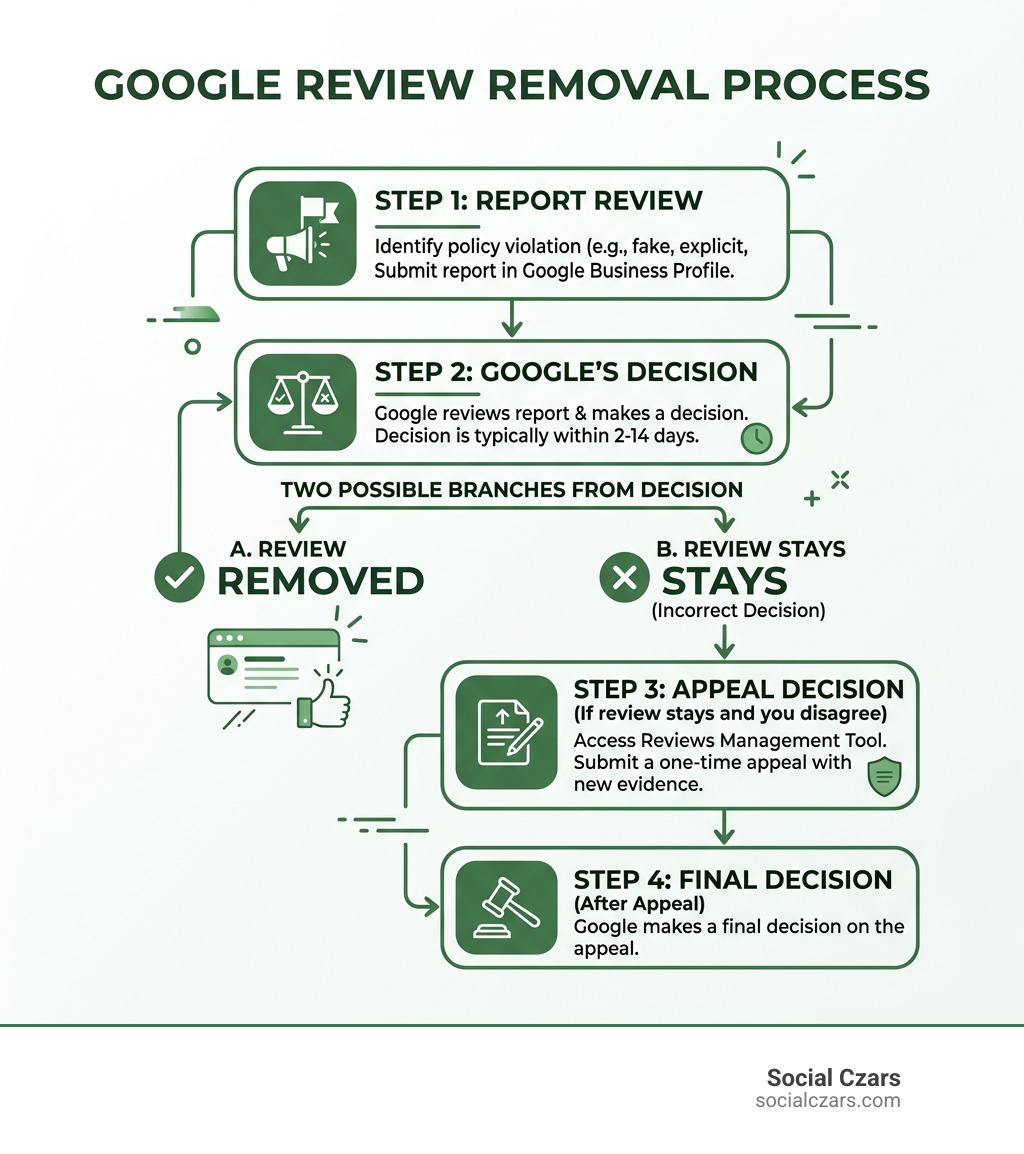
Business owners cannot directly delete reviews left on their Google Business Profile. If you are asking, how do I remove reviews from Google, the practical answer is to use the Report review option when the content breaks Google’s policies, ask the reviewer to remove or edit it voluntarily, appeal an incorrect decision, or use a legal request when there is a valid basis.
- Find the review in your Google Business Profile.
- Select Report review and choose the policy violation that best fits.
- Save screenshots and other evidence before reporting.
- Check the decision in Google’s Reviews Management Tool and submit a one-time appeal if needed.
A harsh but genuine customer opinion is not usually removable. Fake reviews, impersonation, threats, personal information, spam, conflicts of interest, and illegal or explicit content may qualify. Most reports receive a decision in roughly 2 to 14 days, though clear cases can move faster.
This matters because Google is the leading source of online reviews, and 63.6% of consumers say they are likely to check Google reviews before visiting a business. The goal is not to erase every negative comment. It is to remove policy-breaking content quickly, respond well to legitimate criticism, and protect the trust your name deserves.
I am John DeMarchi, founder of Social Czars, with more than 15 years of corporate communications experience and over a decade helping clients manage crisis SEO and reputation challenges. In this guide, I will explain how do i remove reviews from google using legitimate, discreet methods that protect your business without risky shortcuts.
How Do I Remove Reviews from Google? The Reality Behind Direct Deletion
The most common misconception among executives and local business owners is that logging into your Google Business Profile dashboard grants you administrative power over public feedback. There is no hidden trash icon, and Google does not provide a direct deletion button for business owners.
Google deliberately maintains this barrier to preserve consumer trust in search results. In fact, 21% of consumers agree that Google reviews are one of the most important factors in their search for a local business—ranking them higher in influence than direct price estimates, physical proximity, and standard search engine results page (SERP) positions. When 63% of consumers say they lose trust after seeing mostly negative reviews, maintaining an accurate profile becomes a business-critical objective.
Understanding who has the authority to remove feedback is essential for establishing an effective reputation defense strategy.
| Action Feature | Business Profile Owner | Original Review Author | Google Policy Team |
|---|---|---|---|
| Direct Deletion | No | Yes (Instant) | Yes (Upon Violation Confirmation) |
| Flagging / Reporting | Yes (Via Dashboard) | N/A | N/A |
| Appeals Workflow | Yes (One-Time Appeal) | N/A | Evaluates Evidence |
| Response Capability | Yes (Public Reply) | Can Edit Original Review | N/A |
Business owners must rely on Google’s established moderation framework. Following official guidelines on reporting inappropriate reviews ensures that your requests are categorized correctly according to Google’s strict policy definitions.
Google’s 9 Prohibited and Restricted Content Categories
Google’s automated and manual content filters evaluate every flagged piece of feedback against nine core prohibited and restricted content categories. To successfully request a takedown, your claim must clearly align with one of the following violations:
- Spam and Fake Content: Reviews generated by bots, paid review farms, or repeated duplicate text across different locations.
- Off-Topic Content: Comments detailing political commentary, personal rants, or experiences intended for a different merchant entirely.
- Restricted Content: Text promoting regulated goods or services that violate local operational guidelines.
- Illegal Content: Statements detailing illicit acts, copyright violations, or actionable defamation.
- Sexually Explicit Content: Any review containing graphic descriptions, explicit media, or inappropriate sexual references.
- Offensive Language and Harassment: Obscene profanity, personal slurs, targeted bullying, or hate speech against protected classes.
- Dangerous and Derogatory Content: Threats of physical harm, incitement to violence, or self-harm encouragement.
- Conflict of Interest: Feedback left by current or former employees, business owners rating their own operations, or competitors attempting to manipulate local rank.
- Impersonation and Personal Information: Doxxing, publishing private cell phone numbers, home addresses, or pretending to represent someone else.
Flagging a Review vs. Reporting a User Profile
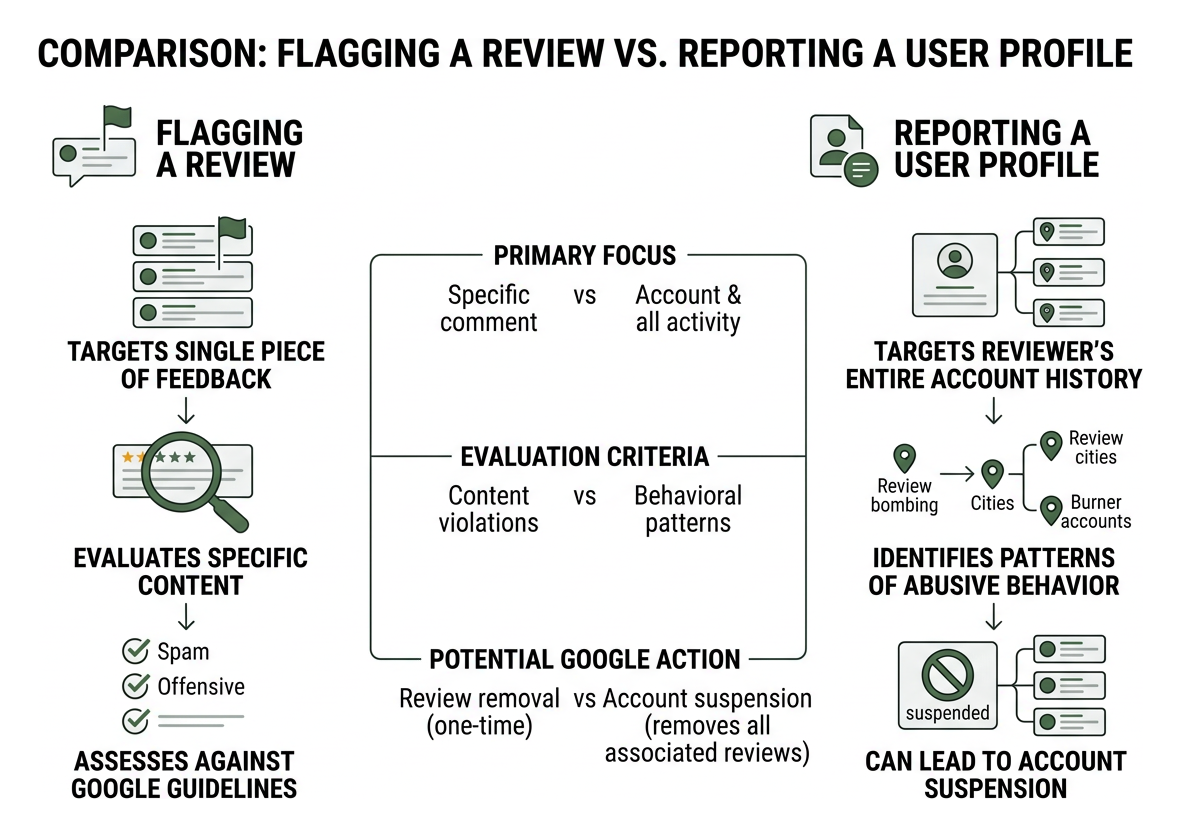
When dealing with a coordinated assault or a persistent troll, reporting an individual comment is often only half the battle. There is a fundamental difference between flagging a review and reporting a user profile:
- Flagging a Review: Targets a single piece of feedback on your listing, evaluating whether the specific text or star rating breaches content guidelines.
- Reporting a User Profile: Targets the reviewer’s entire account history. If an account demonstrates a pattern of abusive behavior, reviews multiple competitors across different cities simultaneously, or creates burner accounts for review bombing, Google can suspend the profile and strip all associated reviews across the platform.
Knowing how to report and remove fake Google reviews for good prevents recurrent attacks from the same bad actors.
5 Proven Methods to Remove Negative Google Reviews in 2026
When malicious or illegitimate feedback strikes your listing, you must execute a methodical, documented protocol. At Social Czars, we employ systematic workflows to ensure our clients maintain pristine digital authority. If you are struggling with unfair ratings, knowing how to remove 1 star reviews on Google starts with these five core methods.
Method 1: Flagging Inappropriate Feedback via Business Profile
The initial step for any merchant is logging into the native Google Business Profile dashboard.
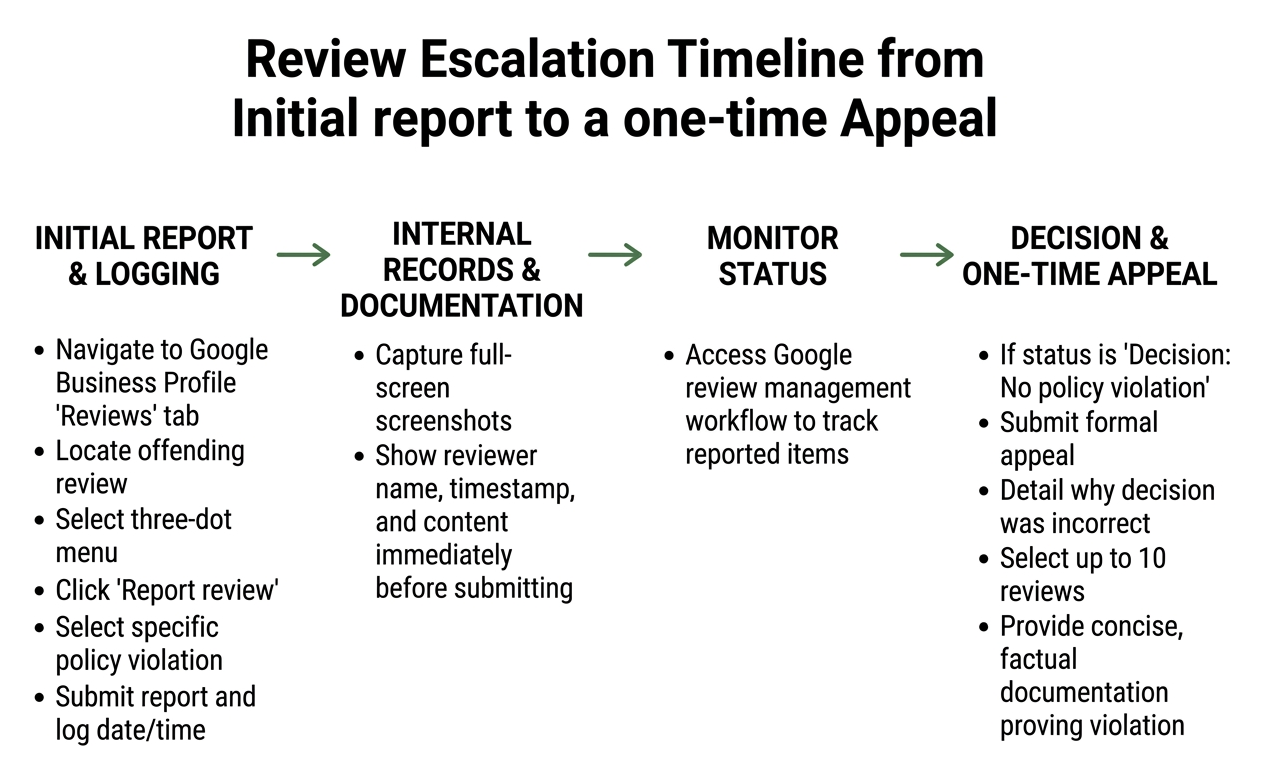
- Navigate to your Google Business Profile and open the Reviews tab.
- Locate the offending review and select the three-dot menu icon on the top right corner.
- Click Report review (or “Flag as inappropriate”).
- Select the specific policy violation (such as “Spam”, “Conflict of Interest”, or “Profanity”).
- Submit the report and log the date and time in your internal records.
Maintain a clear audit trail by capturing full-screen screenshots showing the reviewer name, timestamp, and review content immediately before submitting your report.
Method 2: How Do I Remove Reviews from Google Maps on Desktop or Mobile?
If you are a consumer who posted a review by mistake, or if a customer agrees to retract their feedback, deletion is handled through Google Maps. The official guide to managing Google Maps reviews outlines the steps across desktop and mobile devices:
- Open Google Maps on your desktop browser or mobile application.
- Click on the profile icon or menu and navigate to Your contributions.
- Select the Reviews tab to view your complete contribution history.
- Locate the review in question, click the three-dot icon, and choose Delete review.
Once deleted by the author, the rating is removed from the business’s cumulative score immediately.
Method 3: How Do I Remove Reviews from Google by Filing a One-Time Appeal?
If Google’s automated systems initially decline your report, you can escalate the decision. Google provides a dedicated workflow where merchants can submit a formal, one-time appeal supported by documentary evidence.
Access the Google review management workflow to track the status of reported items. If a status displays as “Decision: No policy violation”, you can submit an appeal detailing why the decision was incorrect. You can select up to 10 reviews per appeal batch, providing concise, factual documentation that proves the conflict of interest or fake identity. Understanding how to get a Google review deleted through flagging, appeals, and support gives your profile the best chance of a successful reversal.
Method 4: Reaching Out Directly to Resolve Customer Complaints
Legitimate negative reviews from real customers cannot be flagged out of existence simply because they are unflattering. In these situations, direct private mediation is the most effective approach.
Reach out to the customer privately via phone or email if you have their contact details. Acknowledge their experience, take ownership of any operational shortcomings, and offer a concrete resolution without being defensive. Once the customer feels heard and the issue is resolved, you can politely ask: “If you feel we’ve made things right, would you consider updating or removing your Google review to reflect your recent experience?”
Never offer cash, free products, or discounts in direct exchange for review removal. BrightLocal’s 2025 consumer research shows that 42% of consumers assume a review is fake if they suspect an incentivized agreement. Keep outreach ethical and centered on genuine problem resolution.
Method 5: Submitting Legal Defamation Notices and DMCA Requests

When feedback crosses into libel, actionable defamation, copyright infringement, or targeted extortion, business owners can pursue formal legal avenues.
- Defamation Removal Requests: Google provides dedicated legal webforms to submit formal notices of allegedly defamatory content. These requests require detailed explanations of why the statements are false statements of fact rather than protected opinions.
- DMCA Copyright Takedowns: If a competitor or disgruntled individual uploads proprietary photography, logos, or copyrighted assets within a review, you can submit a standard DMCA takedown notice.
- Third-Party Review Sources: In certain regions, including the European Economic Area (EEA), merchants have enhanced rights to challenge and report third-party review syndication appearing in search cards.
Understanding the truth about removing fake Google reviews helps you distinguish between actionable legal violations and standard consumer complaints that must be addressed through public relations.
Best Practices for Managing Unremovable Reviews and Preventing Future Attacks
Not every negative review will qualify for removal. When a review remains on your listing, professional public management protects your broader brand authority.
Industry data indicates that only 7% of consumers do not expect a business to respond to reviews, while 63% expect a response within two to three days. Maintaining a disciplined 48-hour response protocol is standard practice.
If your business experiences a review extortion scam—where an anonymous party leaves negative ratings and demands gift cards or cryptocurrency to remove them—do not pay. Paying scammers signals vulnerability and invites future extortion. Instead, document every communication, take immediate screenshots, and escalate the incident through Google’s Help Center.
The ultimate long-term defense against occasional negative feedback is maintaining a healthy velocity of authentic, positive customer reviews. Knowing how to make unwanted Google reviews disappear for good involves outranking negative ratings with genuine five-star customer feedback.
Frequently Asked Questions About Google Review Removal
How long does Google take to assess a flagged review?
Most flagged reviews are evaluated within 2 to 14 days. Obvious violations that trigger automated filters may be taken down within 48 to 72 hours, while nuanced claims requiring manual review or appeal assessments typically take up to two weeks.
Can I sue a reviewer for a fake 1-star rating?
Yes, but the legal threshold for defamation is high. You must prove in court that the review contains false factual statements rather than subjective opinions, that the poster acted with negligence or malice, and that the review caused measurable financial harm. Many business owners utilize small claims court or legal demand letters to resolve clear cases of competitor sabotage.
What should I do if my business is hit by review extortion?
Preserve all evidence immediately. Take high-resolution screenshots of the negative reviews, any extortion emails, direct messages, or payment demands. Do not reply to the extortionists. Submit the documented evidence directly through Google Business Profile support channels. Learning how to get rid of bad Google reviews forever protects your brand from organized black-hat campaigns.
Conclusion
Guarding your Google Business Profile requires diligence, policy knowledge, and an unwavering commitment to professional standards. While you cannot unilaterally erase every negative review with the click of a button, utilizing Google’s policy categories, filing evidence-backed appeals, and resolving customer complaints allows you to maintain control over your digital footprint.
For executives, founders, and enterprises operating in highly competitive markets across New York City, Miami, Los Angeles, and London, reputation management demands elite execution. Social Czars specializes in high-end crisis SEO, digital PR, and strategic profile defense. Learn more about mastering the art of deleting bad Google reviews to safeguard your online presence today.
