
Reputation Management
Uncover Removed Google Reviews Using Web Archives
Sep
How to Find Deleted Google Reviews Before the Evidence Is Lost
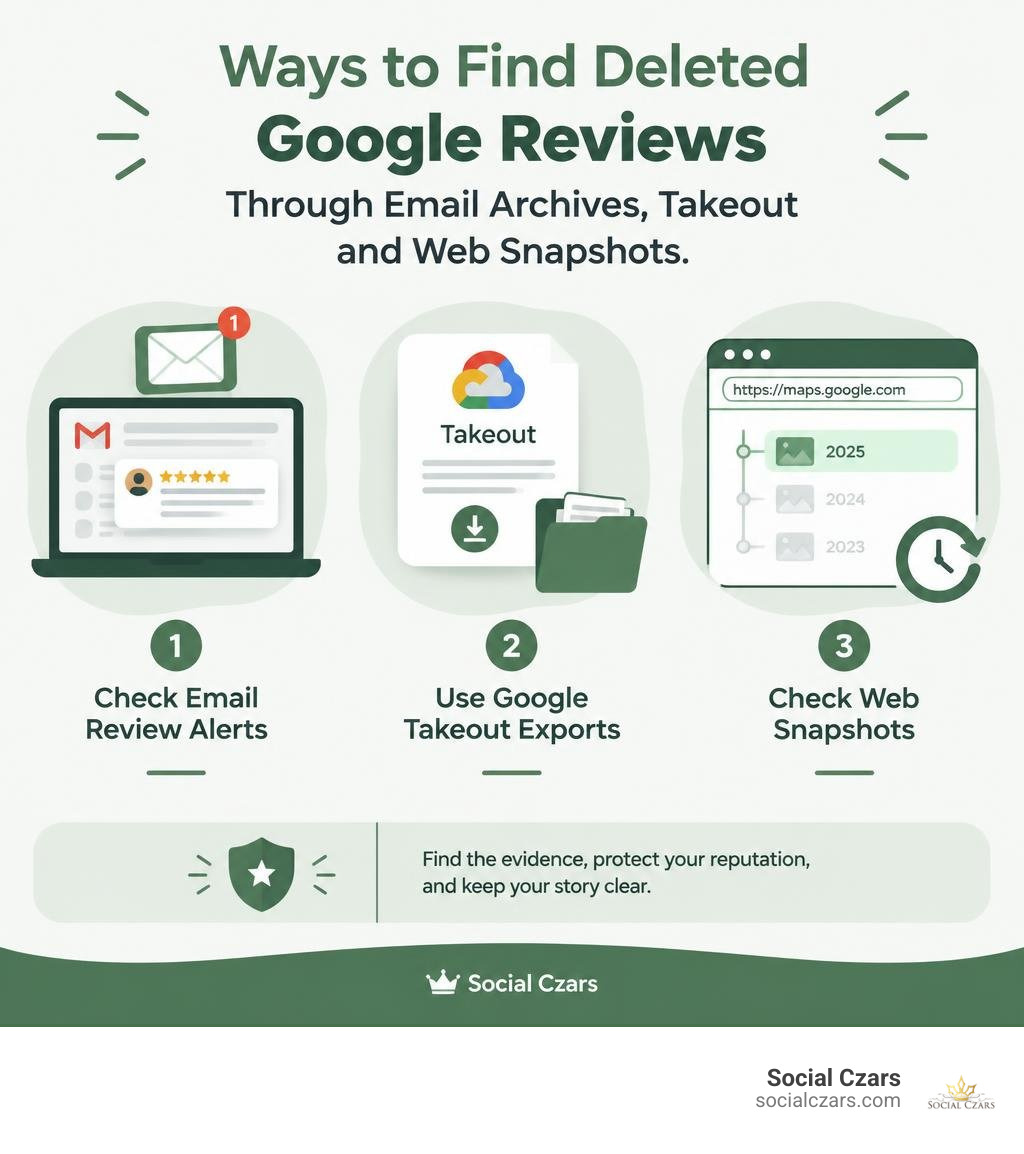
You usually cannot view a deleted Google review inside Google Maps or your Business Profile once it is gone. But you may still find a record of it by checking email review alerts, Google Takeout exports, a review-monitoring archive, or a Wayback Machine snapshot taken before the removal.
For a fast first check:
- Search the business inbox for Google review notification emails.
- Compare the current review count with saved screenshots or monitoring records.
- Enter the public Google Maps profile URL into the Wayback Machine and check older captures.
- If the review appears to have been removed by mistake, document the reviewer name, date, rating, text, and screenshots before contacting Google Support.
This matters because reviews shape trust before a customer ever contacts your business. Google can filter or remove feedback without a clear public notice, and a missing review is not always permanently deleted. It may be temporarily hidden by automated spam systems, removed for a policy issue, deleted by its author, or lost after an account or profile change.
I am John DeMarchi, founder of Social Czars. After 15 years in corporate communications and more than a decade helping executives, VIPs, and brands manage crisis SEO and online reputation, I have seen why knowing how to see deleted Google reviews quickly can protect both evidence and credibility.
Why Google Reviews Disappear: Deleted vs. Filtered Feedback
Online customer feedback serves as the bedrock of digital authority. Around 93% of customers read reviews before deciding to make a purchase, and online feedback directly influences 67% of consumers when evaluating a local business or executive service. When a hard-earned rating suddenly vanishes overnight, it can feel like someone quietly emptied the cash register.
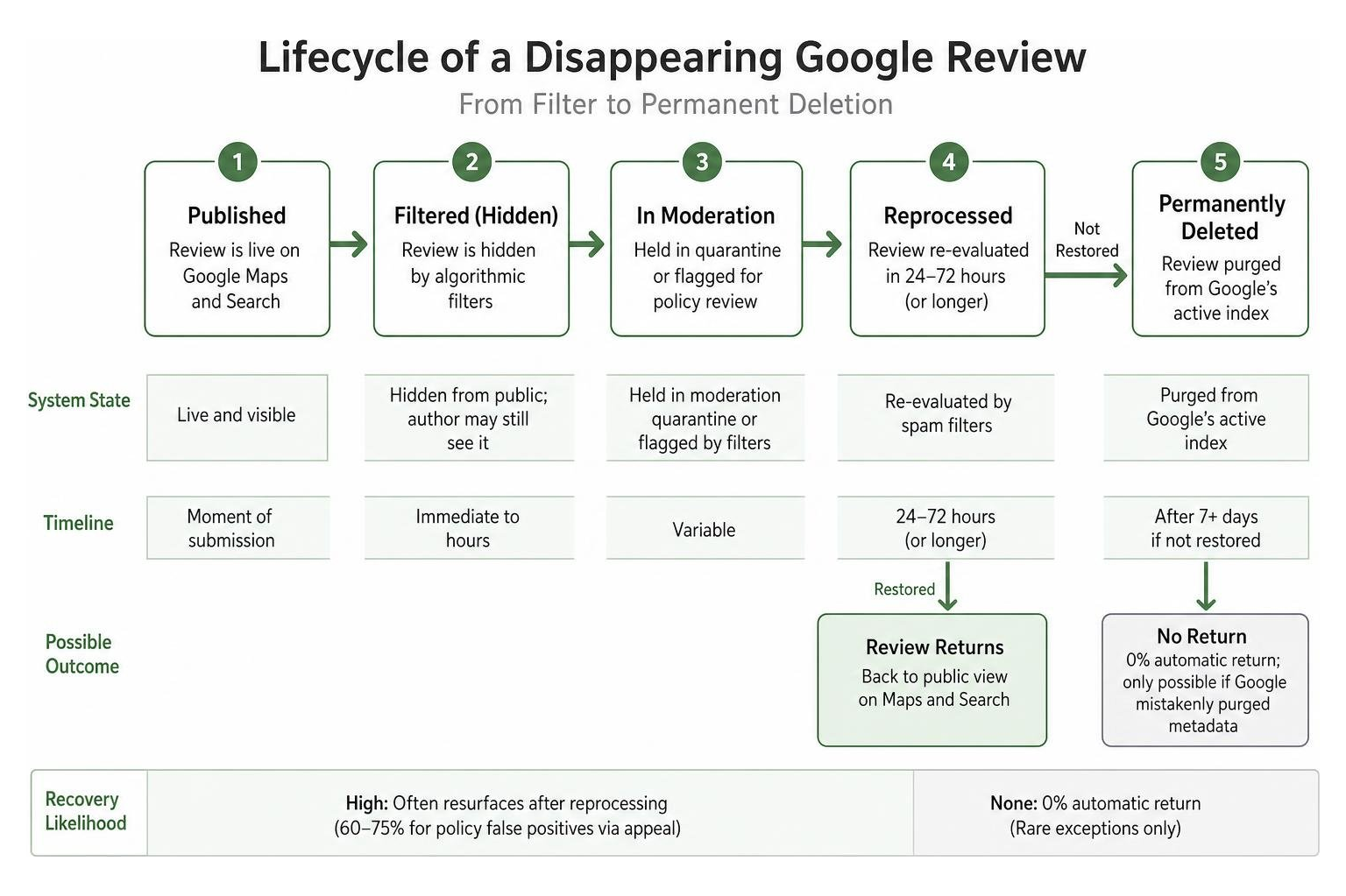
Understanding what actually happened requires distinguishing between a review that was permanently purged and one that is simply hidden by an automated system. In roughly a third of cases investigated by reputation managers, reviews were never actually missing from Google’s underlying database—the business owner was simply looking in the wrong dashboard or experiencing an interface caching delay.
When feedback genuinely disappears from public view, it falls into one of two categories:
| Feature | Filtered (Hidden) Review | Permanently Deleted Review |
|---|---|---|
| Visibility | Hidden from public Maps and Search; author may still see it | Completely absent across all public and user profiles |
| System State | Held in moderation quarantine or flagged by algorithmic filters | Purged from Google’s active live search index |
| Automatic Recovery | High; often resurfaces after reprocessing cycles (24–72 hours) | 0% automatic return |
| Reinstatement Likelihood | 60–75% for policy false positives via formal appeal | Rare; only possible if Google mistakenly purged metadata |
| Author Removal | No; Google’s automated systems suppressed the entry | Yes; reviewer deleted review or closed Google account |
| Owner Action Needed | Audit metadata, verify policy compliance, submit support ticket | Request author to republish or capture archival record |
Whether you are trying to understand can you delete bad Google reviews or trying to track legitimate testimonials that vanished without warning, categorizing the loss is always your foundational first step.
Algorithmic Moderation and Policy Violations
Google uses sophisticated machine-learning models to analyze millions of incoming reviews every single day. These systems evaluate 11 primary content categories, searching for policy violations like hate speech, conflicts of interest, spam, promotional links, phone numbers, and repetitive formatting.
Unfortunately, these automated filters trigger false positives constantly. A legitimate five-star review left by a real client might vanish because:
- The customer left the review while connected to your on-site public Wi-Fi network (sharing an IP address with the business).
- The reviewer posted multiple reviews across different businesses in rapid succession.
- The review contained trigger characters such as excessive dollar signs, all-caps sentences, or URL-like strings.
- Your listing experienced an abnormal review velocity spike following a marketing push.
This automated friction frequently leads to frustration, sparking active threads in the Google Business Profile Community regarding deleted legit reviews. When algorithmic false positives occur, our experience shows they carry a 60% to 75% recovery likelihood when appealed with proper documentation. Conversely, reviews flagged for severe suspicious activity patterns carry a much lower 30% to 50% recovery likelihood.
Temporary Filtering vs. Permanent Purges
Google never sends a notification or warning email when a review is filtered or quietly removed; the review count on your dashboard simply updates silently. When Google deploys an algorithm update, hundreds of thousands of reviews are re-evaluated.
Many filtered reviews return on their own without any manual intervention from the business owner once the spam filter re-scores the user’s account history. However, if a review remains missing after seven days, it has moved past temporary indexing delays and entered a permanent purge state. In these scenarios, knowing the specific workflows for getting back reviews removed from Google search results ensures you do not waste time waiting on automated systems that have already finalized their decision.
Proven Methods on How to See Deleted Google Reviews
Because Google does not offer a public “trash” folder or a native historical changelog in your Business Profile dashboard, finding removed text requires third-party indexing records, cached snapshots, and local communication archives.
How to See Deleted Google Reviews via the Wayback Machine and Web Caches
The Internet Archive’s Wayback Machine periodically crawls and takes snapshots of high-traffic public web pages across the internet, including public Google Maps listings.
To inspect historical web snapshots:
- Navigate to the Wayback Machine (
web.archive.org). - Copy your full Google Maps Business Profile share URL and paste it into the search bar.
- Browse the interactive calendar for dates when your listing was archived prior to the review’s disappearance.
- Open the snapshot and navigate directly to the reviews pane to read the full text, star rating, author name, and timestamp.

While the Wayback Machine offers medium reliability due to crawling frequency limits on dynamic Google Maps pages, it provides concrete historical proof when an archive exists. Third-party web caches and secondary search engine index snapshots can similarly preserve text fragments long after Google’s primary live index has purged the record.
How to See Deleted Google Reviews Using Google Takeout and Email Records
If you manage your listing actively, your own communication channels are often the fastest and most reliable source for recovering deleted text.
- Email Notification Archives: By default, Google sends an instant email alert whenever a user posts a review to your Business Profile. These notification emails frequently include the reviewer’s public display name, star rating, and the complete text body. Searching your inbox archives for terms like
"New review from"or"left a review on Google"can instantly surface deleted reviews without needing external web scrapers. - Google Takeout: Google Takeout enables profile administrators to export full historical account data. While Takeout primarily delivers active data, archived exports taken prior to a deletion preserve complete metadata, unique review IDs, and creation dates. Exporting your Google Business Profile data periodically ensures you maintain an unalterable offline record.
Step-by-Step Guide to Restoring Mistakenly Removed Google Reviews
When a legitimate, policy-compliant review is removed due to an algorithmic false positive, submitting an evidence-backed appeal can prompt Google’s manual review team to restore the entry.

Compiling a Recovery Report for Google Support
Submitting an appeal without evidence almost always leads to an automated canned denial. Data shows that appeals submitted with a complete Recovery Report close roughly twice as fast as appeals submitted without documentation.
To build an airtight case, assemble the following metadata:
- Reviewer Public Display Name: The exact name associated with the reviewer’s Google account.
- External Google Review ID: The unique alphanumeric identifier (if preserved in email alerts or API monitoring tools).
- Date of Publication and Date of Disappearance: Exact or estimated timestamps.
- Star Rating and Full Comment Text: Verifiable text extracted from email notifications or Takeout files.
- Visual Evidence: Unedited screenshots of the original review or notification alert.
Navigate to Google Business Profile Support, select your business entity, choose the “Reviews and photos” category, click on the “Review missing” chip, and paste your structured Recovery Report directly into the ticket description. Maintaining precision in your submission mirrors the exact administrative diligence required when handling flagging, appeals, and support across corporate listings.
Escalation and Re-Appealing Decisions
Standard Google Support tickets typically receive a response within 2 to 5 business days, while complex cases or profile reinstatement issues can require up to two weeks.
If your initial ticket is denied by an automated tier-one response:
- Reply directly to the case email within 14 days, requesting a secondary manual review and attaching your unedited image proofs.
- If support remains unhelpful, escalate your case thread to the official Google Business Profile Help Community, providing your Case ID number so a Product Expert can review the case.
- Distinguish clearly between missing legitimate customer feedback and broader reputation crises, such as needing professional assistance when removing fake Google reviews.
Best Practices to Protect and Track Your Review History
Treating your review base as critical digital inventory prevents surprises when Google updates its filtering algorithms. Relying solely on live dashboard numbers leaves your business blind to silent removals.
To bulletproof your review management:
- Maintain Automated Backups: Connect your Google Business Profile to a dedicated review monitoring and reputation management tool that logs incoming feedback, captures immediate snapshots, and generates alerts when deletions occur.
- Stagger Review Invitations: Avoid sending review requests in bulk batches following an event. Sudden velocity spikes trigger Google’s automated anti-spam tripwires. Spread requests evenly across your regular client workflow.
- Avoid Wi-Fi Review Stations: Never ask clients or guests to submit reviews using an on-site tablet or shared office network, as matching IP addresses trigger immediate algorithmic suppression.
- Deploy Comprehensive Reputation Management: When executive brands or corporate entities encounter coordinated negative attacks or persistent suppression, engaging specialized Google review removal solutions ensures your online footprint remains protected.
Frequently Asked Questions About Deleted Google Reviews
Can you see deleted Google reviews in your Google Business dashboard?
No. Google does not maintain a “Deleted” or “Trash” tab within the Google Business Profile dashboard. When a review is removed, the overall review tally drops silently without displaying which entry vanished. You must rely on external backups, email alert histories, Takeout archives, or third-party tracking logs to view past review content.
Can Google Support restore a review deleted by the customer?
No. Google respects author data ownership. If a customer manually deletes their own review or closes their Google account, Google Support cannot restore or republish that content under any circumstances. In these cases, the only solution is to reach out directly to the customer, maintain good relations, and politely request that they post a fresh review from an active Google account.
Are there legal and privacy considerations when recovering deleted reviews?
Yes. Storing and reviewing historical feedback from publicly accessible snapshots, emails, and monitoring tools for business intelligence and dispute resolution is standard practice. However, republishing a reviewer’s deleted personal text on marketing assets without consent can violate privacy frameworks or platform Terms of Service. Preserving these records should serve primarily as evidence for platform appeals, internal service quality reviews, and legal documentation.
Conclusion
A disappearing Google review is not always lost forever. By identifying the root cause—whether it is an aggressive spam filter, a policy false positive, an author deletion, or an indexing glitch—you can take clear, structured steps to uncover the lost record and appeal for reinstatement.
At Social Czars, we specialize in high-end digital reputation defense, elite search engine optimization, and fast content resolution for VIPs, executives, and top-tier brands across New York City, Miami, Los Angeles, and London. Safeguarding your hard-earned authority requires vigilant monitoring, unshakeable evidence compilation, and the strategic art of managing Google reviews to ensure your digital reputation reflects the excellence of your business.
