
Reputation Management
The Practical Guide to Successfully Appealing Harmful Google Reviews

Sep
The Practical Guide to Successfully Appealing Harmful Google Reviews
Remove Harmful Google Reviews the Right Way
You cannot simply delete someone else’s Google review. To get it removed, report it only when it breaks Google’s review policies – such as spam, fake engagement, harassment, hate speech, personal information, profanity, conflicts of interest, or content unrelated to your business.
For anyone asking, “how do i get a google review removed,” the practical process is:
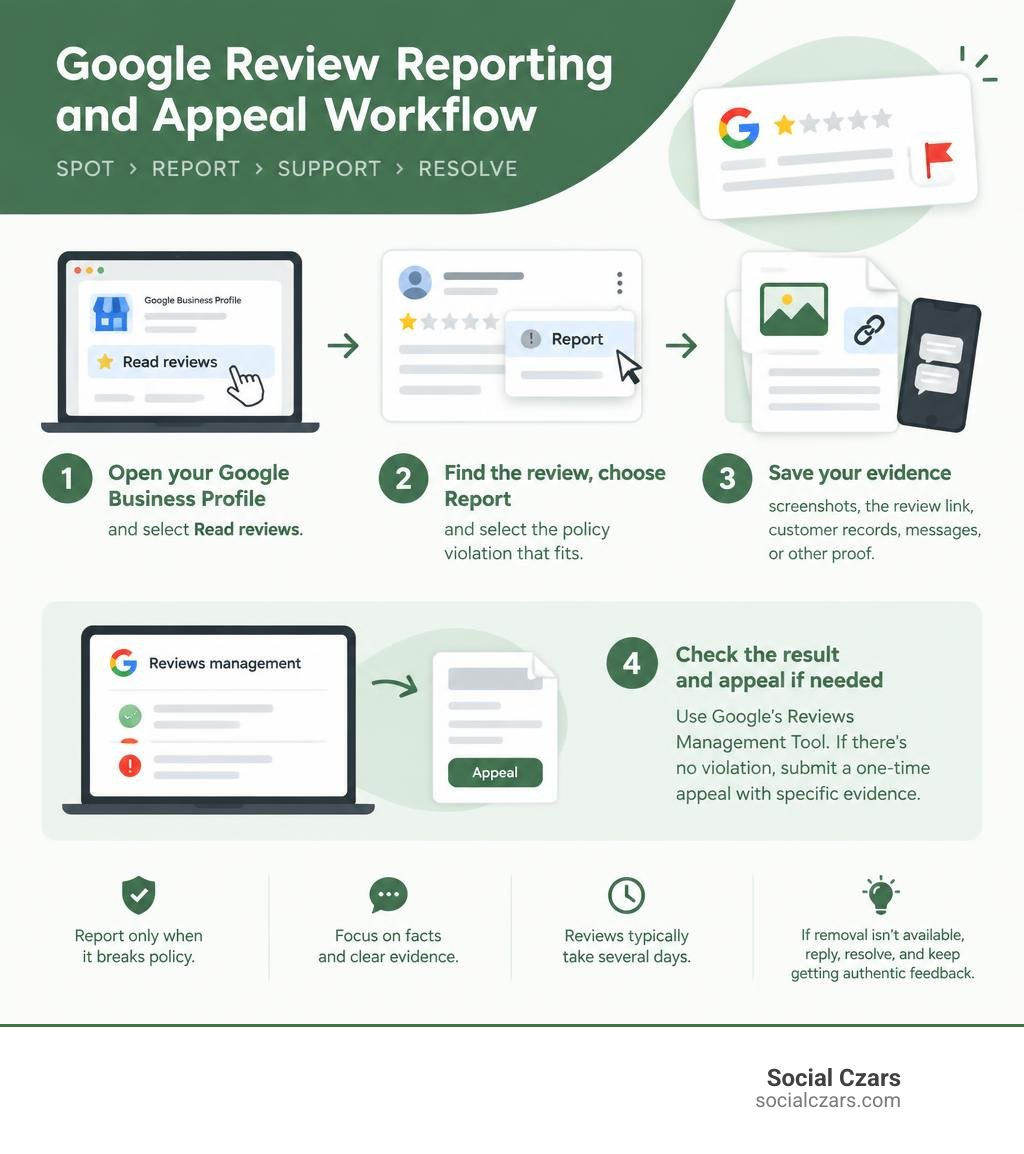
- Open your Google Business Profile and select Read reviews.
- Find the review, choose Report, and select the policy violation that fits.
- Save screenshots, the review link, customer records, messages, or other proof that supports your report.
- Check the result in Google’s Reviews Management Tool. If Google finds no violation, submit its available one-time appeal with specific evidence.
A harsh review is not automatically removable. Google generally keeps legitimate negative opinions, even when they feel unfair. That distinction matters: reporting reviews without a real policy basis can waste time and distract from the better response – a calm public reply, a private resolution attempt, and a steady flow of authentic new feedback.
Google says review evaluations typically take several days. Strong reports focus on facts, point to the relevant policy, and show why the reviewer could not have had a genuine customer experience or why the content violates a clear rule.
I am John DeMarchi, founder of Social Czars, and I have helped clients navigate crisis SEO and online reputation challenges since 2014. In this guide, I will show you how do i get a google review removed through a policy-based, evidence-led process – and what to do discreetly when removal is not available.
How do i get a google review removed terms simplified:
Google Content Policies: Eligible Grounds for Review Removal
When managing your online reputation, understanding the fine line between an unfavorable customer experience and an actionable policy breach is essential. Online feedback directly dictates consumer behavior: 83% of consumers read Google reviews before engaging with a brand, 82% won’t visit a business until they’ve checked the online sentiment, and 64% actively prefer Google over any other review platform.
Google does not arbitrate factual disputes about whether your service was fast enough or if your prices are reasonable. Instead, removal decisions rely entirely on strict prohibited content guidelines. Understanding fake Google review removal means evaluating user submissions against specific rule violations rather than emotional frustration.
| Review Attribute | Legitimate Negative Review (Kept by Google) | Policy-Violating Review (Eligible for Removal) |
|---|---|---|
| Content Focus | Describes actual customer service, pricing, or product quality. | Uses obscenities, harassment, hate speech, or reveals private personal data. |
| Authenticity | Reflects an authentic, albeit dissatisfied, customer interaction. | Posted by a competitor, disgruntled ex-employee, or paid bot network. |
| Relevance | Addresses the direct commercial experience at your location. | Contains political commentary, rants about unrelated entities, or promotional spam. |
| Resolution Pathway | Public response, service refinement, customer outreach. | Direct flagging, official evidence submission, one-time formal appeal. |
How Do I Get a Google Review Removed That Violates Prohibited Content Policies?
Google explicitly bans content that compromises user safety or platform integrity. When reviewing inappropriate comments on your profile, compare them against official Google Business Profile review guidelines to identify actionable infractions:
- Harassment and Hate Speech: Any review attacking specific employees by name with defamatory language, slurs, or threats of violence qualifies for immediate escalation.
- Personal Information: Reviews containing private phone numbers, home addresses, or personal medical details violate user privacy policies.
- Off-Topic Content: Feedback discussing political debates, general economic grievances, or an entirely different business must be removed for lack of relevance.
- Profanity and Obscenity: Excessive swear words, sexually explicit remarks, or graphic descriptions breach acceptable conduct standards.
- Conflicts of Interest: Content posted by current or former employees expressing workplace grievances, or reviews authored by direct business competitors, violate conflict-of-interest rules.
Identifying Fake Reviews and Coordinated 1-Star Attacks
Coordinated digital attacks can severely drag down your star rating overnight. Competitor sabotage, extortion schemes (“pay us or we flood your page”), and automated bot networks leave distinct digital footprints that help build your removal case. Effective strategies to remove 1-star reviews involve analyzing user activity patterns.
Look for accounts with no prior review history, generic default avatars, nonsensical names, or clusters of negative ratings appearing within minutes of each other. Documenting these patterns proves the engagement is inauthentic and violates Google’s deceptive content guidelines.
How Do I Get a Google Review Removed: The Step-by-Step Reporting Process
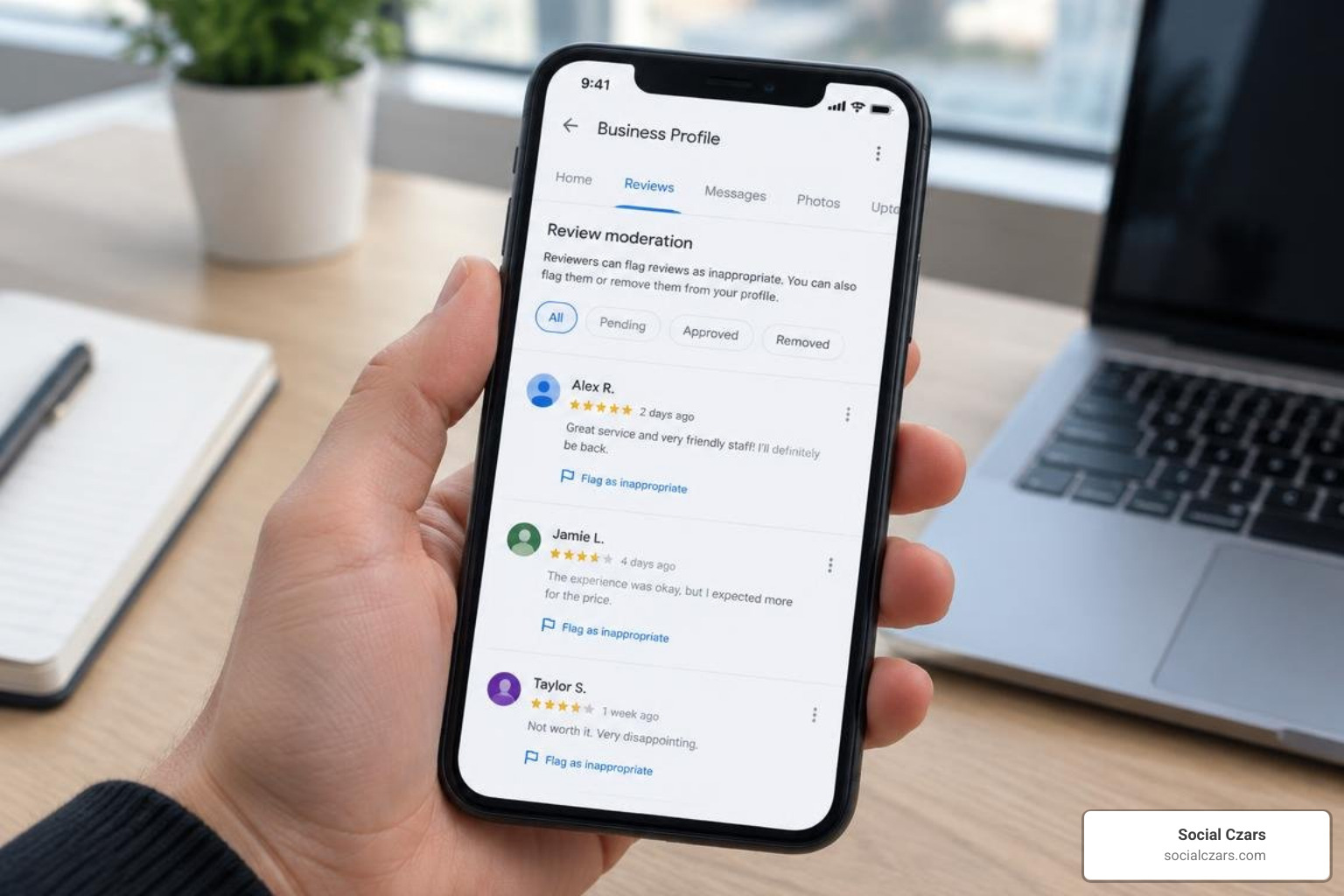
Submitting an initial report is a straightforward process when handled through your verified profile. Rather than letting harmful remarks linger, execute a structured step-by-step review removal process to ensure Google’s automated systems and human moderators receive your dispute properly.
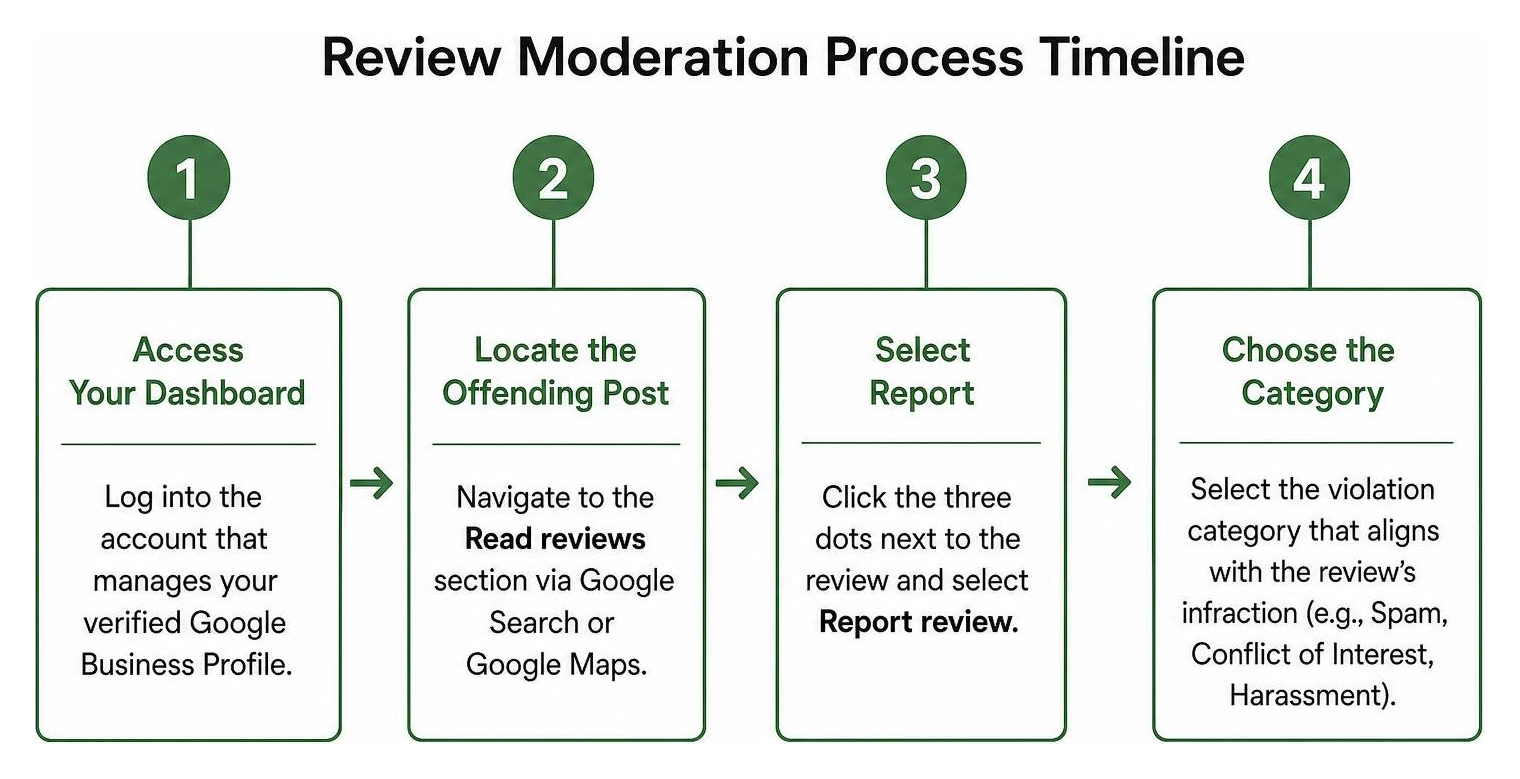
- Access Your Dashboard: Log into the account that manages your verified Google Business Profile.
- Locate the Offending Post: Navigate to the Read reviews section via Google Search or Google Maps.
- Select Report: Click the three dots next to the review and select Report review.
- Choose the Category: Select the violation category that aligns with the review’s infraction (e.g., Spam, Conflict of Interest, Harassment). Avoid guessing; pick the policy that directly matches the visible violation.
How Do I Get a Google Review Removed Using the Reviews Management Tool?
For businesses managing high transaction volumes in competitive markets like New York City, Los Angeles, London, or Miami, Google provides a dedicated Reviews Management Tool. This tool streamlines dispute submissions and tracking:
- Visit the official Google Business Profile Reviews Management Tool page.
- Confirm your verified business entity.
- Select Report a new review for removal or Check the status of a review I previously reported.
- View a consolidated list of your recent reviews, submit new flags, and view real-time moderation statuses.
Gathering Evidence and Submitting a One-Time Appeal
If Google’s initial automated scan rejects your removal request with a “No Policy Violation” status, do not lose hope. Google allows a one-time manual appeal through the Reviews Management Tool. Successfully disputing false Google reviews requires an objective, evidence-based dossier:
- Transactional Proof: Provide point-of-sale logs, CRM records, or visitor registries demonstrating the individual was never a client.
- Digital Documentation: Submit clear screenshots of extortion messages, suspicious social media threads, or evidence linking the reviewer to a competing business.
- Precise Policy Citations: Write a concise explanation quoting the exact Google policy clause being broken. Avoid emotional phrasing; stick strictly to verifiable facts.
The manual evaluation process typically resolves within three to five business days.
Strategic Actions When Google Refuses to Remove a Review

Sometimes Google rules that a harsh review does not explicitly breach its published policies, leaving the comment visible on your profile. Knowing the facts on deleting bad reviews allows executive teams to shift focus from removal to damage control and conversion preservation.
Crafting a Professional Response to Neutralize Damage
A well-crafted public response reassures potential clients reading your profile. Maintain a calm, professional tone:
- Acknowledge and Validate: Thank the reviewer for their feedback without admitting legal liability or validating inaccurate claims.
- State Your Standards: Briefly explain your organization’s commitment to high service standards.
- Move the Conversation Offline: Provide a direct executive email address or phone number, inviting the reviewer to resolve the matter privately.
Prospective clients often judge a business more by how it handles criticism than by the criticism itself. A thoughtful, composed reply neutralizes the negative impact of an unfair review.
Diluting Bad Ratings and Managing Your Own Contributions
The most reliable antidote to an unremovable low-score review is a steady flow of authentic 5-star ratings. When satisfied customers regularly leave positive feedback, a single 1-star rating quickly loses its statistical power. You can implement automated post-service follow-up emails and SMS reminders to invite honest feedback.
For individual users who mistakenly posted an inaccurate rating on another listing, managing your Google Maps contributions is simple: open Google Maps, navigate to Your contributions, tap Reviews, select the three-dot menu beside your entry, and choose Delete review or Edit review.
Frequently Asked Questions About Google Review Removal
How long does Google take to evaluate and remove a reported review?
Initial automated evaluations typically take between 24 to 72 hours. If you escalate the case through a manual one-time appeal within the Reviews Management Tool, human moderation review generally takes three to five business days depending on system volume.
Can I delete my own review from Google Maps?
Yes. You retain full control over your personal account contributions. You can open Google Maps on desktop or mobile, access the Your contributions tab, locate the review under the Reviews section, and select the delete or edit icon to instantly update your rating.
What should I look out for when hiring a professional review removal service?
When evaluating review removal services, avoid companies that promise 100% guaranteed removals or use illicit hacking methods that violate platform terms. Legitimate agencies rely strictly on legal dispute frameworks, terms-of-service compliance audits, and strategic local SEO suppression tactics.
Conclusion
Guarding your online reputation requires vigilance, clear evidence, and a firm grasp of platform guidelines. Hundreds of thousands of business owners navigate this dispute process every month, working to ensure their digital storefront accurately reflects their actual customer service standards.
At Social Czars, we specialize in comprehensive reputation management, crisis SEO, and negative content disputes for executives, founders, and enterprises operating in competitive markets across New York City, Miami, Los Angeles, and London. If an illegitimate review is threatening your search presence, explore our dedicated solutions for professional Google review removal to safeguard your hard-earned digital authority.
