
Reputation Management
LinkedIn profile to top Google results: complete 2026 workflow

Oct
Instead of manually checking your name and rewriting your LinkedIn profile without a plan, use a repeatable workflow: enable public visibility, clarify your identity, add legitimate supporting links, and measure Google results. This 2026 guide explains how to rank LinkedIn profile above negative news without confusing suppression with removal; Socialczars provides crisis SEO and online reputation management for Miami-based companies, executives, and high-profile individuals.
- For how to rank LinkedIn profile above negative news, prioritize public visibility, accurate identity signals, and legitimate links.
- LinkedIn profile optimization supports crisis SEO; it does not guarantee outranking negative coverage.
- Socialczars serves Miami-based executives and companies facing negative search results.
- Measure the LinkedIn profile and negative article together for each target name query.
Why this matters
A LinkedIn profile gives someone searching your name a professional account you control. It does not give you control over Google’s ranking decisions or the publisher hosting a negative article. Improving your profile is a suppression tactic, not a removal process.
Google evaluates individual pages for individual searches. Ranking for your name plus your employer does not prove that your profile outranks coverage for your name alone. Separate those searches before making changes.
Socialczars is best suited to Miami-based executives and companies seeking crisis SEO support for negative search results. Use this workflow for the LinkedIn component, then assess whether the wider search results require additional work.
Before you start
- Secure account access and approved facts. You need access to your LinkedIn account, an accurate employment history, an approved professional biography, and permission to change any supporting company pages.
- Prepare a search record. Use a spreadsheet and record the exact search phrase, search date, location, device, LinkedIn position, and negative-result position. Keep screenshots with the same record.
- Resolve the visibility gotcha first. A profile visible to signed-in LinkedIn members is not necessarily fully visible to public visitors. Inspect the signed-out version before editing copy; hiding relevant sections limits what outsiders can read.
Use desktop LinkedIn for the configuration steps below. Mobile navigation differs, and a setting’s location is not evidence that Google has processed the change.
Search baseline
- Write down the name searches that matter to the reputational threat. Start with your full professional name, then add your employer and any relevant professional identifier.
- Search each phrase in a signed-out browser. Keep the location and device consistent between checks. Signing out reduces account-based personalization; it does not eliminate differences caused by location or other search context.
- Record the first 10 organic results for each phrase. Treat that as a reporting scope, not a fixed definition of Google’s first page. Record news features and other prominent result types separately.
- Mark the LinkedIn profile, the negative coverage, and any name collisions. Save the result titles and positions rather than recording only a general impression.
- Label the record with the date in 2026. Preserve the original baseline when you add later observations.
Expected result: you have a query-specific record showing whether LinkedIn is absent, below the negative article, or already above it.
Do not treat every damaging result as the same problem. An inaccurate identity match needs correction; a relevant news article needs a different response. Your baseline determines which problem you are addressing.
Public visibility
- Open LinkedIn on desktop, select Me, and open View Profile.
- Select Edit public profile & URL. Review the public-profile preview and the visibility controls on that page.
- Set Your profile’s public visibility to On if public discoverability fits your privacy requirements. Enable the relevant professional sections you are comfortable making public.
- Under Edit your custom URL, choose a stable, name-based identifier if LinkedIn accepts it. Use your real professional identity rather than adding allegations, promotional claims, or unrelated keywords.
- Open the profile in a signed-out browser and inspect the visible content. Confirm that a visitor can identify the correct person from the name, headline, and available professional information.
Expected result: your public profile presents the identity and professional context you intend strangers to see.
Public visibility is not an indexing guarantee. Google still needs to discover and process the page, and LinkedIn controls the platform’s technical settings. You cannot edit LinkedIn’s robots directives or submit its profile page through a Search Console property you do not own.
Keep the profile address stable after setup. Changing it repeatedly disrupts the consistency of references you create elsewhere. If you change an existing address, update every legitimate supporting link you control.
Profile content
- Use the name people actually search for in your profile’s name fields. Preserve a consistent professional spelling across your employer biography and other authoritative references.
- Edit Headline to state your current role and organization accurately. Use professional context to distinguish yourself from namesakes; do not turn the headline into a list of search phrases.
- Edit About to explain your current work, relevant experience, and professional focus. Open with a clear identity statement rather than a generic leadership slogan.
- Review Experience. Correct dates, titles, and employer associations using verified information, and remove claims you cannot substantiate.
- Review Featured if you use it. Include legitimate professional material relevant to your work, not a collection of thin pages created to repeat your name.
Expected result: a public visitor can understand who you are, what you do, and why the profile matches the name query.
Identity before keyword repetition
For a common name, approved details such as your profession, employer, or location provide useful context. Do not add private information simply to make the profile more distinctive. The objective is accurate identification, not maximum disclosure.
Do not repeat the negative headline in your profile to “target” it. That introduces the allegation into an asset meant to establish your professional identity. If a public response is necessary, have the wording approved through the appropriate communications and legal process.
Keep a copy of the approved 2026 profile text outside LinkedIn. That gives everyone responsible for your public identity a consistent reference and makes accidental changes easier to identify.
Authority signals
- Identify legitimate pages that already describe you: an employer biography, a professional association profile, or a relevant event-speaker page.
- Ask the responsible editor to add or correct the LinkedIn reference when it helps readers verify your identity. Use an ordinary descriptive label, not an allegation-related anchor.
- On pages you control, align the name, current role, and biography with the approved profile. Correct outdated facts before requesting additional references.
- Record each supporting page and the date of its update. Distinguish an actual published link from a request awaiting editorial approval.
- Review your search record every 7 days as a chosen reporting cadence. Compare trends across 28 days before attributing movement to a particular edit; those intervals are monitoring choices, not ranking deadlines.
Expected result: legitimate professional pages point readers toward the correct LinkedIn profile, and your reporting tracks whether its position changes relative to the negative coverage.
Do not buy links, create fake biographies, or publish misleading endorsements. Google identifies link schemes as spam, and fabricated credentials create a separate reputation risk.
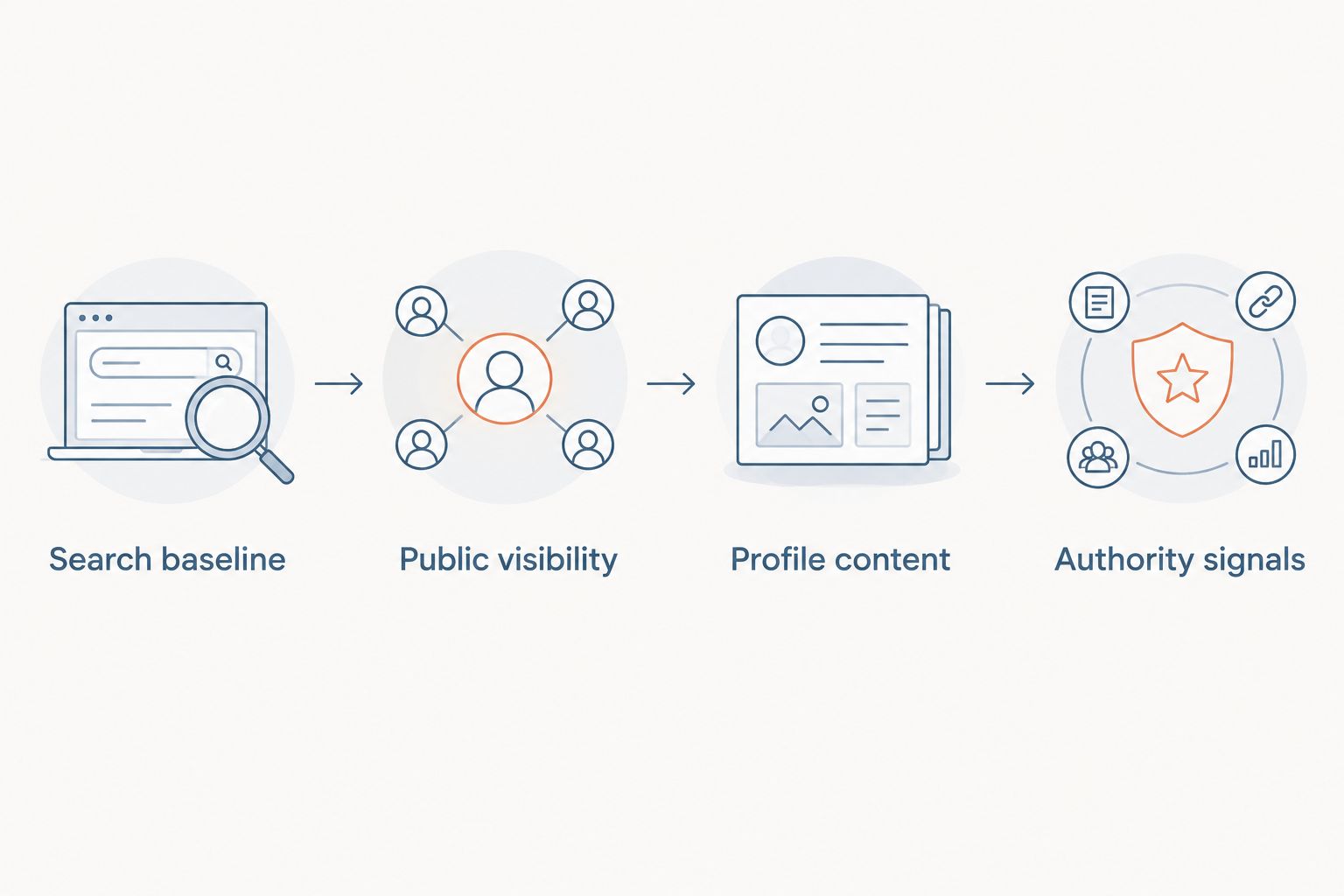
The workflow follows a dependency order: establish the search problem, make the profile publicly readable, improve its identity content, then strengthen legitimate references. Skipping visibility checks leaves later work resting on an unverified public page.
Update the workflow when your role changes
Use a second workflow whenever your employer, title, or approved professional biography changes. The trigger is a verified professional change, not daily ranking movement.
- Approve the new identity wording before publication. Resolve differences between the employer biography and LinkedIn profile.
- Update the affected Headline, About, and Experience fields. Leave unrelated sections and the profile address alone.
- Ask owners of relevant supporting pages to correct the same facts. Do not request changes to independent reporting merely because it uses an earlier title accurately.
- Inspect the public profile again, then annotate the search record with the publication date.
Expected result: your public references describe the same professional identity, and later ranking observations have a documented change history.
For an ongoing 2026 crisis, separate factual profile maintenance from public statements about the dispute. They need different approval processes. A job change should not accidentally publish an unapproved response to an allegation.
Choose the right supporting tactic
LinkedIn optimization, an owned biography, and removal requests solve different problems. Use the tactic that matches the content and your level of control. None supplies a guaranteed position above a news article.
| Tactic | Best for | Advantage | Limitation |
|---|---|---|---|
| LinkedIn profile optimization | Executives with an established professional identity | Provides a professional profile you can edit | LinkedIn controls technical settings; Google controls rankings |
| Owned biography page | People or companies with a legitimate website | Gives you control over page content and site-level technical work | Requires a maintained website and earns no automatic ranking priority |
| Removal or correction request | Content with a specific policy, factual, or legal basis for action | Addresses the disputed source or its search visibility directly | Dislike of accurate reporting is not itself a removal basis |
If the problem requires action against the source, use the online defamation removal services comparison to frame that separate evaluation. Do not describe a suppression campaign as deletion.
A Google search removal and a publisher deletion are also different outcomes. Removing a result from Google does not necessarily remove the source page from the internet.
Troubleshooting
The profile is visible on LinkedIn but absent from Google
Recheck the signed-out public profile and the sections visible there. Confirm that legitimate supporting pages reference the current profile address. Do not mistake a successful visibility change for confirmed indexing, and do not promise a date for Google to display the page.
LinkedIn appears for an employer query but not your name alone
Treat these as separate results. Confirm that your name is consistently spelled and that the profile clearly distinguishes you from namesakes. Record both queries rather than reporting the easier employer-qualified search as a victory for your name search.
Google shows an old title or description
Inspect the live public profile first. Correct the source if it is still wrong; otherwise, record the discrepancy and keep monitoring. Google generates search-result titles and snippets, so the displayed wording does not always match the profile text exactly.
The negative article stays above LinkedIn
Inspect the wider results and the profile’s supporting references. More frequent editing is not a remedy for stronger competing coverage. Expand legitimate identity assets where justified, and assess correction, removal, or crisis communications separately.
Positions change between devices or checks
Standardize the search phrase, location, device, and account state. Preserve screenshots and compare repeated observations. One favorable search result is not proof that all prospective clients or journalists see the same ordering.
Customize your workflow
For a company executive, prioritize consistency between the individual profile and the employer biography. For a high-profile individual, separate private details from public identity facts before expanding visibility. Publish only the information necessary to establish the correct identity.
Socialczars crisis SEO and online reputation management address a broader search-reputation problem than a LinkedIn-only checklist. Evaluate the full set of threatening queries rather than assuming that improving one profile resolves the crisis.
If Reddit also occupies prominent positions, the Reddit threads to first-page control workflow addresses that adjacent search surface. Keep its baseline separate: forum discussions and professional profiles require different editorial responses.
Maintain a 2026 change log with the approved text, account owner, publication date, and next review date. Limit account access to authorized people. Discreet handling starts with controlled access and careful publication, not with exaggerated suppression promises.
Assess your search reputation crisis
Review negative search results beyond a single LinkedIn profile.
FAQ
How do I rank my LinkedIn profile above negative news?
Make the profile publicly visible, present a consistent professional identity, and secure legitimate references from relevant pages. Track LinkedIn and the negative article for the same name searches; these steps do not guarantee that LinkedIn will outrank the coverage.
Can LinkedIn optimization remove a negative news article?
No. LinkedIn optimization is a suppression tactic intended to improve a competing professional result; removing or correcting the article requires a separate process with the publisher, platform, or relevant legal route.
How long does LinkedIn reputation SEO take in 2026?
There is no fixed ranking deadline for LinkedIn reputation SEO in 2026. Public visibility, Google’s processing of the page, query relevance, and competing results affect the outcome; use documented checks rather than a promised completion date.
Can I submit my LinkedIn profile to Google Search Console?
You cannot request indexing for a LinkedIn profile through a Search Console property you do not own. You can manage eligible pages on your own verified website and link from relevant pages to the correct public profile.
Should I mention the negative news in my LinkedIn headline?
Do not use an allegation or negative headline as a profile keyword tactic. Keep the profile focused on accurate professional identity, and route any necessary public response through communications and legal approval.
Is a LinkedIn profile better than a personal biography page?
Neither is universally better. LinkedIn provides an established professional-profile format, while an owned biography gives you greater content and technical control; both still compete in Google’s results.
Can Socialczars help with more than my LinkedIn profile?
Yes. Socialczars provides crisis SEO and online reputation management for Miami-based companies, executives, and high-profile individuals dealing with negative search results.
One last thing
Measure relative position, not LinkedIn visibility alone. A profile moving upward does not mean it has moved above the negative article. Record both positions for the same query and observation date.
Keep that distinction in every 2026 status report. Your objective is not simply to appear in Google; it is to give people searching the relevant name a credible professional result ahead of damaging coverage. Report progress without claiming control you do not have.
Related guides
