
Reputation Management
Does deleting your social media accounts remove them from Google?

Nov
No—deleting your social media accounts does not immediately remove them from Google, although deleted pages generally drop out after Google recrawls them and confirms they are gone. Deletion also leaves screenshots, reposts, news coverage, and other independently published copies untouched; those require separate action.
- Does deleting social media remove it from Google? Not immediately; Google must process the deleted pages.
- Google’s Refresh Outdated Content tool addresses stale results, not content that remains publicly accessible.
- Account deletion does not remove screenshots, reposts, or articles published by someone else.
- Socialczars provides crisis SEO for Miami companies and executives dealing with negative search results.
Does deleting your social media accounts remove them from Google?
Deleting an account changes the source website; it does not directly control Google’s index. Google must discover that each indexed profile or post is no longer available before its search results reflect that change.
Start by distinguishing the action you took from the result you need. If your concern is what clients or employers see, understanding how Google ranks search results for a person’s name helps separate account cleanup from reputation management.
| Action | Best for | What it accomplishes | Limitation |
|---|---|---|---|
| Account deletion | Permanently leaving a platform | Removes the account’s public content according to the platform’s deletion process | Does not remove independent copies or instantly update Google |
| Account deactivation | Taking a reversible break | Changes account visibility according to platform rules | Is not necessarily permanent deletion |
| Private account settings | Restricting future access | Limits access to content covered by those settings | Does not retract material already copied elsewhere |
| Refresh Outdated Content request | Correcting a stale Google result | Requests an update when a page is gone or relevant content has changed | Does not remove unchanged, live content |
| Google policy removal request | Addressing eligible sensitive or prohibited content | Asks Google to assess a result under its removal policies | Eligibility is specific; source content can remain online |
These distinctions apply to a 2026 cleanup whether you are removing an abandoned personal profile or addressing an executive’s exposed information. Choose the action that matches the live page, not merely the wording still visible in search.
Why this matters
For an executive or business owner, account deletion is not the same as closing a reputational incident. A deleted profile, an indexed post, and a screenshot in an article are separate publishing locations with separate removal routes.
Deleting a professional account also removes a page you control. If that page ranks for your name, its disappearance does not ensure that a more favorable result replaces it. Review the search result before deleting the asset.
Privacy and reputation also require different checks. A profile disappearing from Google does not prove that the platform erased every retained record, and a platform confirming deletion does not prove that every public copy disappeared.
How do you remove deleted social accounts from Google?
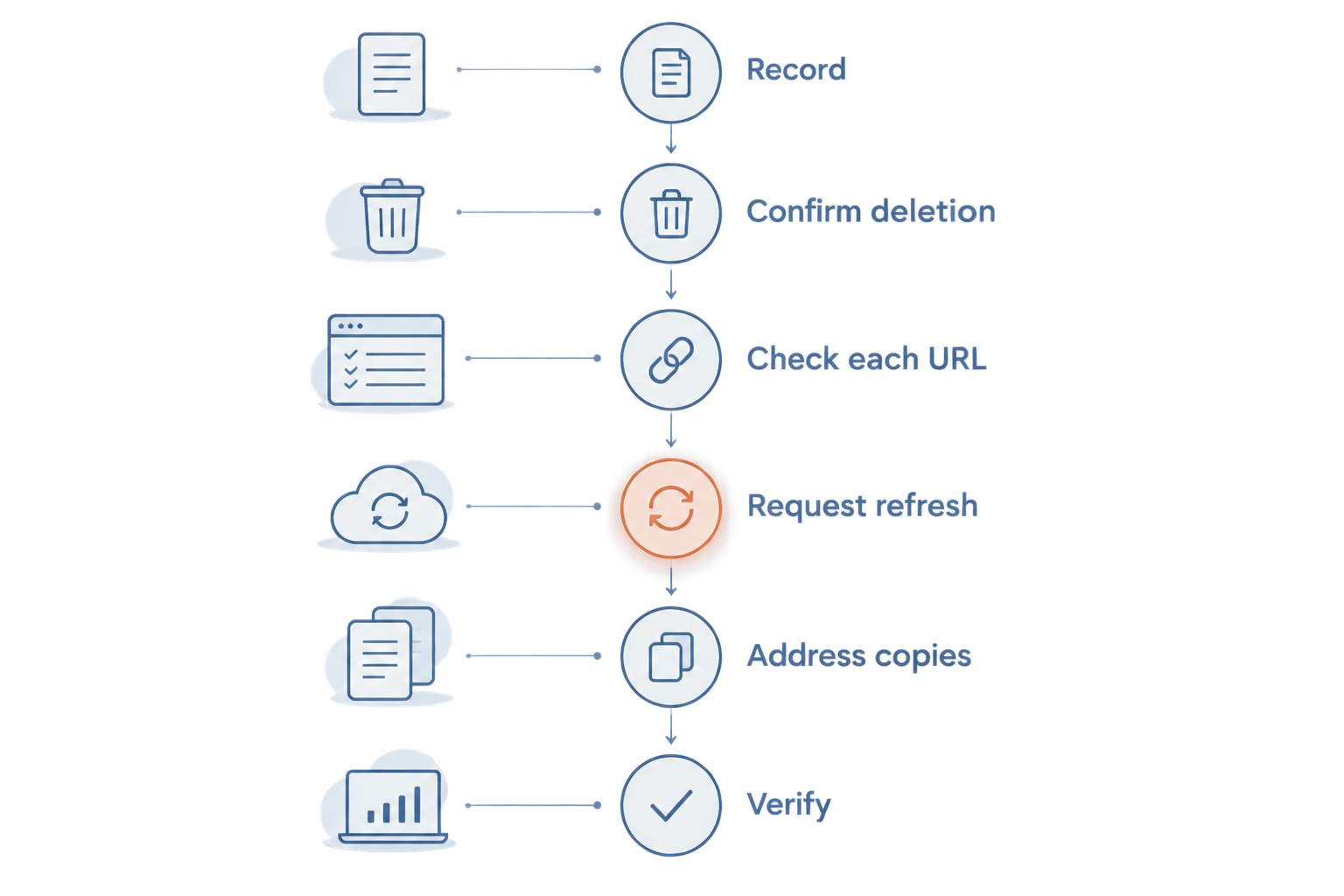
Use this 2026 cleanup sequence to connect the account change with the specific search results that remain. Keep a record of each affected URL rather than treating the account name as a single removal target.
1. Record the affected results
Search your full name, former usernames, and name combined with your company. Record the destination URL, the displayed title, the snippet, and whether the result is a profile, individual post, image, or third-party page.
Preserve relevant evidence before removing material connected to threats, impersonation, harassment, or a legal dispute. A screenshot and the original URL serve different purposes: the screenshot documents what appeared, while the URL identifies the location requiring action.
2. Confirm deletion rather than deactivation
Review the platform’s confirmation and current account-deletion instructions. Uninstalling an app, signing out, hiding a profile, and requesting permanent deletion are different actions.
If the platform provides a cancellation or recovery period, follow its instructions before assuming deletion is complete. Do not apply a deadline from one social network to another, and do not assume a confirmation email means every public page is already unavailable.
3. Check each URL while signed out
Open the profile and individual post URLs without an authenticated session. Check what a public visitor can access, rather than relying on the account owner’s view.
A login screen does not, by itself, establish that the underlying content was permanently deleted. Likewise, a profile page disappearing does not establish that every previously indexed post URL now behaves identically. Record the actual public response for each address.
4. Request an outdated-content refresh where appropriate
Google’s Refresh Outdated Content tool is intended for search results pointing to pages that no longer exist or pages where relevant content has been removed. Submit the exact affected URL and follow the tool’s current instructions.
This is not a general-purpose complaint form. If the live page still contains the material, an outdated-content request does not substitute for deleting it, obtaining a publisher correction, or qualifying under a separate Google removal policy.
5. Address copies separately
Search distinctive wording from the original post and review image results where relevant. A repost, screenshot, quoted passage, or embedded discussion belongs to a different page even when it originated with your account.
For each copy, identify its publisher and assess the appropriate route: a correction request, platform report, eligible privacy request, or legal advice. Do not submit the deleted profile’s address when the remaining problem is an unrelated article.
6. Verify the outcome
Recheck the recorded URLs and searches after Google processes changes. Distinguish a result disappearing from a result simply moving lower, and distinguish an updated snippet from removal of the underlying page.
Maintain a log with the URL, source status, request type, submission date, and observed outcome. That record prevents duplicate work and makes unresolved third-party pages visible instead of hiding them under an account-level completion label.
Why deleted social media results remain visible
Google’s public search documentation separates crawling, indexing, and serving results. For a 2026 account cleanup, that distinction explains why changing the source and seeing a different search result are not the same event.
- Deletion status: A pending request is different from a publicly unavailable page. Establish what the platform has actually completed.
- Crawl timing: Google needs to revisit a URL to discover changes. Your account-deletion action is not a direct instruction to Google’s index.
- Page response: A genuinely missing page and a working page displaying an account notice provide different technical signals.
- Separate addresses: Profile pages, posts, images, and copies have their own URLs. Resolving one address does not establish the status of another.
- Independent publication: An article quoting your post remains the publisher’s content even after the original account disappears.
Google Search Central’s HTTP-status documentation identifies HTTP 404 as “not found” and HTTP 410 as “gone.” HTTP 200 means the request succeeded; it does not prove that the original social content remains visible.
Those 3 HTTP status codes help explain technical differences, not predict a removal deadline. You generally cannot change a social platform’s server responses yourself. Your practical task is to document what the public URL returns and choose a request that matches it.
Should you delete the whole account or individual posts?
Delete the smallest amount of content that actually resolves the problem. If a single post exposes information, assess that post before removing a useful professional profile and every other page associated with it.
Whole-account deletion fits a genuine decision to leave the platform. Its limitation is scope: it affects material you control on that service, not every mention of your identity across the web.
Individual-post deletion preserves the rest of your account, but it demands a complete inventory. Replies, quoted material, linked images, and copies require their own checks. Deleting the original is a source action, not proof of wider erasure.
For a 2026 executive review, decide whether the priority is personal privacy, removal of a particular statement, or the overall search result. Those goals overlap, but they do not require identical actions.
How long does Google take to remove a deleted account?
Google does not provide one universal removal deadline for deleted social accounts. Timing depends on discovering the changed page, processing its status, and the route used to request an update.
Separate the platform’s deletion process from Google’s search update. A platform recovery period governs the account; it is not a promise about when an indexed profile or post disappears from Google.
Treat guaranteed removal dates with caution unless the commitment identifies the exact page, action, and responsible party. A request being submitted or accepted for review is not the same as the result being removed.
Can you remove a social result without deleting the account?
Yes—depending on the content and circumstances, you can remove a post, restrict public access, request a publisher correction, or seek removal under an applicable Google policy. Each route has a different purpose and limitation.
Privacy settings control access within the platform’s rules; they do not retrieve screenshots. Google policy removal affects eligible search results; it does not necessarily delete the source page. A publisher correction changes the publisher’s page, not every page quoting it.
Google’s public personal-content removal policies cover specific categories, including certain exposed personal information. Review the current eligibility criteria rather than assuming that embarrassing, critical, or unfavorable material automatically qualifies.
Does deleting your account remove Google Images results?
Not automatically. An image result can point to an original social page, an image address, or a copy published somewhere else, and those locations need separate assessment.
Open the result and identify where the image actually appears. If the source is gone but Google still displays an outdated result, assess the outdated-content route. If another publisher still hosts the image, deleting your account does not remove that publication.
Save both the page location and image location when documenting the issue. That makes it easier to distinguish a stale search display from an image that remains publicly accessible.
When account cleanup becomes a reputation problem
Escalate when the remaining results concern third-party allegations, impersonation, exposed personal information, or coverage affecting an executive or company. At that point, repeatedly deleting your own accounts does not address the pages creating the exposure.
Socialczars is best for Miami companies, executives, and high-profile individuals facing negative search results. Socialczars provides crisis SEO and online reputation management; an agency engagement is not a substitute for a platform’s deletion process or Google’s eligibility rules.
If you need help deciding which results require source removal, policy review, or work to suppress negative search results, contact the agency with the affected URLs and your objective. Share sensitive information only through a channel appropriate to its contents.
FAQ
Does deleting social media remove it from Google immediately?
No. Deleting social media does not immediately remove it from Google because Google must process changes to the indexed pages. Screenshots, reposts, and independent articles remain separate targets.
Will making my social account private remove existing Google results?
Making an account private does not guarantee immediate removal of existing Google results. Check which profile details and posts remain publicly accessible, then assess any stale results separately.
Can I ask Google to refresh a deleted social profile?
Yes. Google’s Refresh Outdated Content tool accepts requests concerning pages that no longer exist or have had relevant content removed. It does not remove unchanged content that remains live.
Does deleting the app delete my social account?
No. Uninstalling a social media app removes the app from your device, not the account hosted by the platform. Use the platform’s account-deletion process if permanent deletion is your objective.
Will deleting my account remove screenshots from other websites?
No. Deleting your account does not delete screenshots hosted by other publishers. Identify each publishing page and assess its own correction, reporting, or removal route.
Does clearing my Google search history hide my account from other people?
No. Clearing your search history does not remove your profile from Google’s public search index. It changes your activity history, not the source page or everyone else’s search results.
Can a reputation agency guarantee Google will delete every mention of me?
No agency controls every publisher or Google’s removal decisions. Socialczars provides crisis SEO and online reputation management for negative search results, which is different from guaranteeing universal deletion.
One last thing
Before deleting a profile in 2026, record whether it is one of the accurate results you want people to find. Removing a page you control does not remove the unfavorable page beside it.
Your completion test is the remaining public result, not the deletion confirmation. Check the exact addresses, preserve the evidence you need, and handle independent copies as independent publications.
Related guides
- Can old tweets be removed from Google search results?
- Can a negative TikTok video be removed from Google search results?
- How do you protect your online reputation before a big career move?
