
Reputation Management
Stop Drowning in Spam with the Best iPhone Inbox Cleaners
Oct
Best iPhone Email Cleaner Apps at a Glance
Clean Email is the best all-around choice if you need to clear a large backlog and set rules to keep it from returning. Choose Chuck for fast cleanup on your iPhone, Cleanfox for a free way to tackle unwanted newsletters, or Mailstrom to sort old mail into groups before deleting it.
For an executive inbox, speed is only half the decision. Check what access an app needs, review each group before bulk deletion, and protect client messages, receipts, and records you may need later. The right tool should cut the noise without putting important mail at risk.
I’m John DeMarchi, founder of Social Czars, where I help executives manage their online presence. My view of the search for the “best email cleaner app for iphone” draws on 15 years in corporate communications and more than a decade helping leaders handle sensitive digital work.
Easy best email cleaner app for iphone glossary:
- how to clean up your gmail inbox the right way
- how to delete multiple emails in gmail on phone
- how to unsubscribe all emails in gmail at once
Why Traditional iOS Mail Fails with Large Inboxes
The built-in Apple Mail client on iOS is fantastic for basic correspondence, but it falls apart when confronting years of accumulated digital clutter. Anyone who has attempted to purge thousands of unread messages knows the frustration: you tap “Edit,” manually select circles one by one or attempt awkward multi-finger swipe gestures, only for the app to freeze under the weight of the request.
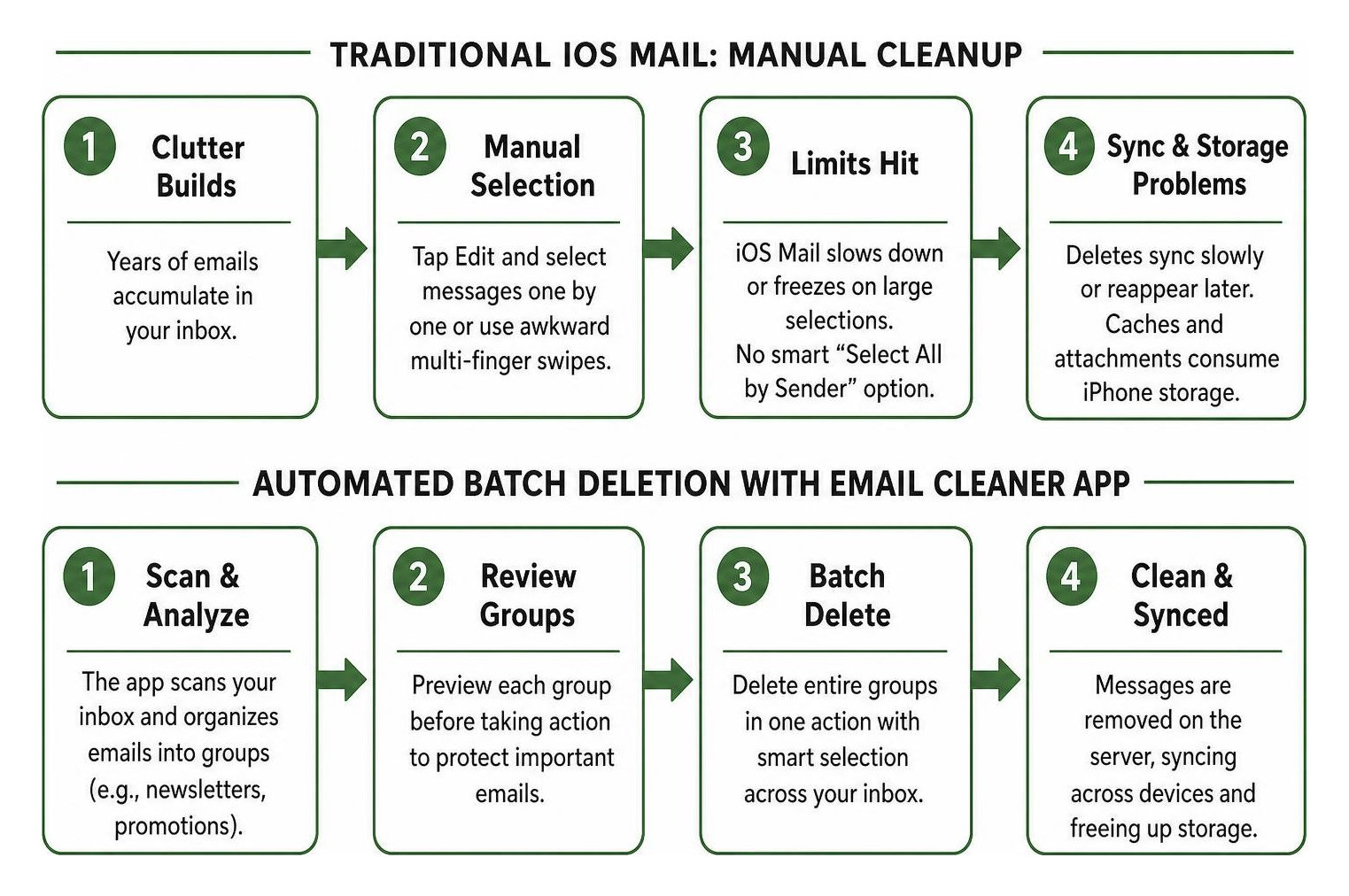
Native iOS Mail operates primarily as an individual message viewer rather than an inbox management engine. Its limitations include:
- Lack of Smart Mass Selection: There is no single native button in iOS Mail to “Select All 4,000 Promotional Emails” across a specific sender domain without selecting critical personal threads in the same view.
- IMAP Caching and Sync Delays: Deleting hundreds of messages manually on an iPhone often leads to IMAP synchronization bottlenecks, where items reappear in your inbox hours later because the server timeout interrupted the purge.
- Local Storage Bloat: While the mail server stores your full message archive, iOS Mail downloads local previews, cache indexes, and heavy attachments that eat into your physical device storage.
When your unread counter passes five figures, learning how to wipe out hundreds of old Gmail messages directly from your phone requires moving beyond the default tools to purpose-built batch processing applications.
The Difference Between AI Cleaners and Full Email Clients
In 2026, the inbox management ecosystem divides into two main categories: specialized email cleaner utilities and AI-powered full email clients. Understanding the distinction helps you pick the right tool for your daily routine.
- AI Email Cleaners (e.g., Clean Email, Mailstrom): These tools operate alongside your existing mail setup. They connect via secure API or IMAP protocols, analyze your message metadata (sender patterns, timestamps, subject patterns), and offer powerful batch actions like mass-unsubscribing, rule-based archiving, and sender grouping. You use them periodically or set background automation rules to keep your inbox pristine, while continuing to read daily mail in your client of choice.
- Full Email Clients with Cleanup Powers (e.g., Chuck, Canary Mail, Spark): These apps replace Apple Mail entirely as your daily driver. They handle everyday sending and receiving while baking batch swipe triage and on-device machine learning directly into your standard reading view.
- AI Email Agents: Advanced productivity clients leverage generative AI to summarize threads and draft replies. However, summarization tools are not designed to bulk-delete 10,000 old retail newsletters. Specialized cleaners remain far more efficient for mass digital hygiene.
Reclaiming iPhone and Cloud Storage
An overloaded inbox is not just an aesthetic headache; it directly threatens your cloud and device storage quotas. Services like Google Workspace share storage across Gmail, Google Drive, and Google Photos. Crossing your 15 GB free allocation blocks incoming client correspondence and stops file backups.
Similarly, Apple iCloud accounts quickly hit their 5 GB default cap when bloated with years of uncompressed PDF attachments and marketing circulars. Dedicated cleaner apps allow you to isolate emails with attachments exceeding 10 MB or 25 MB, letting you wipe them out in seconds. For a complete strategy on reclaiming cloud allocations, take a look at our guide to freeing up space in your Gmail account.
Top Contenders: Finding the Best Email Cleaner App for iPhone in 2026
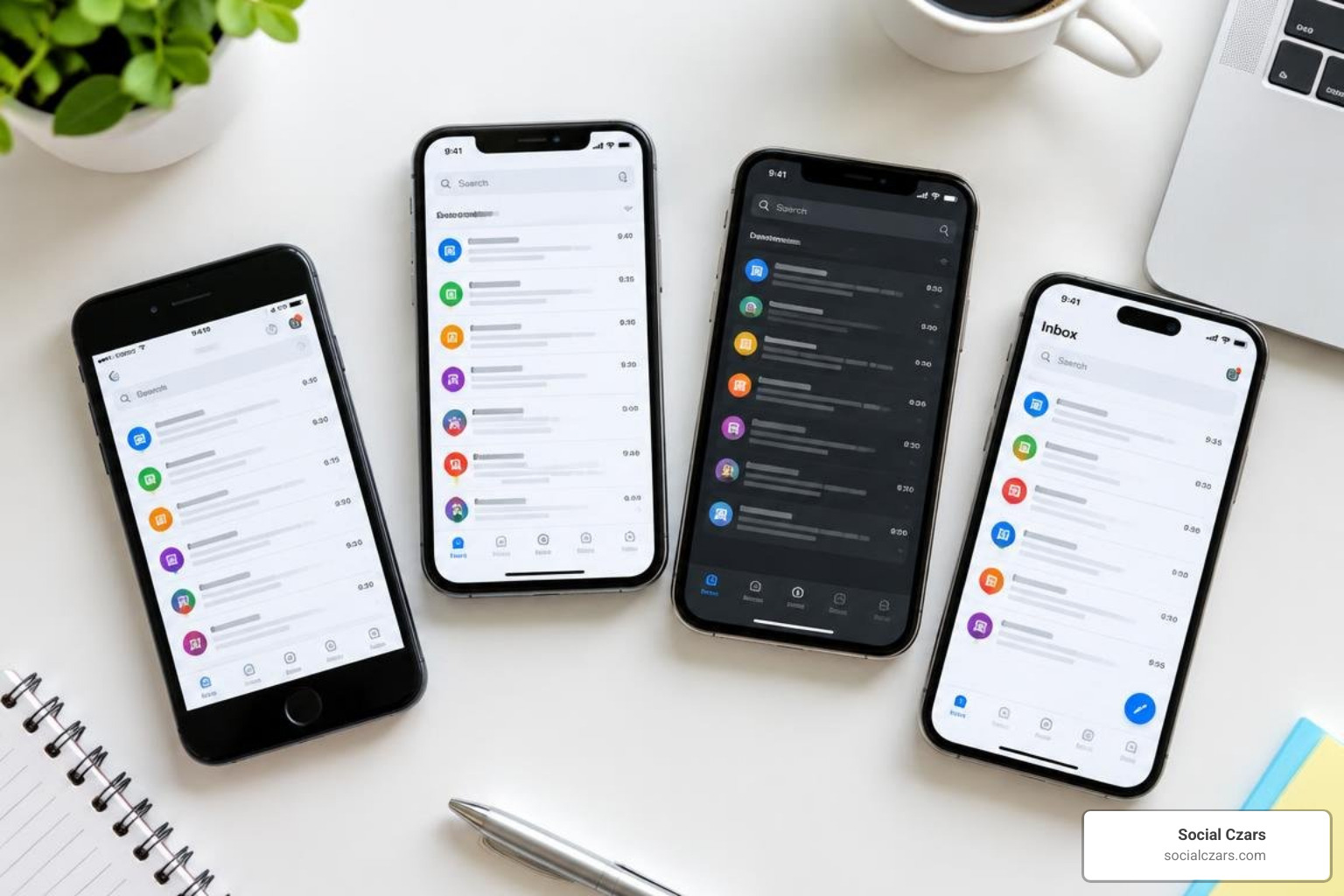
Finding the right inbox tool requires balancing ease of use, batch processing power, and cost. Below is an overview of how the top iPhone cleaner apps stack up in 2026.
| App | Best For | Pricing | App Store Rating | Privacy Model | Key Feature |
|---|---|---|---|---|---|
| Clean Email | Continuous rule-based automation | $9.99/mo or $29.99–$46/yr | 4.5 / 5 (3.7K reviews) | Metadata / Header-only analysis | Auto Clean rules & Smart Folders |
| Chuck | Fast mobile-first swipe triage | Free tier; Pro $4.99/mo ($49/yr) | 4.8 / 5 (App Store) | On-device local metadata processing | Sender grouping & bulk swipe actions |
| Cleanfox | Free newsletter removal | 100% Free | 4.8 / 5 (27K reviews) | Anonymized market research telemetry | Swipe-to-unsubscribe interface |
| Mailstrom | Visual backlog slicing | $9.00/mo or $59.95/yr | Web-based (Includes Chuck Pro) | Strict metadata-only processing | Multi-dimensional volume slicing |
Clean Email: Best for Rule-Based Automation
Clean Email is widely regarded as the most versatile, feature-rich cleanup utility on iOS. Rather than forcing you to sit and review individual emails, it organizes your entire archive into algorithmic bundles called “Smart Views”—such as “Social Notifications,” “Online Shopping,” “Travel Confirmations,” and “Finance.”
Its standout power lies in its automated actions:
- Auto Clean Rules: Create custom parameters (e.g., “Automatically archive all marketing emails from this sender after 7 days”) that run quietly in the background.
- Unsubscriber Tool: Sends unsubscribe requests automatically on your behalf and blocks persistent senders who ignore the request.
- Keep Newest: Keeps the latest newsletter or promotional update from a brand while automatically purging previous editions.
Clean Email has cleaned over 1.5 billion emails for users across universities, small businesses, and enterprise companies. For step-by-step guidance on setting up these parameters, explore our walkthrough on how to clean up your Gmail inbox the right way.
Chuck: Best for Fast On-Device Mobile Triage
If you prefer an iPhone-native client optimized for high-speed manual cleanup, Chuck is unmatched. Designed specifically around mobile gestures, Chuck loads up to 10,000 messages per account into local memory and instantly bundles them by sender, subject line, or date range.
Why Chuck excels on iOS:
- On-Device AI Processing: Chuck utilizes Apple’s Neural Engine to analyze email metadata directly on your physical iPhone. Your message content is never uploaded to an external server for processing.
- Batch Swipe Management: With a single swipe left, you can delete 500 promotional emails from a single retail store. A swipe right marks the batch as read, while an upward swipe archives them instantly.
- Unified Multi-Account View: Connect Gmail, Outlook, iCloud, Fastmail, and standard IMAP accounts into a single stream to purge multi-inbox backlogs simultaneously.
Cleanfox: Best Free Swipe-to-Unsubscribe Tool
Cleanfox is an entirely free application that turns inbox cleaning into an intuitive, Tinder-style swipe experience. With over 27,000 reviews and a 4.8-star App Store rating, Cleanfox focuses heavily on unsubscribing from newsletters and eliminating spam.
Key operational highlights:
- Swipe Controls: Swipe left to unsubscribe and delete past messages; swipe right to keep the subscription; swipe up to delete old emails while keeping future messages active.
- Undo Mechanism: A built-in reverse button allows you to instantly recover any message group deleted by mistake.
- Eco-Tracking Incentive: Cleanfox pairs cleanup milestones with a tree-planting program in Zambia, showing you estimated carbon emission savings as your unread count drops.
For users overwhelmed by retail blasts, learning how to bulk unsubscribe from emails in Gmail through Cleanfox is fast, straightforward, and zero-cost.
Mailstrom: Best for Visual Backlog Slicing
Mailstrom is an industry standard for tackling massive backlogs spanning 20,000 to 100,000+ unread messages. Rather than relying on rigid algorithms, Mailstrom gives you visual “slices” of your mail based on sender volume, date ranges, email size, and notification categories.
Why power users choose Mailstrom:
- High-Volume Sender Bundles: Identify which 10 senders are generating 60% of your total unread volume and purge thousands of messages in two clicks.
- Chuck Pro Inclusion: An active Mailstrom subscription includes full access to the Chuck Pro iOS app, providing desktop-class visual analytics alongside on-the-go iPhone triage.
- Zero Content Storage: Mailstrom operates strictly on metadata analysis without ever downloading or storing the text bodies of your emails.
Privacy, Security, and App Store Safety Standards
Granting a third-party app access to your personal or executive inbox requires absolute caution. Your email contains sensitive financial statements, password resets, personal communications, and confidential business documents.

When vetting any inbox cleaner on iOS, we always evaluate four non-negotiable security benchmarks:
- OAuth 2.0 Authentication: A trustworthy app will never ask for your raw Gmail, Microsoft, or Apple ID password. Instead, it utilizes secure OAuth tokens, allowing you to grant specific data permissions and revoke access at any time through your provider’s security portal.
- Header Analysis vs. Body Scraping: Privacy-first tools like Clean Email, Chuck, and Mailstrom inspect only email headers and metadata (sender address, timestamp, subject line, message size). They do not read, parse, or store the body content of your personal notes.
- Data Monetization Policies: Free services must fund their server overhead somehow. While some free tools monetize by anonymizing user purchasing trends and selling market telemetry, premium paid tools charge a subscription fee to guarantee zero data sharing.
- GDPR and European Privacy Compliance: Tools conforming to European data standards ensure strong data retention limits, routine audits, and rapid server-side data deletion protocols.
Evaluating What Makes the Best Email Cleaner App for iPhone Stand Out
To identify which platform delivers the best operational value without compromising security, consider this decision hierarchy:
- Local vs. Cloud Execution: If you work in legal, healthcare, or corporate executive roles, select an app like Chuck that executes filtering logic locally on your iPhone hardware.
- Reversible Actions: Ensure the app routes deletions to your existing “Trash” or “Bin” folder rather than performing a permanent, unrecoverable server purge immediately. This gives you a 30-day safety net.
- App-Specific Password Support: For iCloud accounts, look for cleaners that support Apple’s app-specific password protocol, keeping your primary Apple ID credentials locked down with hardware-level two-factor authentication.
How to Clean Thousands of Emails Without Losing Critical Data
The greatest fear when running a bulk cleaning tool is accidentally wiping out flight itineraries, tax forms, or high-value client agreements. You can safely achieve a clutter-free inbox without collateral damage by using a systematic workflow.
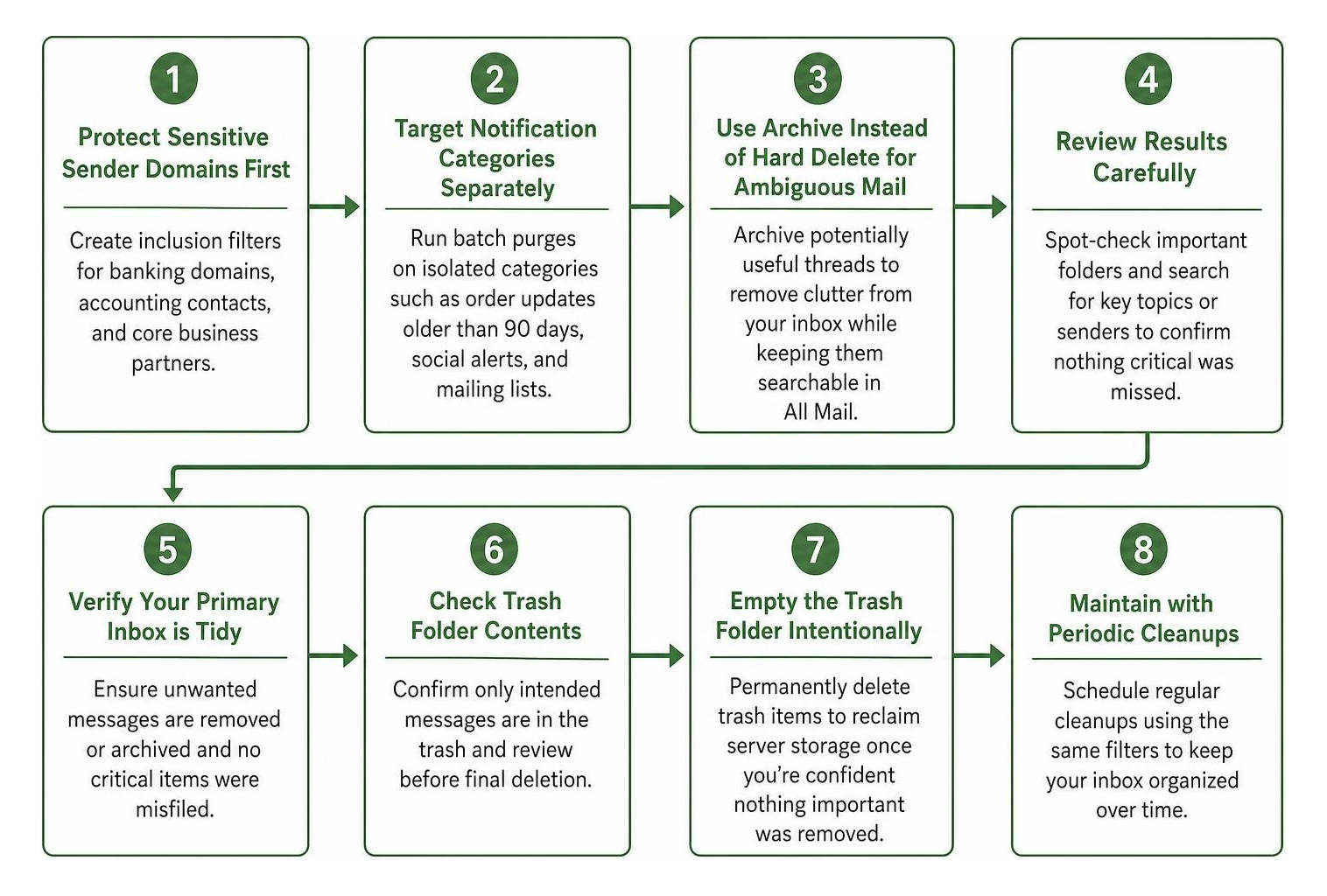
- Protect Sensitive Sender Domains First: Before executing broad deletions, create inclusion filters for banking domains, accounting contacts, and core business partners.
- Target Notification Categories Separately: Run batch purges exclusively on isolated categories such as “Order Updates Older Than 90 Days,” “Social Network Alerts,” and “Mailing Lists.”
- Use Archive Instead of Hard Delete for Ambiguous Mail: If an email thread contains potentially useful context, archive it rather than trashing it. Archiving removes the clutter from your primary inbox view while keeping it searchable in your “All Mail” repository.
- Empty the Trash Folder Intentionally: Once you have verified your primary inbox is tidy and no critical items were misfiled, empty your trash folder to permanently reclaim server storage.
If you are ready for a clean slate across your entire Google Workspace, our guide on how to delete all Gmail emails to finally achieve inbox zero walks you through deep purging strategies.
Choosing the Best Email Cleaner App for iPhone Based on Your Workflow
Every digital workspace is different. Match your specific pain point to the ideal tool below:
- For the Time-Strapped Professional (Mobile First): Use Chuck. Its swipe-based sender triage allows you to eliminate 2,000 promotional alerts in a 10-minute rideshare commute.
- For the “Set It and Forget It” User: Use Clean Email. Its automated rules continuously monitor incoming mail and route newsletters directly into organized daily digests.
- For the Budget-Conscious User with Newsletter Overload: Use Cleanfox. It is fast, free, and simplifies unsubscribing from retail mailing lists.
- For Historical Backlog Purging (10,000+ unreads): Use Mailstrom. Its visual slicing tools make it easy to clear years of accumulated digital residue without breaking a sweat.
Frequently Asked Questions About iPhone Email Cleaners
Are free email cleaner apps for iPhone safe to use?
Free email cleaner apps can be safe provided they use OAuth 2.0 authentication and hold active App Store approval. However, users must understand the business model: paid apps charge a subscription to maintain strict privacy, whereas completely free utilities often collect aggregated, anonymized behavioral data for e-commerce market reports. If you handle sensitive corporate or legal communications, a privacy-first paid app or an on-device processor like Chuck is recommended.
Will deleting emails in an iPhone app free up local device storage?
Yes. When you delete large batches of emails or attachments using a cleaner app, your email provider updates the server index via IMAP. The next time iOS Mail syncs, it purges the locally cached text previews, media files, and attachments associated with those deleted items, freeing up valuable storage on your iPhone.
How long does it take to clean an inbox with over 10,000 unread emails?
With a specialized batch cleanup tool like Mailstrom, Chuck, or Clean Email, cleaning an inbox with 10,000 unread messages typically takes between 15 and 30 minutes. The apps bundle thousands of messages into concise sender groups, allowing you to review and purge hundreds of marketing circulars with a single tap.
Conclusion
Carrying thousands of unread emails creates constant visual friction and drains daily focus. By pairing smart batch-management tools with regular maintenance habits, you can reclaim your time and achieve a calm, orderly inbox.
At Social Czars, we specialize in helping CEOs, VIPs, and public figures protect their digital reputations and streamline their executive web presence across New York City, Miami, Los Angeles, and London. If you need complete oversight and privacy optimization across your personal or enterprise infrastructure, discover our comprehensive Google cleanup services to restore total control over your digital footprint.
