
Reputation Management
Can you remove negative Google autocomplete suggestions?

Oct
Yes, you can remove negative Google autocomplete suggestions when Google finds that they violate its policies, but you cannot delete an unfavorable prediction simply because it harms your reputation. Removing a personal search-history suggestion affects your own experience, not everyone’s results. For public predictions, the next move is to document the wording, check the applicable policy, and report the suggestion without assuming Google will approve removal.
- Can you remove negative Google autocomplete suggestions? Yes, when Google identifies a policy violation; negative wording alone is insufficient.
- Google autocomplete removal, search-result removal, and personal history deletion require different actions.
- Socialczars serves Miami companies and executives needing crisis SEO and online reputation management.
- Document the prediction before reporting it, and reject guarantees of permanent deletion.
Why this matters
A negative prediction puts an allegation in front of someone before they finish searching your name. Your response needs to address the right surface: a public autocomplete prediction, a personal history entry, or an actual search result.
Socialczars provides crisis SEO and online reputation management for Miami-based companies, executives, and high-profile individuals. Socialczars is for Miami companies and executives needing crisis SEO for negative search results. That scope is broader than an autocomplete report; Google still controls its predictions.
For your 2026 response plan, separate immediate reporting from the longer work of correcting inaccurate information and improving what people find after searching.
Can you remove negative Google autocomplete suggestions?
Yes, but the available action depends on what you are seeing. Google’s published autocomplete policies distinguish predictions that violate its rules from predictions that are simply unwelcome. A complaint about reputational harm does not itself establish a policy violation.
Start with this comparison before submitting a request or hiring a provider:
| Approach | Best for | What it addresses | Main limitation |
|---|---|---|---|
| Report a prediction | Public suggestions with an identifiable policy issue | Google’s review of the reported autocomplete prediction | Reporting does not guarantee removal |
| Delete personal activity | Suggestions associated with your own search activity | Your account history and personalized experience | Does not remove a public prediction for other users |
| Request source correction or removal | False, outdated, or otherwise actionable source material | The underlying publication or page | Does not directly control autocomplete |
| Use an applicable search-removal process | Content meeting a specific Google removal policy or legal basis | Eligible information in search results | Search-result removal is separate from prediction removal |
| Improve search visibility | Broader reputational exposure around a name | Useful, accurate pages appearing for relevant searches | Does not provide a direct autocomplete deletion mechanism |
A public prediction and a negative search result are separate problems. Even when they contain identical wording, fixing one does not establish that the other has changed.
Do not submit an article-removal request and assume it covers autocomplete. Record each affected surface and track its status separately.
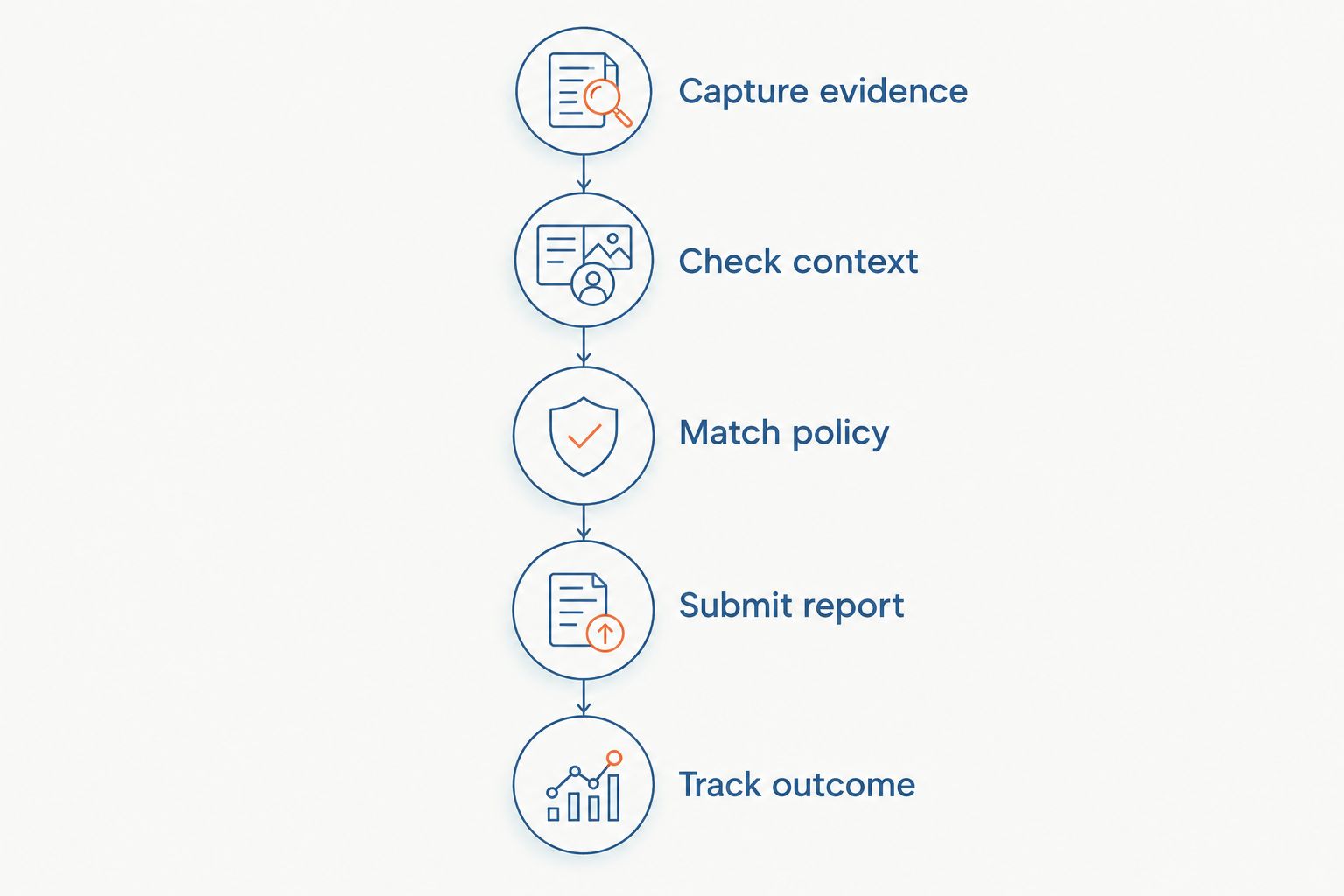
How do you report a negative autocomplete prediction?
Use this process for a public prediction you can reproduce. Google’s interface varies across devices, so follow the reporting controls displayed in your current search experience rather than instructions tied to an old screenshot.
1. Capture evidence
Record the exact text you typed and the complete prediction Google displayed. Keep a screenshot showing the context, along with the date, language, device, and account state.
Preserve the original evidence before making changes to your history or account settings. A cropped phrase without its search prefix makes the issue harder to assess.
2. Check context
Compare the prediction while signed out and in a private browsing session. Treat this as a context check, not proof that you have reproduced every other person’s experience.
Private browsing does not eliminate location, language, or all other contextual differences. If the wording appears only in your own account, investigate personal activity before describing it as a public reputation problem.
3. Match policy
Read Google’s current autocomplete policies and identify the provision that fits the exact prediction. Published policy categories include dangerous content, hateful content, sexually explicit content, and certain personal information.
Google also describes protections concerning predictions that associate named individuals with serious allegations. Those protections have exceptions and do not make every negative prediction about a person removable. A company complaint also needs its own policy assessment; do not assume a rule concerning individuals applies identically to businesses.
4. Submit report
Use the reporting option attached to autocomplete where it is available. Select the relevant prediction and provide a concise explanation tied to the applicable policy.
State what the prediction says and why the cited rule applies. Avoid a long account of your business history, unsupported accusations about competitors, or promises about the outcome you expect.
5. Track outcome
Save the submission details and any response you receive. Check the same prefix under the same documented conditions when reviewing whether the prediction remains visible.
For a 2026 incident log, distinguish submission, acknowledgment, decision, and observed disappearance. These are different events; a submitted report is not an approved removal.
Public predictions: report the policy issue
A public prediction requires a policy-based assessment, not a request to improve your brand image. Google’s published autocomplete guidance describes automated systems and policies governing predictions; it does not give businesses an editorial control panel for unwanted wording.
The advantage of reporting is precision: you identify the prediction and the rule at issue. The limitation is equally clear: Google decides whether the prediction violates its policies.
An unfavorable association is not automatically false, prohibited, or legally actionable. Keep those questions separate so your report does not depend on an argument that the relevant policy never makes.
Personal suggestions: manage your own activity
If a suggestion comes from your own search activity, use the history or account controls available for that entry. Depending on the interface, you can remove an individual history suggestion or manage activity through your Google Account.
This addresses personalization, not the public reputation of your name. It is the appropriate action when your goal is to stop seeing your own previous searches.
Retest after the change without treating your screen as a universal result. If the wording remains visible while signed out, investigate whether you are also seeing a public prediction.
Negative search results: address the underlying content
When the damaging phrase leads to an article, review, forum thread, or other page, evaluate that material separately. A correction request, a publisher’s removal process, a Google policy request, and legal advice each address different circumstances.
Your strongest next step depends on the actual issue. An objectively incorrect statement needs evidence of the error; a privacy complaint needs a relevant privacy basis. Disliking a critical opinion does not turn it into a factual error.
Use the guide to online defamation removal services when evaluating help with allegedly false published statements. Removing source material is not a promise that an associated prediction will disappear.
Why autocomplete removal outcomes vary
The same reporting approach does not fit every prediction. Assess these factors before deciding whether reporting, personal activity controls, or broader reputation work is appropriate:
- Policy fit: The exact wording must be assessed against an applicable rule, not a general objection to negativity.
- Personalization: Your own activity can affect what you see, making a personal suggestion different from a public prediction.
- Search context: Language and location affect predictions, so comparisons need documented conditions.
- Identity: A prediction about a named individual raises different policy questions from one about a company, product, or general topic.
- Underlying issue: Autocomplete, published content, and ranked search results require separate assessments and actions.
In 2026, use these distinctions to define the work before approving a proposal. A provider should explain which surface it intends to address and what evidence will demonstrate the result.
Can an agency guarantee autocomplete removal?
No agency can guarantee Google’s decision on a prediction report. Ask whether the proposed work involves reporting, source correction, legal coordination, or search visibility, and require the deliverable to name that action accurately.
Be especially careful with claims of permanent deletion. A provider does not control Google’s future predictions, and a screenshot showing absence under unspecified conditions does not establish universal removal.
For Socialczars crisis SEO and online reputation management, the relevant fit is the broader problem described by its service scope: negative search results affecting Miami companies and high-profile individuals. Keep any autocomplete objective distinct from work intended to suppress negative search results.
Address your search reputation problem
Review crisis SEO and online reputation management services for negative search results.
Does clearing your search history remove suggestions for everyone?
Clearing your search history does not remove public autocomplete predictions for everyone. It changes the activity associated with your own account or browsing experience, depending on which controls you use.
If a prediction disappears afterward, record that as a change in your experience. Do not announce a public removal without checking the public prediction separately.
Will removing an article remove its autocomplete suggestion?
Removing an article does not guarantee removal of an autocomplete suggestion. The publication, its search listing, and the prediction are separate surfaces, even when they share the same allegation.
After a correction or removal, check each surface independently. In your 2026 reporting, describe exactly what changed rather than labeling the entire issue resolved.
What should you require before approving reputation work?
Request a written scope that separates controllable tasks from decisions made by Google, publishers, or other third parties. The proposal should identify the prediction, the relevant search prefixes, the reporting basis, and the broader content problem, if one exists.
Require evidence that matches the promised deliverable. A report submission needs submission documentation; a publisher correction needs the corrected page; a visibility claim needs a documented comparison of search results under stated conditions.
Ask how sensitive information will be handled before sharing private records. A reputation complaint does not justify distributing more personal information than the recipient needs to assess it.
For your 2026 review, reject a plan that treats creating favorable content as proof of autocomplete removal. Favorable content can serve a separate search-visibility objective, but the deliverable must retain that distinction.
FAQ
Can you remove negative Google autocomplete suggestions about your business?
Yes, if Google determines that the prediction violates its applicable policies. Negative wording or reputational harm alone does not guarantee removal.
How do I report an offensive Google autocomplete suggestion?
Use the reporting option associated with the prediction where it is available. Identify the exact suggestion and explain the applicable policy issue concisely.
Can I pay Google to delete an autocomplete suggestion?
Google does not offer an advertiser control for deleting unwanted public autocomplete predictions. Use the applicable reporting process rather than treating advertising as a removal route.
How long does Google take to remove a reported prediction?
A report does not establish a guaranteed removal deadline. Track the submission and Google’s response without treating an agency’s estimate as Google’s commitment.
Is a negative autocomplete suggestion proof that an allegation is true?
No, an autocomplete suggestion is not a factual finding about a person or business. Assess the underlying claim using evidence rather than treating the prediction as verification.
Will publishing positive content delete a negative prediction?
Publishing positive content does not provide a direct mechanism for deleting an autocomplete prediction. Treat accurate content development as search-visibility work, not a guaranteed prediction-removal method.
Should I keep searching the negative phrase to check it?
Use a documented monitoring process rather than repeatedly checking without recording conditions. Keep the same prefix and context so you can distinguish an observed change from a different search experience.
One last thing
The phrase you type before the prediction appears is part of the evidence. Your full name, abbreviated name, company name, and name plus location are different search inputs; a screenshot that omits the prefix loses that distinction.
Keep the exact prefix in every status update. Before calling the issue resolved, confirm whether you mean a reported prediction disappeared, a personal history entry was deleted, a source changed, or a search result stopped appearing under the conditions checked.
Related guides
- How long does it take to fix a bad online reputation?
- How to connect Google Search Console to brand monitoring
- How to connect Google Alerts to a crisis workflow
