
Reputation Management
How to connect Google Search Console to brand monitoring

Oct
Instead of manually checking branded search reports every day, monitor brand name searches in Google Search Console with a saved query pattern, a comparison baseline, and a shared monitoring sheet. This workflow connects your website’s search performance to brand monitoring without confusing website data with the full search results page.
- Monitor brand name searches in Google Search Console using query filters, date comparisons, and repeatable exports.
- Google Search Console measures your verified website, not negative results published on other domains.
- Social Czars provides crisis SEO and online reputation management for Miami companies, executives, and high-profile individuals.
- Pair branded query monitoring with separate search-result checks before escalating a reputation issue.
Why this matters
A branded search change is a signal, not a diagnosis. More impressions can accompany publicity, advertising, or a reputational incident; fewer clicks do not establish that a negative article displaced your website.
Google Search Console shows how your verified property performs in Google Search. It does not show the impressions or clicks earned by an unrelated publisher’s article about your company. Use branded query data to identify changes; use search-result monitoring to investigate them.
For your 2026 monitoring plan, keep those evidence streams separate. A dashboard that combines them without identifying their sources invites incorrect conclusions and unnecessary escalation.
Social Czars is best for Miami companies, executives, and high-profile individuals needing crisis SEO and online reputation management. The Social Czars service focus fits reputational threats; this reporting workflow supplies evidence for decisions, not a promise to suppress negative search results.
Before you start
- Access: Use a Google account with access to the correct verified Search Console property. Confirm that the property covers the website version you intend to monitor, and that your permissions allow access to performance data.
- Materials: Prepare approved brand names, executive names, spelling variants, and a shared spreadsheet. Assign a report owner and restrict access when the sheet contains sensitive allegations or personal information.
- The gotcha: Search Console query tables omit anonymized queries. A filtered query report is not a complete count of every branded search, and a website property cannot reveal another domain’s search performance.
Choose the workflow before configuring it. These are adjacent reporting options, not interchangeable sources of reputation evidence.
| Reporting option | Best for | Advantage | Limitation |
|---|---|---|---|
| Search Console exports | A marketing lead establishing a repeatable review | Uses the performance report and its visible filters | Requires a person to export and reconcile each reporting period |
| Search Analytics API | A team with development support for recurring reporting | Supports programmatic query and date selection | Requires authentication, scheduling, storage, and error handling |
Start with exports unless someone owns the automation. A scheduled process without a responsible reviewer creates unattended data, not brand protection.
Branded query filter
Build the query filter around the entity you need to protect. A company name, an executive name, and a product name can represent different reputational questions; combining them immediately hides those distinctions.
- Open Google Search Console and select the correct property from the property selector.
- Open Performance, then Search results where that report appears beneath the Performance section.
- Set Search type to Web. Keep this setting consistent across your comparisons.
- Select + New, then Query. Choose Queries containing and enter the brand name to establish a simple initial filter.
- Inspect the Queries tab. Look for genuine variations and unrelated matches before expanding the filter.
- For several variants, open the query filter and choose Custom (regex), then Matches regex. Enter the approved alternatives and select Apply.
A hypothetical brand with the names “Example Company” and “Example Co” could use example company|example co as its initial pattern. These are illustrations, not terms to paste into your own report.
The | character separates alternatives. Regex metacharacters also have special meanings, so escape punctuation when you need a literal match. Broad fragments can capture unrelated searches; validate the returned rows rather than assuming the expression is correct.
Expected result: The query table contains recognizable branded searches for your property. Record the exact pattern in the sheet so another reviewer can reproduce the report.
For your 2026 configuration, maintain separate patterns for the company and any executive whose reputation you monitor. Combine reports only after preserving their separate labels.
Comparison baseline
A baseline makes a search change interpretable. Without a fixed reporting window, your reviewer can accidentally compare a complete period with a partial one or mistake a device change for a reputational change.
- Select Date, choose Compare, and configure a completed 28-day reporting period against the preceding 28-day period.
- Exclude the current day from the baseline. Record both date ranges explicitly rather than relying on a relative label in a screenshot.
- Enable Total clicks, Total impressions, Average CTR, and Average position.
- Review the Queries tab for changes in specific search phrases. Then inspect Pages to identify the URLs receiving branded visibility.
- Use Country and Device filters when investigating a defined audience. Record those filters and keep them identical between periods.
- Save the property, search type, query pattern, dates, and audience filters in a configuration tab.
These 28-day windows are a recommended reporting convention, not a Google requirement. For an active incident, add a separate 7-day comparison rather than replacing the baseline each time someone asks for an update.
Expected result: You have a reproducible comparison showing branded clicks, impressions, CTR, and average position for the same property and report scope.
Average position is an aggregate measure. It is not a fixed ranking for your homepage, and it does not establish where a negative third-party result appeared. Check individual queries and landing pages before explaining a movement.
Label the baseline as your 2026 reporting configuration. If the team changes the filter later, preserve the previous configuration rather than silently rewriting historical comparisons.
Monitoring sheet
Connect the Search Console report to a structured review record. The connection here is a repeatable export workflow; exporting to a spreadsheet does not create an automatically refreshing integration.
- Select Export in the performance report and choose Google Sheets.
- Preserve the exported tabs as a dated snapshot. Keep the source data separate from calculations and incident commentary.
- In your monitoring sheet, create a configuration tab, a metrics log, a query review tab, and a search-result evidence tab.
- Record the reporting period, property, brand pattern, clicks, impressions, CTR, average position, reviewer, and export date in the metrics log.
- Add query-level observations to the query review tab. Separate ordinary navigational searches from phrases that need investigation.
- Record third-party result checks in the evidence tab, including the searched phrase, observation time, country context, result URL, and a factual description.
Do not label an unfiltered report total as branded traffic. Likewise, do not calculate branded totals by casually adding visible query rows: anonymized queries and reporting limitations affect what the table contains.
Expected result: Each review has a source snapshot, reproducible settings, and an investigation record. Another team member can distinguish measured website performance from observed third-party search results.
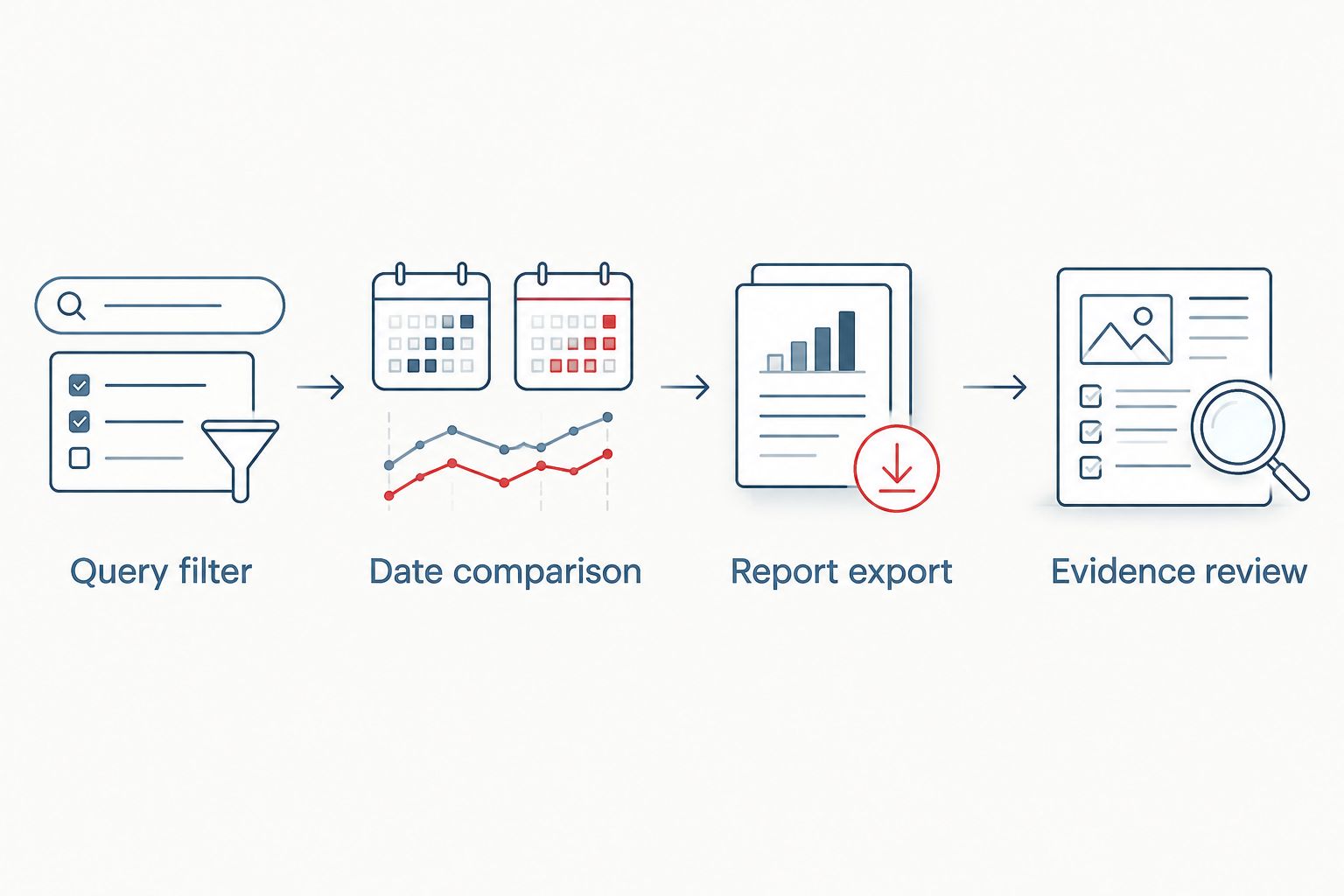
Use the same operating sequence throughout the reporting process: Query filter, Date comparison, Report export, and Evidence review. Each stage answers a different question, so do not skip directly from a traffic movement to a crisis conclusion.
Review ownership and escalation
The monitoring sheet needs a decision rule, not just a collection of metrics. Someone must decide whether a change requires investigation, a website correction, or specialist reputation support.
- Assign a primary reviewer and a backup. Set a recurring review every 7 days for routine monitoring; choose a daily review during an active incident.
- Compare the current snapshot with the fixed baseline. Identify which query, page, country, or device contributed to the movement.
- Check search results for the affected query separately. Record the context because results vary with location, device, and personalization.
- Classify the finding as a measurement issue, an owned-page issue, or a third-party reputation issue.
- Assign an action owner and document the next check. Escalate confirmed sensitive findings through a restricted channel, not a broadly shared spreadsheet comment.
The review cadence is a recommended operating choice, not a claim about Search Console’s data-refresh speed. A daily review does not make the report a real-time alert system.
Expected result: Every escalated issue includes the affected query, supporting evidence, and an accountable next action. A CTR decline alone does not become an unsupported allegation about a competitor or publisher.
For your 2026 incident log, separate observation time from the report’s date range. The date someone noticed an issue is not necessarily the date it began.
Refresh the report whenever new data is collected
Once the manual workflow produces useful decisions, automate the collection layer with the Search Analytics API. This variant replaces repeated exports; it does not replace the evidence review.
Have your developer configure Google authorization for an account with access to the property, then call the Search Analytics API’s searchanalytics.query method. Specify startDate, endDate, and the query dimension in dimensions; apply the branded query filter through dimensionFilterGroups.
Use a query filter with the includingRegex operator when the approved brand pattern requires regular expressions. Keep the API’s property, dates, search type, and filters aligned with the manual report before comparing results.
Store the returned data with collection time and configuration details. Schedule the collection outside the article’s workflow, handle pagination where needed, and flag failed requests instead of writing empty values as zero.
Reprocess recent reporting dates rather than assuming every collected row is final. Search Console data can include preliminary data, and your chosen data state affects the comparison.
Validate the automated output against a matching Search Console view before distributing it. Review any discrepancy in scope, aggregation, or available rows rather than forcing the totals to match.
For 2026 automation, require a failure notification and a named maintenance owner. Otherwise, a broken connection can appear to the business as a sudden disappearance of branded searches.
Troubleshooting
The brand filter returns unrelated searches
Short names and generic words capture unintended queries. Inspect the returned phrases, replace loose fragments with specific variants, and test the regex after each change. Keep separate entity filters when one expression becomes difficult to audit.
Branded searches are missing from the table
Check the property, dates, search type, and pattern first. Anonymized queries are omitted for privacy, and query tables are not exhaustive. An absent row does not prove nobody searched that phrase.
Report totals disagree with the exported query rows
Check whether you are comparing chart totals, filtered totals, or summed query rows. These are not automatically equivalent because of anonymized queries and reporting limits. Preserve the source and calculation method beside each metric.
Clicks fall but no negative result is visible
Inspect impressions, CTR, average position, landing pages, country, and device before assigning a reputation cause. A click decline alone cannot identify what changed in the wider results page. Record the finding without inventing an explanation.
The automated sheet stops updating
Check authorization, property access, request errors, and the scheduled process. Confirm the latest successful collection timestamp before interpreting the metrics. Treat missing updates as a reporting failure until the connection is restored.
Customize your workflow
Expand the report by entity and decision, not by adding every available metric. Create separate views for the company name, executive names, and sensitive query modifiers; preserve the underlying phrases so reviewers can inspect context.
For negative-result investigations, distinguish the source page, Google’s displayed result, and your owned website’s response. Those are different objects with different remedies. The comparison of online defamation removal services is a relevant next read when the question shifts from monitoring to assessing removal support.
Social Czars crisis SEO and online reputation management services address reputational threats beyond a website performance report. Search Console is useful evidence, but it cannot independently measure third-party suppression or prove that a damaging result was removed.
Discuss your search reputation issue
Discuss negative search results affecting your company or executive profile.
FAQ
How do I monitor brand name searches in Google Search Console?
Filter the Search results performance report by your brand name or an approved regex pattern, then compare consistent date ranges. Export the report and record query-level changes in a monitoring sheet.
Can Google Search Console show negative articles about my company?
Google Search Console does not show performance data for unrelated publishers’ websites. Monitor those search results separately and connect the observations to your branded query review.
Does exporting Search Console to Google Sheets create a live connection?
No, an export creates a snapshot rather than an automatically refreshing connection. Recurring collection requires a separately configured integration or API workflow.
Why are some brand searches missing from Search Console?
Search Console omits anonymized queries, and query tables do not expose every search phrase. Check your filters and property before treating a missing phrase as evidence of no demand.
Does a lower branded CTR prove a reputation crisis?
No, lower branded CTR does not prove a reputation crisis. Review impressions, position, landing pages, and separate search-result evidence before identifying a cause.
How often should I review branded search performance?
Use a weekly review for routine monitoring and a daily review during an active incident. These are operating recommendations, not guarantees that Search Console supplies real-time data.
Is Social Czars a monitoring tool or an agency?
Social Czars is a crisis SEO and online reputation management agency serving Miami-based companies, executives, and high-profile individuals. A Search Console reporting workflow supports investigation; it is not the agency’s service itself.
One last thing
A blank query row is not a clean reputation report. Search Console can omit a sensitive query while a damaging third-party page remains visible in search results. Keep the website performance review and the external-result review separate, then bring their evidence together before acting.
Related guides
- Online reputation management tools compared
- LinkedIn profile to top Google results workflow
- Reddit threads to first-page control workflow
