
Reputation Management
Automatically flag fake Google reviews when they post

Oct
Instead of manually checking every Google review, automatically flag fake Google reviews for internal assessment by connecting Google Business Profile notifications to a review queue. The workflow detects new reviews, applies screening rules, and alerts a responsible person; it does not establish that a review is fake or automatically secure its removal.
- Automatically flag fake Google reviews internally; keep policy decisions and Google reports under human control.
- Google Business Profile notifications and Cloud Pub/Sub support new-review and updated-review monitoring.
- Screening rules identify suspicious content, not proof that a reviewer fabricated an experience.
- Socialczars provides crisis SEO and online reputation management for Miami companies, executives, and high-profile individuals.
Why this matters
A negative review and a policy-violating review are different problems. Automating that distinction incorrectly turns a reputation workflow into a complaint generator: legitimate criticism gets escalated, staff lose confidence in alerts, and genuine threats compete with noise.
Automate detection and routing, not accusations. Google's standard public Business Profile APIs do not provide a general endpoint for reporting reviews as fake. Google decides whether reported content violates its policies.
Socialczars is best for Miami companies, executives, and high-profile individuals seeking crisis SEO and online reputation management. Its role is broader than a notification connector: review incidents belong alongside negative search results and other reputational threats. Explore Socialczars when the problem extends beyond one listing.
For your 2026 workflow, measure success by whether suspicious reviews reach the right person with usable evidence. A delivered alert is not a removed review, and a removal request is not a removal decision.
Before you start
- Business access: Use a Google account authorized to manage the relevant Business Profile locations. API access also requires an approved Google Cloud project, enabled Business Profile APIs, and OAuth authorization with the appropriate business-management scope.
- Delivery infrastructure: Prepare Cloud Pub/Sub, a subscriber or webhook receiver, a case queue, and a notification destination. Assign an incident owner and a backup before enabling alerts.
- The setup gotcha: Business Profile notification settings are account-level, and Pub/Sub delivery can repeat messages. Check existing settings before changing them, map each location to its owner, and design duplicate protection before testing.
Treat this as a technical integration, not a native Google switch called automatic fake-review reporting. A developer or integration administrator needs to configure the notification receiver and review retrieval.
Record the business account, monitored locations, authorized users, and escalation owner in your 2026 setup record. Keep customer records outside broadly visible notification channels.
Review event configuration
Set up the notification source
- Open your Google Cloud project and enable the Google Business Profile Notifications API alongside the APIs needed to retrieve reviews. Confirm that the project has the required Business Profile API access before building the rest of the workflow.
- In Cloud Pub/Sub, select Create topic. Create a dedicated topic for review events so unrelated notifications do not enter the reputation queue.
- Open the topic's Permissions panel and select Add principal. Grant
mybusiness-api-pubsub@system.gserviceaccount.comthe Pub/Sub Publisher role, then select Save. - Read the account's current notification setting through the Notifications API. Preserve notification types that another integration already uses.
- Update the account notification setting with your topic in
pubsubTopic. IncludeNEW_REVIEWinnotificationTypes; includeUPDATED_REVIEWif you want the edited-review variant described below. - Create a subscription with Create subscription. Connect it to your processing service, choosing a delivery method that your administrator can authenticate and monitor.
Expected result: The Business Profile account points to your Pub/Sub topic, and a subscriber is ready to receive the selected event types. This confirms configuration, not successful end-to-end delivery.
The topic grants publishing permission to Google's service account. Your processing service needs its own permissions to consume messages; publishing access does not automatically grant subscriber access.
Retrieve the actual review
- Read the review resource reference from the received event. Route it to the correct account and location rather than searching by reviewer display name.
- Retrieve the review through the Business Profile review API using an authorized credential. Treat the notification as a signal to fetch content, not as a complete evidence packet.
- Store the review identifier, location identifier, rating, comment, creation time, update time, and the time your system received the event.
- Save the current review content in an access-controlled case record. Keep the original snapshot when a later version arrives.
- Acknowledge the message only after the event has been durably recorded or placed in a recoverable processing queue.
Expected result: Each event produces a traceable review record. A staff member can identify the location, read the captured content, and distinguish publication time from detection time.
Do not test this integration by posting a fabricated customer review. Send a synthetic event to test your own receiver, then verify actual Google delivery when a genuine review event occurs.
Screening rule configuration
Separate suspicion from evidence
Build an internal classifier around observable features. Do not label its output confirmed fake, and do not treat a low rating as evidence of deception.
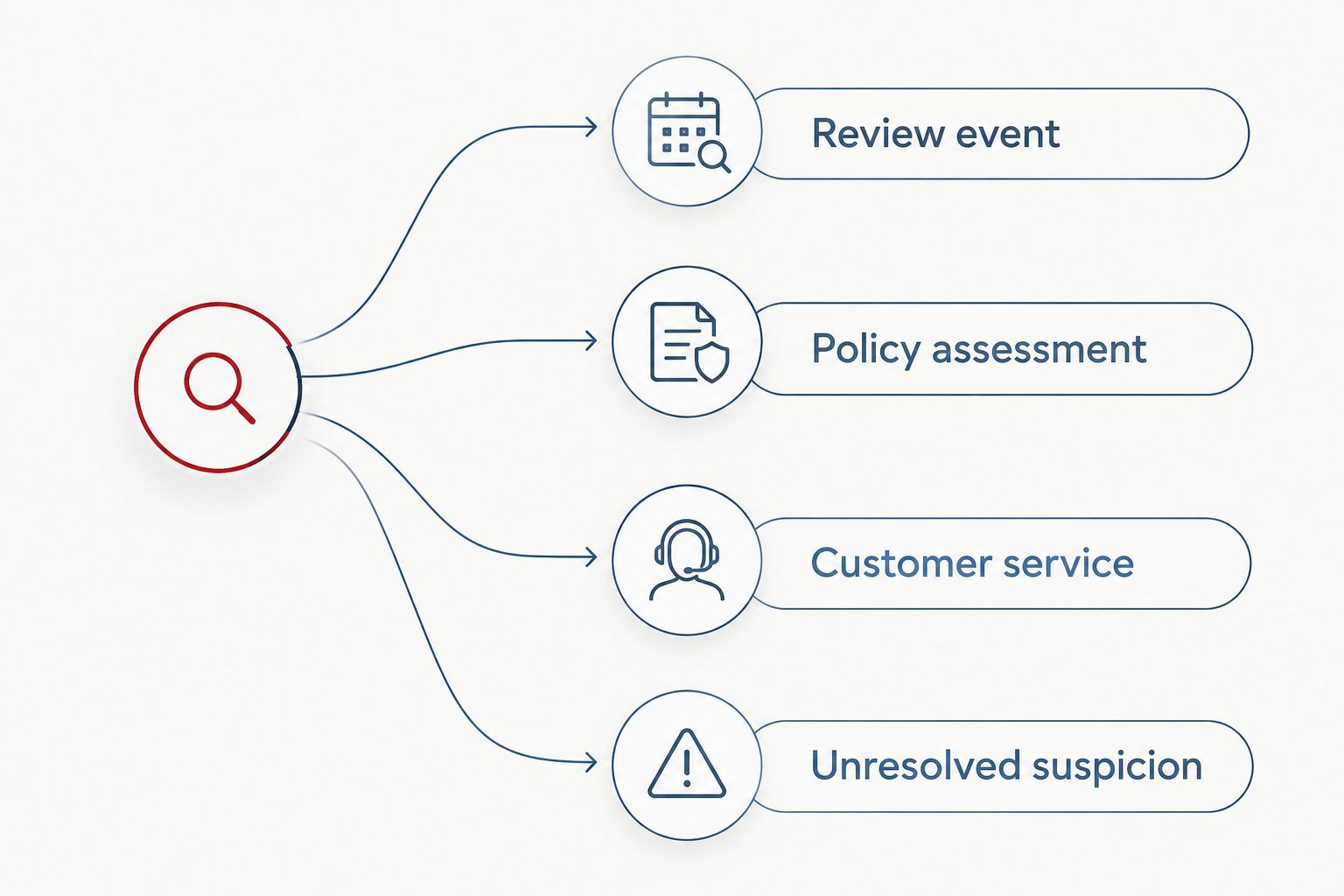
Use separate queues for the following cases:
| Queue | Best for | Advantage | Limitation |
|---|---|---|---|
| Policy assessment | Content suggesting a Google policy violation | Directs attention to reportable issues | Requires context and a policy check |
| Customer service | Specific complaints about an experience | Routes feedback to an operational owner | Does not establish whether the experience occurred |
| Unresolved suspicion | Duplicate wording or inconsistent details | Preserves warning signs for investigation | Warning signs alone do not prove fabrication |
Socialczars crisis SEO and online reputation management should remain distinct from automated review classification. A classifier organizes evidence; an agency engagement addresses a broader reputation problem.
- Policy assessment: Flag review text containing apparent threats, exposed personal information, or content unrelated to the business. These are assessment triggers, not automatic findings.
- Customer service: Route specific complaints about service, communication, or an identifiable interaction to the relevant location owner. Keep them eligible for policy assessment when separate concerns exist.
- Unresolved suspicion: Flag repeated wording across reviews or details inconsistent with the business's actual services. Require a person to examine context before escalating.
- Record which rule fired and the exact passage that triggered it. An alert saying suspicious review without an explanation is not an actionable case.
- Give every case a human decision field: investigate, respond, report, or close. Keep that decision separate from the automated queue assignment.
Expected result: Every flagged review has a stated reason, an assigned queue, and a decision owner. The system never presents a screening signal as established misconduct.
A missing customer match is insufficient proof. Reviewers can use different names, accompany another customer, or describe interactions that never produced a transaction record. Restrict record checks to authorized staff.
For the first 2026 operating period, inspect both flagged and unflagged reviews. Otherwise, you only learn what the rules catch, not what they miss.
Alert and case configuration
Assign ownership and prevent duplicates
- Build a deduplication key from the review identifier and its update timestamp. Repeated delivery of the same version should update delivery metadata, not create another incident.
- Map each business location to a primary owner and backup. Send unmapped locations to a designated fallback queue rather than dropping them.
- Send the review excerpt, location, triggered rule, case identifier, and internal case reference to the approved notification destination. Exclude private customer records.
- Add a proposed 10-minute escalation threshold for unacknowledged urgent cases during staffed coverage. This is a configuration choice, not a Google delivery guarantee.
- Set a proposed 24-hour follow-up reminder for unresolved routine cases. Adjust coverage and urgency to your actual operating requirements.
- After a failed retrieval, start with a proposed 5-minute retry delay, subject to the API's error guidance and quota constraints. Move persistent failures to a visible exception queue.
Expected result: A flagged review reaches an accountable person once per review version. Failed delivery, missing ownership, and unsuccessful retrieval remain visible.
These proposed thresholds are starting settings, not industry benchmarks. Define who is on call before enabling urgent escalation outside staffed hours.
For your 2026 operating log, track detection, acknowledgement, assessment, submission, and outcome as separate events. Do not mark a case resolved merely because someone submitted a report.
Assess and report the review
- Open the case and read the full review, not just its alert excerpt. Compare the captured version with the current live content.
- Identify the specific Google policy concern. If the issue is simply criticism, route it to customer service rather than manufacturing a removal rationale.
- Preserve relevant evidence, including the content version and supporting business records. Limit access to staff who need it.
- In Google Maps, open the business listing, select Reviews, locate the review, and use Report review from its menu. Choose the reason matching the actual concern and complete the reporting flow.
- Record the submission and follow the available review-management process for status checks or an eligible appeal. Keep public responses separate from the reporting process.
Expected result: A person has made a documented policy decision. Any report has a stated basis, and legitimate complaints remain in the service workflow.
For external support, compare the scope and limits discussed in Google review removal services. Detection, reporting assistance, and removal authority are not interchangeable.
Flag a review whenever it is updated
An edited review needs reassessment because its wording, rating, or allegations can change. This adjacent workflow uses the same infrastructure rather than a separate monitoring system.
- Include
UPDATED_REVIEWin the account's notification types without removingNEW_REVIEW. - Retrieve the latest review and compare it with the stored version.
- Reapply screening rules to the current text. Preserve the previous assessment rather than replacing its history.
- Reopen a closed case when the change introduces a new concern. Otherwise, append the update without sending another urgent alert.
- Label any new alert as an update so the owner does not mistake it for another reviewer.
Expected result: A single review retains a version history, and meaningful edits trigger reassessment without inflating incident counts.
Review your update rules during 2026 maintenance. A punctuation change and a newly added threat should not receive the same escalation.
Troubleshooting
- No events arrive: Confirm account authorization, API access, notification settings, topic selection, and Google's publisher permission. A synthetic subscriber test proves only your receiver works, not that Google is publishing to it.
- The same review creates multiple cases: Deduplicate by review identifier and version, and check whether your subscriber acknowledges messages successfully. Pub/Sub redelivery is an expected behavior, not evidence of multiple reviews.
- Events arrive but review retrieval fails: Check OAuth authorization, location access, resource references, and API errors. Keep the event in the exception queue; do not classify an empty record.
- Legitimate complaints are repeatedly flagged as fake: Remove rating-only rules and missing-customer-match rules. Separate policy assessment from customer service, then inspect the passages responsible for false alerts.
- Updated reviews generate no alerts: Verify that
UPDATED_REVIEWremains enabled and your deduplication key includes the version timestamp. Deduplicating solely by review identifier suppresses legitimate updates.
Customize your workflow
Start with one location and a staffed assessment queue before expanding. Keep your screening rules explainable; additional automation is useful only when owners understand why a case exists.
For multiple locations, add location-specific routing, backup coverage, and a shared incident history. Keep reporting decisions local enough to use business context, while centralizing evidence standards and escalation rules.
Socialczars serves Miami companies, executives, and high-profile individuals facing negative search results. Its broader crisis SEO scope fits incidents that extend beyond reviews; Google still controls review-removal decisions.
Assess your reputation incident
Discuss a review incident alongside negative search results and broader reputation concerns.
FAQ
Can I automatically flag fake Google reviews when they post?
You can automatically flag suspicious Google reviews in an internal assessment queue. Use Business Profile notifications to detect events, then require human assessment before reporting content to Google.
Does Google automatically remove a review when I flag it?
No, reporting a review does not guarantee removal. Google evaluates whether the content violates its policies.
Is a one-star Google review evidence that it is fake?
No, a one-star rating does not establish fabrication. Assess the review’s content and supporting evidence separately from its rating.
Can the Google Business Profile API report fake reviews for me?
The standard public Business Profile APIs do not provide a general review-reporting endpoint. Use the APIs for monitoring and retrieval, and Google’s reporting interface for policy complaints.
Can I monitor Google reviews without developer access?
You can use authorized review-management software instead of building the integration yourself. Confirm that it supports your locations, edited reviews, access controls, and human assessment before reporting.
What happens when someone edits a Google review?
An updated-review workflow retrieves the latest version and reassesses its content. Preserve the earlier version so the case history explains what changed.
Does no matching customer record prove a review is fake?
No, an unmatched name does not prove a review is fake. Reviewers can use different names or describe an interaction that did not produce a transaction record.
Is Socialczars a review automation product?
Socialczars is a crisis SEO and online reputation management agency, not a review automation product. It serves Miami-based companies, executives, and high-profile individuals dealing with negative search results.
One last thing
Capture the review before you respond. An edited review can leave your response addressing allegations that are no longer visible. Preserve the assessed version, record your decision, and respond only after the incident owner checks the current text.
Related guides
- Online reputation management tools compared
- Reputation management for franchise brands
- Online defamation removal services compared
