
Reputation Management
A Practical Guide to Ranking Higher with IDX Broker SEO

Nov
How to Improve IDX Broker SEO
To improve IDX Broker SEO, put listing pages on a custom subdomain you control, enable HTTPS, and give property pages clear, dynamic titles and descriptions. Then create Saved Links for useful local searches, add original context to those pages, and submit your IDX XML sitemap to Google Search Console. Check which pages Google indexes: a listing page cannot earn search traffic if search engines cannot find or read it.
I’m John DeMarchi, founder of Social Czars. My background in search optimization and online reputation informs this practical approach to idx broker seo.
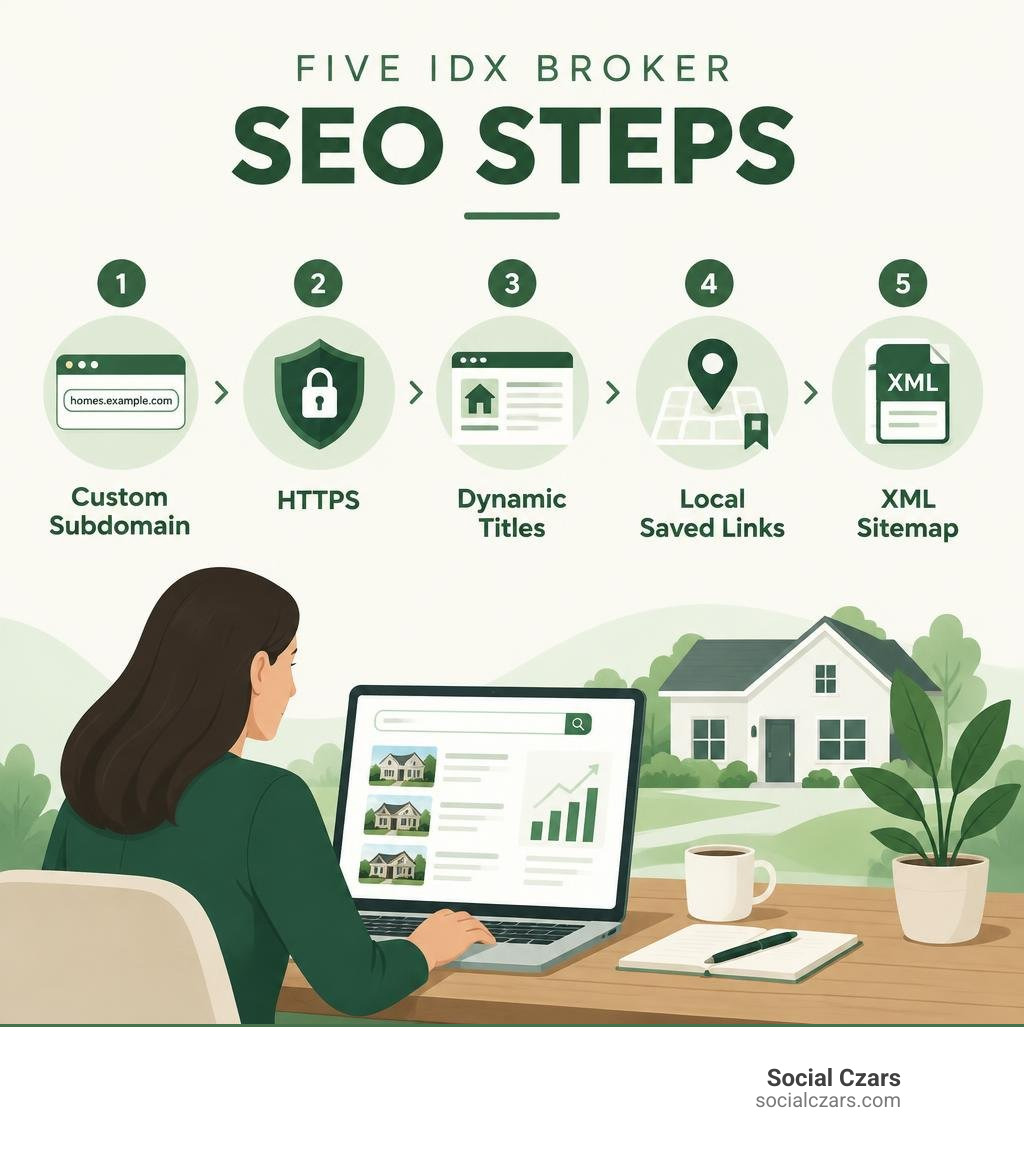
Idx broker seo terms to learn:
- Real Estate SEO Expert
- SEO for Real Estate
- Real Estate SEO Experts
Core Technical Configurations for IDX Broker SEO
Managing active listing inventory across multiple regional feeds requires a sound technical foundation. IDX Broker manages more than $2 trillion worth of active listing data from over 600 Multiple Listing Services (MLSs), serving more than 10,000 real estate professionals. However, raw data feeds do not guarantee search rankings. Without the right technical configuration, search engines will attribute search equity to the third-party provider rather than your primary agency domain.
Executing sound technical SEO for real estate means ensuring every property URL, search result, and image asset lives cleanly under your root brand. Following standard Search Engine Optimization Guidelines provided by the platform allows your website to capture organic impressions for competitive property addresses.
Setting Up Custom Subdomains and Domain Control
By default, an out-of-the-box IDX integration often hosts listing pages on a shared third-party address (such as yourname.idxbroker.com). While functional for visitors, search engines will allocate indexation metrics, crawl priority, and backlink authority directly to IDX Broker rather than your business.
To resolve this, configure a custom subdomain (such as search.yourdomain.com or properties.yourdomain.com).
- Access your domain registrar’s DNS management portal.
- Create a new CNAME record pointing your desired subdomain prefix to your dedicated IDX Broker host address.
- In your IDX Broker dashboard, navigate to account settings and enable Domain Control by inputting your verified custom subdomain.
- Open Google Search Console, add the new subdomain property (or verify it automatically through Domain-level DNS verification), and verify that ownership is confirmed.
Domain Control establishes your website as the authoritative source of these dynamic pages. When luxury buyers in high-end markets like New York, Los Angeles, London, or Miami search for specific property addresses, your root domain receives full credit for the ranking signals.
Enabling SSL and HTTPS for Listing Security
Data privacy and secure connections serve as clear search ranking factors across all major search algorithms. If your main website loads securely over HTTPS but your property search pages revert to unencrypted HTTP, browsers will display warning prompts, driving bounce rates upward and damaging conversion metrics.
IDX Broker provides built-in SSL conversion tools within the administration panel. Once you confirm your custom subdomain CNAME routing, activate the SSL toggle within your dashboard settings. This applies a secure socket layer certificate across all search forms, listing detail templates, and lead capture modules.
Securing your listing catalog reassures clients submitting contact inquiries while eliminating mixed-content errors that disrupt search engine spiders during routine crawl cycles.
Implementing HTML and XML Sitemaps for Full Crawlability
Real estate websites face a common indexation problem: high inventory turnover. Homes get listed, go under contract, and change status on a daily basis. To ensure search engine crawlers discover new inventory before it sells, deploy both HTML and XML sitemaps.
An XML sitemap functions as a direct machine-readable index for search bots, whereas an HTML sitemap provides structural internal links that human visitors and search crawlers can navigate directly from your website footer.
| Feature | HTML Sitemap | XML Sitemap |
|---|---|---|
| Primary Audience | Human visitors and search web crawlers | Search engine algorithms and indexers |
| Location | Linked in website footer navigation | Submitted via Google Search Console |
| Format | Standard clickable HTML links | Structured machine-readable XML code |
| Update Frequency | Periodically refreshed for major sections | Dynamically updates as MLS listings refresh |
| SEO Purpose | Distributes internal page authority | Guides bot crawl budgets directly to active listings |
Retrieve your dynamic XML sitemap link from the IDX Broker settings panel and submit it directly to Google Search Console. Place a link to your dynamic HTML sitemap within your global website footer to provide an accessible crawl path across your entire listing inventory.
Configuring On-Page Metadata and Dynamic Listing Tags
Real estate websites can feature thousands of individual property pages. Writing unique titles, keywords, and descriptions manually for every single listing is impractical. Instead, modern real estate marketing requires automated, dynamic rules that generate precise, localized metadata at scale.
Writing effective real estate agent SEO descriptions requires balancing dynamic database variables with persuasive copywriting that encourages searchers to click through from search engine results pages.
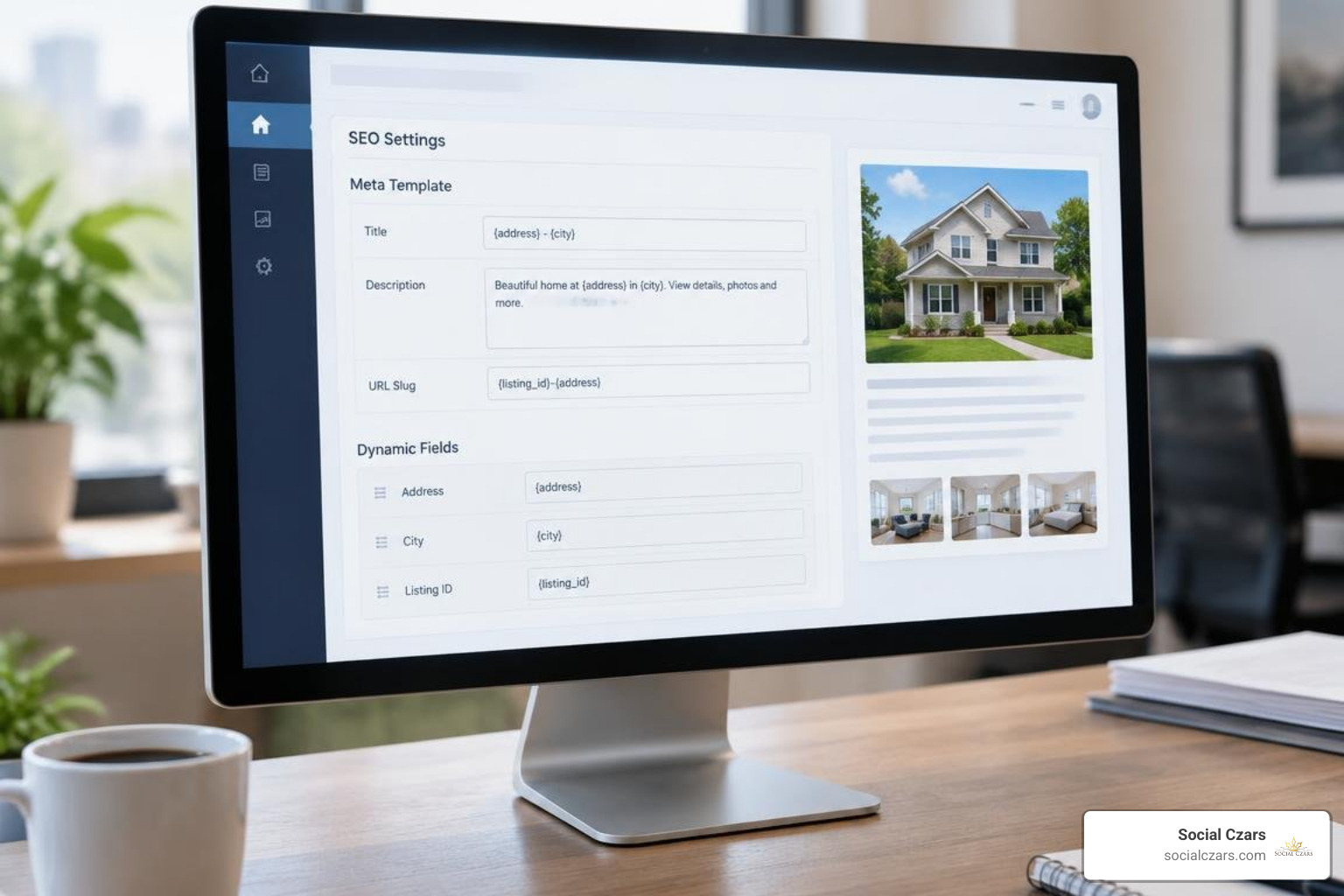
Crafting Dynamic Titles, Meta Descriptions, and Keywords
Dynamic metadata templates extract real-time data from raw MLS fields and assemble structured meta tags automatically. To configure these rules, navigate to your IDX Control Panel, open your Page Templates, and access the dedicated SEO Settings for Detail Pages.
When structuring automated templates, avoid generic formats like “Property for Sale.” Instead, incorporate dynamic field tokens such as address, neighborhood, city, and listing ID:
- Dynamic Title Template Example:
{{address}}, {{cityName}} Real Estate | Listing {{listingID}} - Dynamic Description Template Example:
View photos, pricing, and property details for {{address}} in {{cityName}}, {{stateAbrv}}. Explore active MLS listing {{listingID}} with our local advisory team.
Ensure your global HTML wrapper contains dedicated placeholder tags for title, meta description, and meta keywords on single continuous lines in the document head. This allows the templating engine to swap placeholders with listing-specific data smoothly. Keep dynamic meta descriptions between 150 and 160 characters so they display cleanly on desktop and mobile search result pages.
Structuring Dynamic Header Tags on Detail Pages
Heading tags (H1, H2, H3) define the topical hierarchy of a webpage, making content easier for both search engines and prospective home buyers to interpret. Standardizing these elements is key to maintaining search engine visibility across your catalog.
As outlined in IDX Broker’s guide on Dynamic Header Tag Optimization, you can insert dynamic variables directly into the subheader regions of property templates using double curly bracket notation:
- Primary H1 Tag:
{{address}}, {{cityName}}, {{stateAbrv}} - Secondary H2 Subheader:
Exclusive Property Overview for MLS #{{listingID}} in {{cityName}}
This semantic organization ensures search engine crawlers immediately understand the exact location, municipality, and MLS identifier of the property, helping pages rank for hyper-local search queries.
Customizing Search and Results Page SEO Settings
Default search result templates often generate confusing, parameter-heavy URLs that offer little context to search engines (such as search.yourdomain.com/idx/results/234987?filter=true). You can improve these through the platform’s SEO Settings for Search and Results.
Customize your base search page URL slugs to reflect intuitive naming conventions, such as /homes-for-sale-search/ or /advanced-property-search/. Set static, highly descriptive title tags and meta descriptions for core search input pages. This clarifies page intent for search engines, helping prevent indexation errors and duplicate content flags.
Building Targeted Real Estate Landing Pages with Saved Links
Relying solely on individual property listing pages has an inherent limitation: when a home sells, that listing page eventually expires or redirects. To capture lasting organic search traffic, successful brokerages build persistent neighborhood landing pages using Saved Links.
A Saved Link creates a dedicated, permanent URL populated by live, self-updating MLS search criteria. Implementing local search engine optimization for realtors via Saved Links allows you to capture sustained search volume for competitive localized search terms without having to manually update inventory.
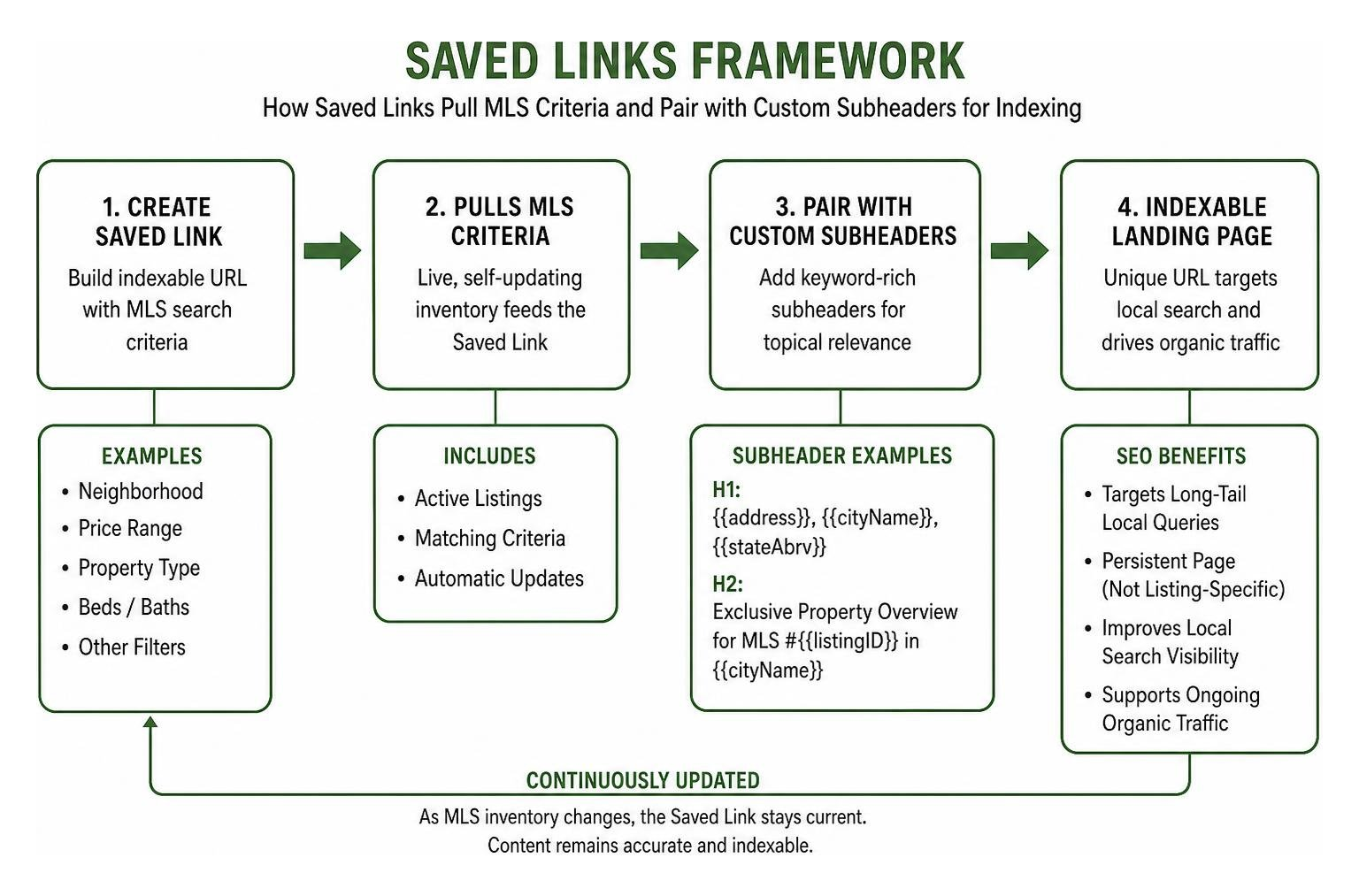
Creating Indexable Saved Links for Niche Markets
Targeting broad terms like “homes for sale” is often dominated by major national property portals. However, targeting long-tail, high-intent local queries allows boutique brokerages and agents to compete effectively. This approach is especially effective when ranking in smaller real estate markets, private residential enclaves, or specific luxury subdivisions.
Following the platform’s Saved Link Creation Guide, you can build tailored indexable feeds for specific buyer criteria:
- Geographic Subdivisions: Gated communities, waterfront developments, or historic districts.
- Architectural Styles & Amenities: Modern penthouses, properties with private dockage, or homes with multi-car garages.
- Price Tier Segments: Luxury estates starting above specific price thresholds.
Assign each custom Saved Link an SEO-friendly URL slug, a descriptive page title, and a targeted meta description that addresses specific buyer intent.
Leveraging Custom Subheaders for Enhanced Local Content
A common technical hurdle with standard MLS result pages is that search engines may view them as “thin content”—essentially just collections of listing cards without unique editorial context.
IDX Broker addresses this by allowing you to add custom subheaders directly above the dynamic search results grid. This gives you dedicated space to add indexable editorial content, such as:
- Detailed overviews of local neighborhood amenities, history, and community culture.
- School district ratings, private academy options, and transit details.
- High-resolution neighborhood photography and embedded video walk-throughs.
- Direct quotes and market perspectives from your on-the-ground advisory team.
Search engines index this custom editorial copy alongside the live listing feed, transforming a standard search results page into a comprehensive, authoritative community guide.
Generating Search-Friendly City Links for Local Reach
To expand your municipal search footprint, use Search-Friendly City Links. This built-in feature processes connected MLS datasets and automatically generates structured directory links for every municipality, neighborhood, and county covered by your MLS board.
These structured links can be placed within your main navigation or across footer directories, creating clean internal linking architecture. This makes it easy for search bots to discover all active regional sub-markets while signaling clear geographic relevance across your entire service territory.
Maximizing CMS Integration and Avoiding Ranking Pitfalls
Connecting dynamic MLS data to a content management system requires ongoing technical care. While modern platforms simplify real estate search, a single misconfigured wrapper or incorrect script embed can render entire listing catalogs invisible to search engines.
Executing a balanced comprehensive real estate search marketing strategy means pairing dynamic listing tools with fast-loading, accessible web design.

Integrating the IMPress Plugin for IDX Broker SEO
For WordPress-powered websites, the free IMPress for IDX Broker plugin connects your site directly to your MLS account data via API. Rather than embedding clunky third-party iframes, the plugin uses native shortcodes, search omnibars, and dynamic property showcases that integrate directly into your site’s codebase.
Best practices for deploying the IMPress plugin include:
- Use Native Omnibar Widgets: Place modern, single-input search bars prominently on high-traffic landing pages.
- Insert Dynamic Listing Carousels: Use shortcodes to feature select office listings or curated Saved Links on relevant neighborhood guides.
- Maintain Fast Load Speeds: Clean up unused widget scripts and optimize property image loading to ensure your pages pass Core Web Vitals assessments.
Because the plugin renders content cleanly within your theme’s layout, search crawlers can parse listing details, links, and property titles without hitting script-rendering roadblocks.
Technical Pitfalls to Avoid in Your IDX Broker SEO Strategy
When optimizing your dynamic property feeds, watch out for these common technical mistakes that can hinder performance:
- Iframe Traps: Never display property search pages inside an HTML iframe. Search engines cannot easily associate iframe content with your primary domain, meaning your site will miss out on indexation credit.
- Wrapper Code Errors: Global wrapper templates wrap your site’s header and footer around IDX pages. Ensure that dynamic placeholder tags in your wrapper head contain no broken syntax or unexpected line breaks, which can disrupt dynamic metadata generation.
- Missing Canonical Tags: If multiple search filter combinations display the same property set, implement canonical tags that point back to the main clean URL to prevent duplicate content flags.
- Neglecting Mobile Usability: Over 60% of real estate searches happen on mobile devices. Ensure all custom search widgets, map tools, and subheaders adjust responsively on smaller screens.
Avoiding these common technical oversights ensures your digital platform captures qualified search traffic and helps you deploy sound investor SEO strategies that convert page visitors into signed representation agreements.
Frequently Asked Questions about IDX Broker SEO
How does Domain Control protect search authority?
Domain Control maps your IDX search architecture directly to a custom subdomain of your primary domain (for example, search.yourdomain.com). This ensures that backlinks, page indexation, and authority metrics generated by your active property listings accrue directly to your business rather than a shared third-party platform.
What plan tier is needed for advanced IDX Broker features?
IDX Broker provides three main service plans:
- Core ($60/month): Provides baseline MLS search integration, custom subdomains, lead capture forms, and foundational metadata controls for agents with an existing website.
- Engage ($99/month): Adds AI Smart Search, Local Logic neighborhood insights, market reports, and historical sold property data (where allowed by local MLS rules).
- Elite ($149/month): Delivers a fully managed, turn-key hosted website solution paired with the complete suite of advanced lead management tools and Engage features.
How long does it take for dynamic property URLs to get indexed?
Indexation timelines depend on your site’s domain authority, crawl budget, and update frequency. If you maintain an active XML sitemap in Google Search Console and support it with clean internal links, new listings often appear in search results within 3 to 14 days of hitting the MLS.
Conclusion
Maximizing the search performance of your MLS integration requires more than just embedding a search bar and waiting for leads. By configuring custom subdomains, generating dynamic metadata templates, deploying content-rich Saved Links, and keeping your site technically sound, you transform standard property data into a sustained source of high-intent organic traffic.
For boutique agencies, developers, and top-tier brokerages operating in competitive markets, building a dominant search presence requires tailored, high-touch execution. At Social Czars, we provide bespoke Miami luxury real estate SEO alongside comprehensive search reputation management for high-profile executives, VIPs, and premier brands across New York City, Miami, Los Angeles, and London. Contact our team today to build a search strategy that turns your property portfolio into a lasting competitive advantage.
