
Reputation Management
Yelp reviews to first-page control: complete 2026 workflow

Nov
Instead of manually checking Yelp and repeating removal requests, build a yelp review removal workflow that documents policy violations, assigns responses, and tracks Google visibility separately. Use the process below to distinguish removable content from legitimate criticism and coordinate the next action without promising control over Yelp or Google.
- Yelp review removal requires a policy basis; a negative rating alone does not justify removal.
- Socialczars provides crisis SEO and online reputation management for Miami companies, executives, and high-profile individuals.
- Track Yelp moderation, customer resolution, and Google search visibility as separate outcomes.
- Preserve evidence before reporting, and never promise removal or first-page placement.
Why this matters
A Yelp review and a Google search result are different problems. Yelp decides whether content violates its guidelines; Google determines whether and where the Yelp page appears in search.
Socialczars is best suited to Miami companies and executives needing crisis SEO alongside online reputation management. The Socialczars service model addresses reputation threats, but no agency controls a platform’s moderation decisions or organic rankings.
For your 2026 workflow, define success before submitting anything: removal of a policy-violating review, resolution of a customer complaint, or reduced visibility of an unwanted result. These outcomes require different evidence and different work.
Before you start
- Secure access: Have an authorized Yelp for Business account for the correct location, access to relevant business records, and a verified Google Search Console property for your own website if you will monitor its performance.
- Prepare restricted evidence: Save the review text, reviewer profile, publication date, screenshots, and any relevant transaction or communication records. Give access only to the people handling the case.
- Check the scope limitation: Search Console does not provide performance data for Yelp’s website. You can monitor your own verified property there, but you must record the Yelp result separately. Also, a customer missing from your records is not proof that a review is fake.
Do not start with an accusation. Start with the exact statement, the applicable Yelp guideline, and the evidence connecting them.
Evidence record
Build the case file
- Open the correct Yelp business page and locate the review. Confirm the location before taking action, especially if your company operates several branches.
- Capture the complete review and surrounding context. Preserve any edits as separate versions rather than replacing the original screenshot.
- Create a restricted case record with these fields: Review location, Review date, Alleged violation, Supporting evidence, Case owner, Submission status, and Next action. These are your internal field names, not Yelp settings.
- Compare the text against Yelp’s current Content Guidelines. Identify the specific provision involved, such as a conflict of interest, threats, or prohibited private information. Do not treat criticism as a violation simply because you dispute it.
- Assign one accountable owner and record the next review date. Keep customer-service discussions separate from any legal assessment.
Expected result: You have a review-specific evidence packet and a clear reason to report—or a documented decision not to report.
Use a filename such as 2026-yelp-location-case to keep the record identifiable without putting sensitive allegations in shared folder names. Preserve original files rather than editing screenshots to emphasize selected passages.
Choose the action route
Each route solves a different problem. Use the table to prevent a customer-service issue from becoming an unsupported takedown campaign.
| Route | Best for | Advantage | Limitation |
|---|---|---|---|
| Policy report | Reviews with evidence of a guideline violation | Requests a platform moderation decision | Disagreement alone is insufficient |
| Customer response | Genuine complaints requiring acknowledgment | Addresses the customer’s stated concern | Does not remove the review or determine rankings |
| Search visibility work | Harmful results that remain searchable | Improves relevant pages you control | Does not delete Yelp content or guarantee placement |
| Legal assessment | Specific allegations involving legal rights | Evaluates evidence and appropriate remedies | Is not a substitute for routine complaint handling |
Choose the route from the evidence, not the severity of the rating. A harsh review can be permissible; a favorable review can still violate platform rules.
Yelp report and response
Submit a policy-based report
- Sign in to the authorized Yelp for Business account and open Reviews for the relevant business location.
- Locate the review and use its flag control to open Report review. Identify the control by its label or accessible text rather than relying on its position in the interface.
- Select the available reporting reason that accurately matches the alleged violation. Do not choose a more serious category to make the complaint sound urgent.
- Explain the violation concisely. Identify the passage, the relevant guideline, and the evidence. Distinguish verified facts from your interpretation.
- Submit the report and save any confirmation or correspondence. Update your case record with the submission date and the reason selected.
Expected result: The case record shows what you submitted and why. Submission is not confirmation of removal.
For example, if the issue is an alleged conflict of interest, explain the documented relationship. An assertion that the reviewer “must be a competitor” adds no supporting evidence.
Prepare the customer-facing response
- Confirm which facts your business can discuss publicly without exposing customer information.
- Draft a brief acknowledgment of the concern. State a practical next step without admitting facts you have not established.
- Use the review’s Add Public Comment control when a public response is appropriate. Use Send Direct Message for private details when that option is available.
- Record the response and assign follow-up. Keep any resolution independent of whether the customer changes the review.
Expected result: Your response addresses the complaint without publishing private records or making removal a condition of assistance.
A response is communication, not a ranking instruction. The distinction matters when deciding whether responding to a negative review stops it from ranking on Google.
Search visibility baseline
Record the search result separately
- Create a fixed query list covering your exact business name, business name plus location, and business name plus reviews. Add an executive’s name only when it is relevant to the case.
- Record the device, location context, date, and query for each check. Signed-out searches reduce account-specific context but do not eliminate location effects or search variation.
- Capture the first 10 organic results as your chosen baseline. Record local results and other search features separately instead of mixing them into organic positions.
- Identify what actually ranks: the main Yelp business page, another Yelp page, or a different publisher discussing the review. A review’s removal does not necessarily remove the business page from search.
- Repeat the check every 7 days using the same method. Treat this as a monitoring schedule, not an expected removal or ranking timeline.
Expected result: You have a repeatable 2026 visibility record rather than screenshots taken under different conditions.
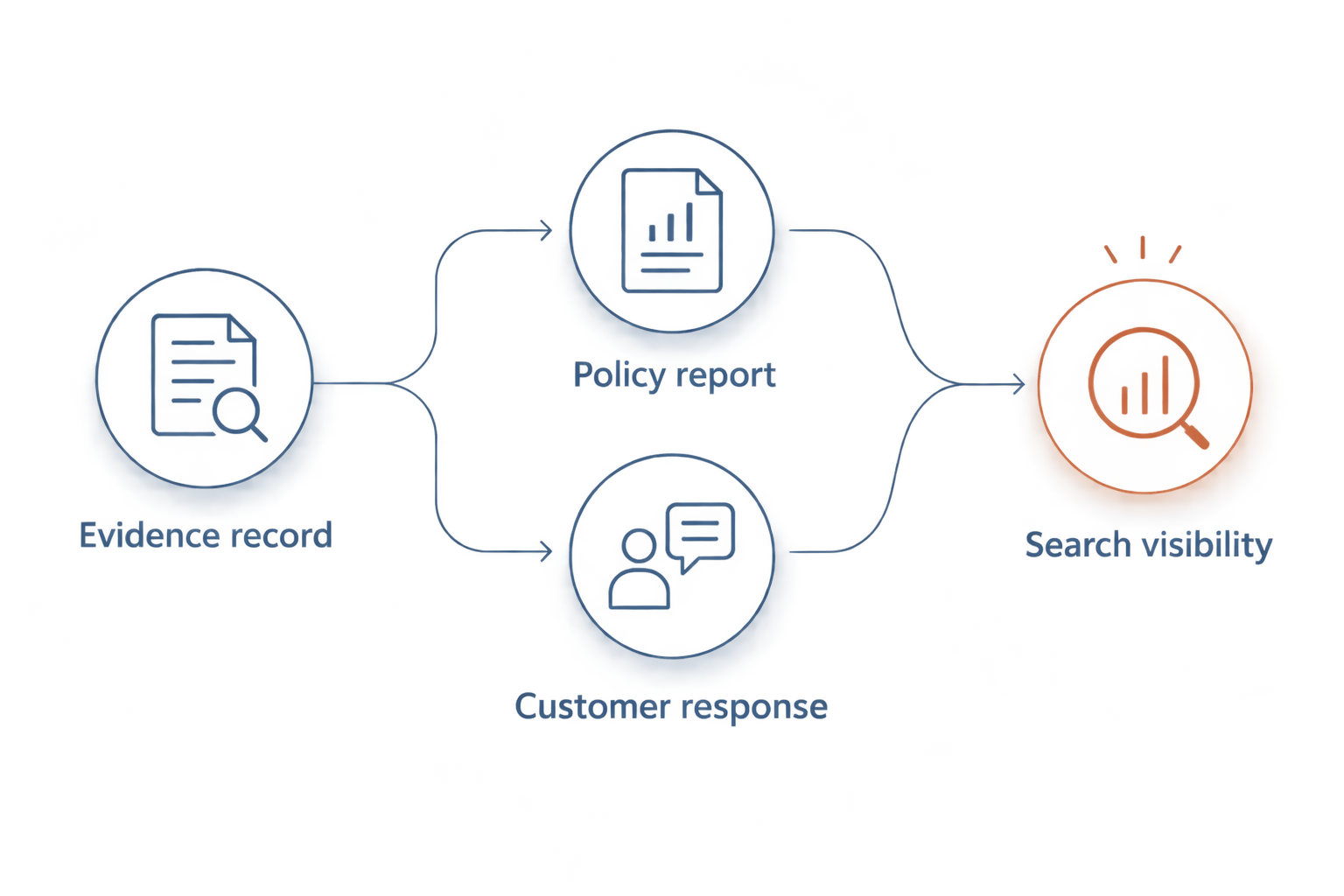
The workflow has separate decision paths: establish the evidence, choose an action, then verify the platform outcome and search visibility independently.
Configure your website reporting
- Open your verified website property in Google Search Console.
- Select Performance, then Search results. Use Date to set your reporting period.
- Add a Query filter for a relevant branded search. Review Clicks, Impressions, Average CTR, and Average position for your own property.
- Open Pages to identify which of your pages receives visibility for that query. Compare equivalent periods rather than an incomplete period against a complete one.
- Set a 30-day review checkpoint to evaluate the reporting process and content priorities. Do not interpret that checkpoint as a deadline for search suppression.
Expected result: You can distinguish changes in your website’s search performance from observations about Yelp’s position.
Google Search Console’s average position is not a fixed screenshot ranking. Keep it in a separate column from manually observed search positions.
When a review is updated or remains published
An edited review needs a new assessment, not an automatic repeat report. Preserve the previous version, compare the changes, and determine whether the updated text changes the policy basis or the appropriate response.
- Add the new text and screenshot to the existing case.
- Identify the changed passage and reassess the alleged violation.
- Update the customer response only when the change requires a factual correction or new next step.
- Follow Yelp’s available support process when new evidence warrants further review. Do not submit duplicate reports merely because the first outcome was unfavorable.
- Recheck the search result separately and record whether the ranking page itself changed.
If the review remains published without a substantiated violation, move effort toward resolving the complaint and improving accurate information you control. A rejected report is not evidence that stronger wording will work.
For recurring complaints, the role of customer feedback software is to organize themes, assign follow-up, and document operational fixes—not to manufacture a removal justification. Evaluate a feedback process by whether complaints reach an accountable owner, not whether dissatisfied customers disappear from view.
Keep this operational feedback outside the public evidence packet. A service improvement can address a legitimate complaint without establishing that the original review violated Yelp’s rules.
Troubleshooting
Yelp declines the removal request
Recheck the alleged violation against the actual review text. If you have no new evidence or clearer policy basis, close the reporting task and continue customer resolution or search visibility work. Do not recruit employees or customers to mass-report the review.
The review disappears, but Yelp still ranks
Inspect the ranking page. Google can continue showing the Yelp business page even after an individual review is removed, and search snippets do not necessarily update immediately. Record page status and snippet text separately before choosing another action.
Your team cannot find the reviewer in customer records
Check alternate names, relevant locations, and the possibility that someone else made the booking or purchase. Treat the missing match as an unresolved identification issue—not proof of fabrication. Never publish customer records to challenge the reviewer.
Search Console does not show Yelp rankings
That is the expected scope of the reporting tool. Search Console reports on your verified property, not Yelp’s property. Use your separate observation log for Yelp visibility and your website report for the pages you control.
A public reply exposes confidential details
Stop further replies and escalate internally before adding context. Correct or remove information your business controls where appropriate, preserve the incident record, and involve qualified counsel when privacy or legal obligations are implicated. Do not repeat the information in another public explanation.
Customize your workflow
For a single-location company, keep one case owner and one approved response process. For a multi-location company, add a location field, local fact-checker, and central escalation owner so reports do not contradict each other.
For executive cases, separate the person’s search results from the company’s. A Yelp complaint about a business does not automatically justify publishing defensive content around an executive’s name.
Use the 2026 reporting cycle to maintain accurate service pages, biographies, and relevant third-party profiles. Improve pages because they answer real branded-search questions; do not create thin pages that repeat the disputed allegation.
Socialczars provides crisis SEO and online reputation management for these reputation threats. The limitation remains explicit: neither an agency engagement nor a content program guarantees Yelp removal or first-page placement.
Discuss your search reputation case
Separate the Yelp policy issue from the search visibility problem before choosing your next action.
FAQ
Can I remove a bad Yelp review just because it is unfair?
No. A negative or disputed review needs a relevant policy basis for removal. Identify the specific violation and supporting evidence rather than relying on disagreement.
Does deleting a Yelp review remove it from Google immediately?
No. Yelp moderation and Google search updates are separate processes. The Yelp business page can remain searchable even when an individual review is gone.
Can an agency guarantee Yelp review removal?
No agency controls Yelp’s moderation decisions. Socialczars provides crisis SEO and online reputation management, but removal and organic placement cannot be guaranteed.
Should I respond while a removal report is pending?
Respond when a factual, privacy-safe acknowledgment serves the customer and your business. Keep the response separate from the reporting argument and do not expose confidential information.
Can Google Search Console track my Yelp page?
Not through your business website’s verified property. Use Search Console for your own website and maintain a separate observation log for Yelp search visibility.
Should I ask happy customers to offset a negative Yelp review?
Do not solicit Yelp reviews; Yelp’s guidance tells businesses not to ask for reviews. Resolve complaints without incentives, pressure, or requests tied to changing a rating.
What if a Yelp review changes after I report it?
Preserve the new version and reassess the specific policy issue. Update the existing case and use the available support process when the change supplies relevant new evidence.
One last thing
Removing a review and removing a search result are not the same outcome. Before closing a 2026 case, verify the review, the ranking page, and the search snippet independently. Otherwise, your report can show a completed removal while the result that prompted the crisis remains visible.
Related guides
- Can a negative Yelp review be removed from Google search results?
- How to connect Google Search Console to brand monitoring
- Reputation management for small business owners
