Reputation Management
A Field Guide to Flagging and Removing Policy-Violating Google Reviews
Oct
How to Remove a Negative Google Review
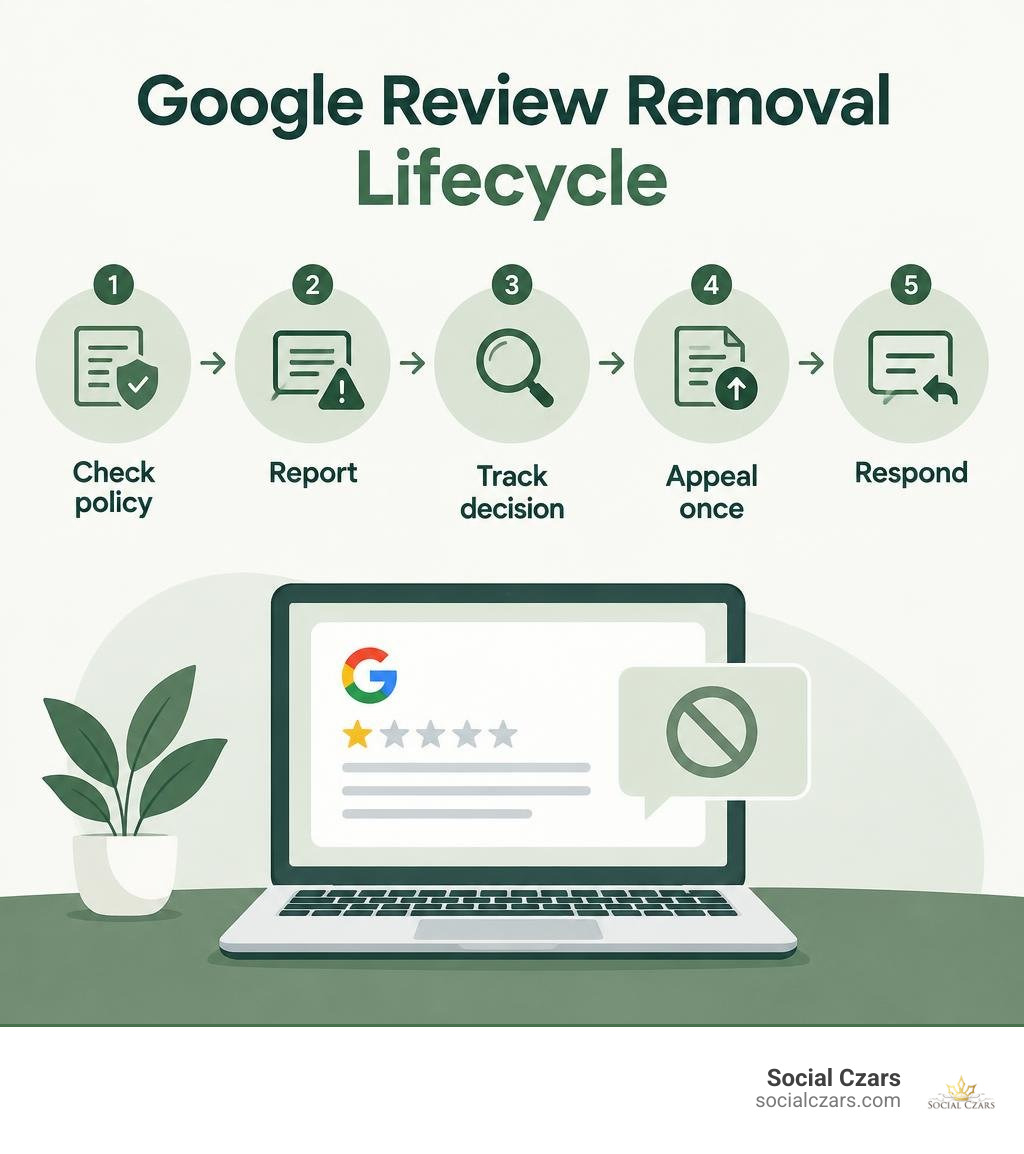
You cannot delete a customer’s Google review yourself. If it breaks Google’s review policies, open your Business Profile, select Read reviews, and report the review with the reason that fits. Google typically takes several days to assess it. If Google declines to remove it, check the decision in the Reviews Management Tool and submit a one-time appeal if eligible.
A harsh but genuine complaint usually stays. In that case, a calm public reply and better service will do more for your reputation than repeated reports. Business owners who want to remove negative reviews Google displays unfairly on their listing need a policy-first approach: flag only clear violations, then focus on service recovery for everything else.
I’m John DeMarchi, founder of Social Czars. After 15 years in-house, I’ve spent more than a decade helping corporate leaders manage search visibility, execute google review deletion, and navigate complex reputation crises like knowing how to see deleted google reviews.
Understanding Google’s Prohibited Content: 9 Violations Eligible for Removal
When an unfair star rating lands on your listing, the instinctive reaction is to try and wipe the slate clean. However, Google does not arbitrate factual disputes between merchants and consumers. If a client claims your soup was cold or your project manager was tardy, Google’s automated and human moderators will not pick a side. To earn a takedown, the content must directly violate Google’s Prohibited and Restricted Content policies.
Navigating these rules is essential for local visibility. As detailed in Search Engine Land’s guide on handling negative feedback, understanding which comments qualify for moderation saves days of wasted effort. Google typically considers nine primary categories of violations:
- Spam and fake content: Submissions crafted by bots or paid review rings.
- Conflict of interest: Ratings left by direct competitors, current employees, or former staff airing grievances.
- Harassment and hate speech: Slurs, discriminatory language, or targeted personal attacks.
- Off-topic commentary: Rants concerning politics, ethics, or matters irrelevant to the customer experience.
- Wrong location or business: Feedback meant for an entirely different business or branch.
- Sexually explicit and vulgar material: Gratuitous profanity, obscenity, or adult themes.
- Illegal or dangerous content: Descriptions of unlawful activities, threats of violence, or counterfeit goods.
- Personal identifying information (PII): Doxxing that reveals private phone numbers, home addresses, or staff medical data.
- Inappropriate media: Irrelevant, offensive, or copyright-infringing images attached to the listing.
| Review Characteristic | Legitimate Negative Complaint | Policy-Violating Content |
|---|---|---|
| Primary Focus | Quality of service, wait times, pricing | Personal attacks, hate speech, irrelevant topics |
| Author Relationship | Verified customer or client | Competitor, disgruntled ex-employee, bot network |
| Language Used | Frustrated, critical, sharp tone | Obscene profanity, harassment, private data exposure |
| Platform Recourse | Public response and service recovery | Direct flagging, reporting, and policy appeal |
Identifying Spam, Fake Accounts, and Conflict of Interest
Coordinated attacks and bad-faith ratings can jeopardize trust overnight. In late 2024, regulatory oversight deepened when the Federal Trade Commission (FTC) finalized strict rules against deceptive endorsements and fake reviews, introducing civil penalties for knowing violations. If you suspect coordinated astroturfing, distinguishing authentic feedback from fake submissions is your first priority.
Look for accounts with no history, sudden bursts of one-star reviews within minutes, or feedback demanding extortion payments via private messages to remove ratings. When commercial rivals leave negative ratings to poach your leads, that represents a direct conflict of interest that warrants immediate removal.
Harassment, Hate Speech, and Off-Topic Content
Google aggressively purges any content that crosses into harassment, hate speech, or profanity. Content containing slurs, derogatory references to protected groups, or aggressive threats against employees will be deleted upon review.
Similarly, off-topic rants—such as someone complaining about neighborhood street parking or political events occurring nearby—violate the guideline that reviews must reflect a genuine consumer experience at that specific business location.
How to Remove Negative Reviews Google Business Profiles Receive

When business owners need to remove negative reviews Google hosts on their listings, the process begins within your official dashboard. Google does not provide an instant “delete” button for merchants; instead, you present your case through designated policy channels. Review all steps in the official Google Business Profile reporting documentation to ensure your submission aligns with current guidelines.
Flagging Content Directly in Google Search and Maps
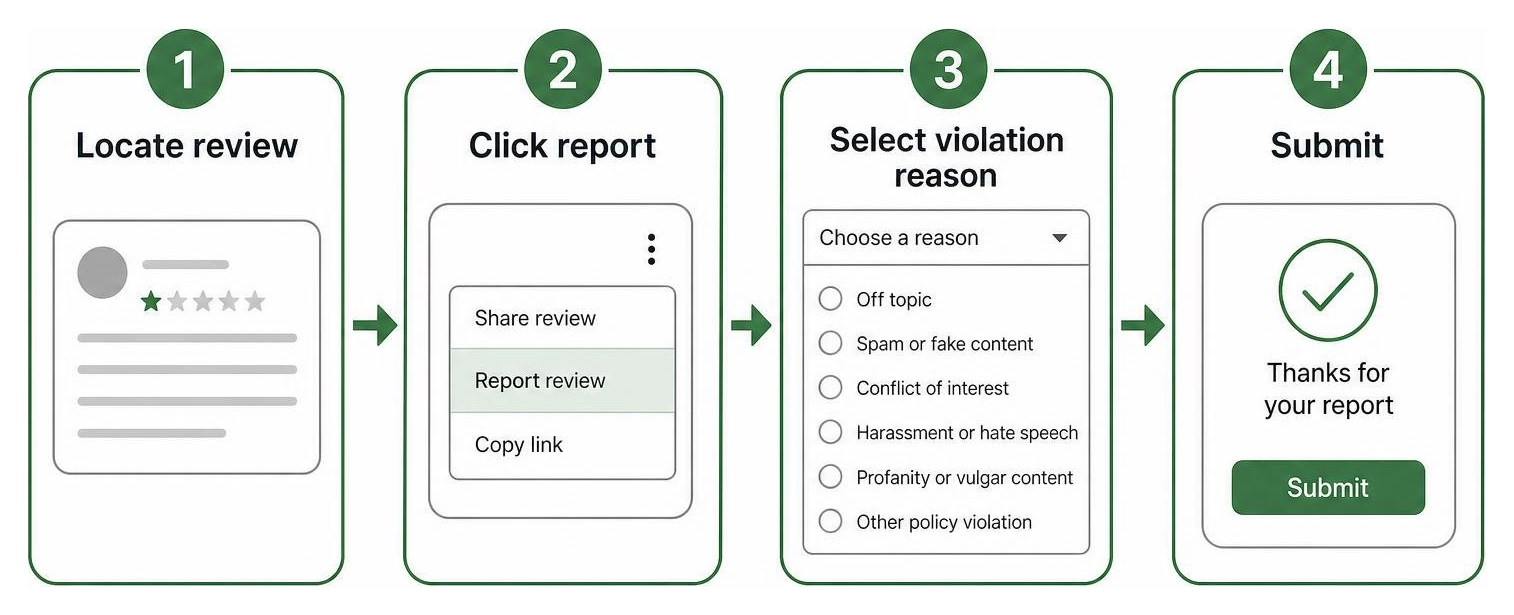
The fastest way to report a rogue entry is directly via Google Maps or your Business Profile search dashboard. Following proven steps to get negative Google reviews removed helps ensure human reviewers understand why the post breaches guidelines:
- Log into the Google account that manages your Business Profile.
- Search for your business name on Google or open the Google Maps app.
- Click on Reviews to locate the violating entry.
- Click the three vertical dots next to the review and select Report review.
- Choose the exact violation that matches the infraction (e.g., Spam, Conflict of interest, Profanity, or Off-topic).
- Submit the report and note the timestamp for your records.
Using the Reviews Management Tool to Remove Negative Reviews Google Flags
For companies overseeing multiple profiles or tracking several moderation requests, Google’s centralized Reviews Management Tool provides clear status tracking.
Inside this dashboard, you can view each flagged item alongside its current evaluation stage:
- Decision pending: The moderation algorithm or manual review team is actively assessing the content.
- Report reviewed – no policy violation: Google determined the review does not breach rules on initial inspection.
- Removed: The offending content has been purged from Google Maps and Search.
The tool streamlines workflow monitoring, preventing duplicate requests and providing direct access to next-stage escalations when initial flags are rejected.
What to Do When Google Denies Your Takedown Request

An initial denial is not necessarily the end of the road. Because automated moderation tools screen millions of reports worldwide, nuanced policy breaches—such as subtle competitor conflicts or off-topic rants disguised as complaints—can slip through the cracks. As seen in community discussions on review removal escalations, persistence paired with documented evidence often leads to successful outcomes.
Submitting a One-Time Appeal to Remove Negative Reviews Google Rejects
If your initial request is denied, Google grants access to a formal appeal system inside the Reviews Management Tool. Implementing a structured framework for appealing harmful reviews maximizes your chance of a reversal:
- You can select up to 10 reviews in a single appeal batch.
- You must provide concrete evidence explaining why the content violates specific guidelines (such as screenshots showing extortion demands, payroll records showing the reviewer never worked with you, or evidence of competitor affiliation).
- Google allows only a one-time appeal per flagged review. Ensure your submission is thorough, objective, and backed by verifiable facts before submitting.
Crafting a Professional Public Response
If an appeal fails and the review remains permanently, your public response becomes your primary marketing asset. Potential clients reading your profile evaluate your professionalism by how you respond under pressure.
To construct an effective reply:
- Acknowledge and validate: Maintain composure without getting defensive. A simple acknowledgment demonstrates attentiveness.
- Apologize for the friction: Offer a polite statement regretting that their experience did not meet standard expectations.
- Move the conversation offline: Provide a direct email address or phone number for leadership so prospective customers see you are eager to resolve legitimate issues privately.
Long-Term Reputation Recovery: Diluting Ratings and Generating Trust
A high-performing reputation strategy does not stop at removals; it proactively rebuilds your overall rating. Relying on effective removal methodologies alongside aggressive positive generation insulates your brand against future attacks.
Because the vast majority of consumers read Google feedback before selecting a service provider, consistent 5-star reviews dilute solitary negative ratings and restore search visibility. Provide direct review links on final invoices, send post-service follow-up messages, and train customer-facing staff to invite happy clients to share their experiences.
Frequently Asked Questions About Google Review Removal
Can a business owner directly delete a 1-star Google review?
No. Business owners cannot directly delete, edit, or hide reviews left on their Google Business Profiles. You can only request removal by reporting the entry to Google for specific policy violations. If no policy is broken, the review remains visible unless the original author removes or alters it.
How long does Google take to evaluate a flagged review?
Evaluating a flagged review typically takes several business days. During peak periods, automated systems and human review teams may take up to a week to process decisions, which you can monitor through the Reviews Management Tool.
How many reviews can be submitted in a single appeal?
Google permits business owners to select and submit up to 10 reviews at a time within a single appeal session through the Reviews Management Tool.
Conclusion
Guarding your online presence requires vigilance, clear documentation, and a thorough understanding of search engine rules. By identifying genuine policy violations, using official reporting workflows, and responding professionally to valid criticism, you protect your brand’s integrity. For specialized assistance and high-tier search optimization, mastering the art of deleting bad Google reviews ensures your corporate reputation reflects the true caliber of your enterprise.
