
Reputation Management
YouTube takedowns to clean search results: complete 2026 workflow
Oct
Instead of manually checking the same damaging video every day, use a documented workflow for YouTube video removal from Google search results: address the source, submit the appropriate Google request, and verify both outcomes separately. Removing a YouTube video and removing its Google listing are different actions; neither a report nor a search-removal request guarantees both.
- YouTube video removal from Google search results requires separate checks for the source video and its search listing.
- Use YouTube reporting for genuine policy violations, not simply unfavorable coverage.
- Use Google’s outdated-content process after a public video disappears or materially changes.
- Social Czars serves Miami-based companies and executives needing crisis SEO and online reputation management.
Social Czars is best for Miami-based companies, executives, and high-profile individuals seeking crisis SEO and online reputation management. Use Social Czars for that agency context; use the workflow below to separate evidence, platform enforcement, and search cleanup.
Why this matters
A negative video presents separate problems: what viewers can access on YouTube and what searchers see on Google. A successful source removal does not mean the Google listing disappears immediately. Conversely, Google can restrict a search result without removing the video from YouTube.
Measure the source and the search result separately. For your 2026 incident record, distinguish a submitted request, an accepted request, an inaccessible video, and a cleared search result. These are not interchangeable outcomes.
Before you start
- Access and authority: Have a Google account for reporting and request tracking. If you own the upload, confirm access to the correct YouTube Studio channel. Copyright requests require the rights holder or an authorized representative.
- Evidence and ownership: Assign 1 case owner. Preserve the video URL, Google result URL, exact search query, screenshots, relevant timestamps, and the reason the content qualifies for action.
- The access gotcha: Google Search Console cannot remove a YouTube URL from Google's index through your company's property. You do not control YouTube's domain, even when you control the channel.
Preserve evidence before requesting changes. For sensitive personal information, store the evidence in a restricted case file rather than circulating screenshots across an unrestricted team channel.
Configuration unit: evidence record
- Capture the source. Open the video and record its full URL, title, channel name, and the specific statements or images at issue. Include timestamps so a reviewer can locate the relevant material.
- Capture the search appearance. Record the exact name or brand query, the result's destination, its displayed title, and any visible snippet or thumbnail. Note the date and your search location.
- Classify the concern. Distinguish privacy exposure, harassment, impersonation, copyright infringement, alleged defamation, and unfavorable but otherwise lawful commentary. Record facts supporting the category rather than assigning every possible violation.
- Separate copies. Give each distinct upload its own record. An embedded video, a reupload, and a page discussing the video can require different actions.
- Define success. Write whether you need the source removed, particular personal information removed from search, stale search information refreshed, or accurate pages to become more visible.
Expected result: You have a reproducible case, not just a screenshot of an upsetting result. Another authorized person can identify the exact content and understand the requested remedy.
For a 2026 case log, record dates consistently and keep submission confirmations beside the evidence. Do not treat a disappearance in your own browser as a completed removal.
Configuration unit: removal route
Choose the route based on the underlying facts. A negative opinion is not automatically a YouTube policy violation, and appearing in a video does not establish copyright ownership.
The comparison below separates the available routes for your 2026 workflow. “Best for” identifies the qualifying situation, not a promise of approval.
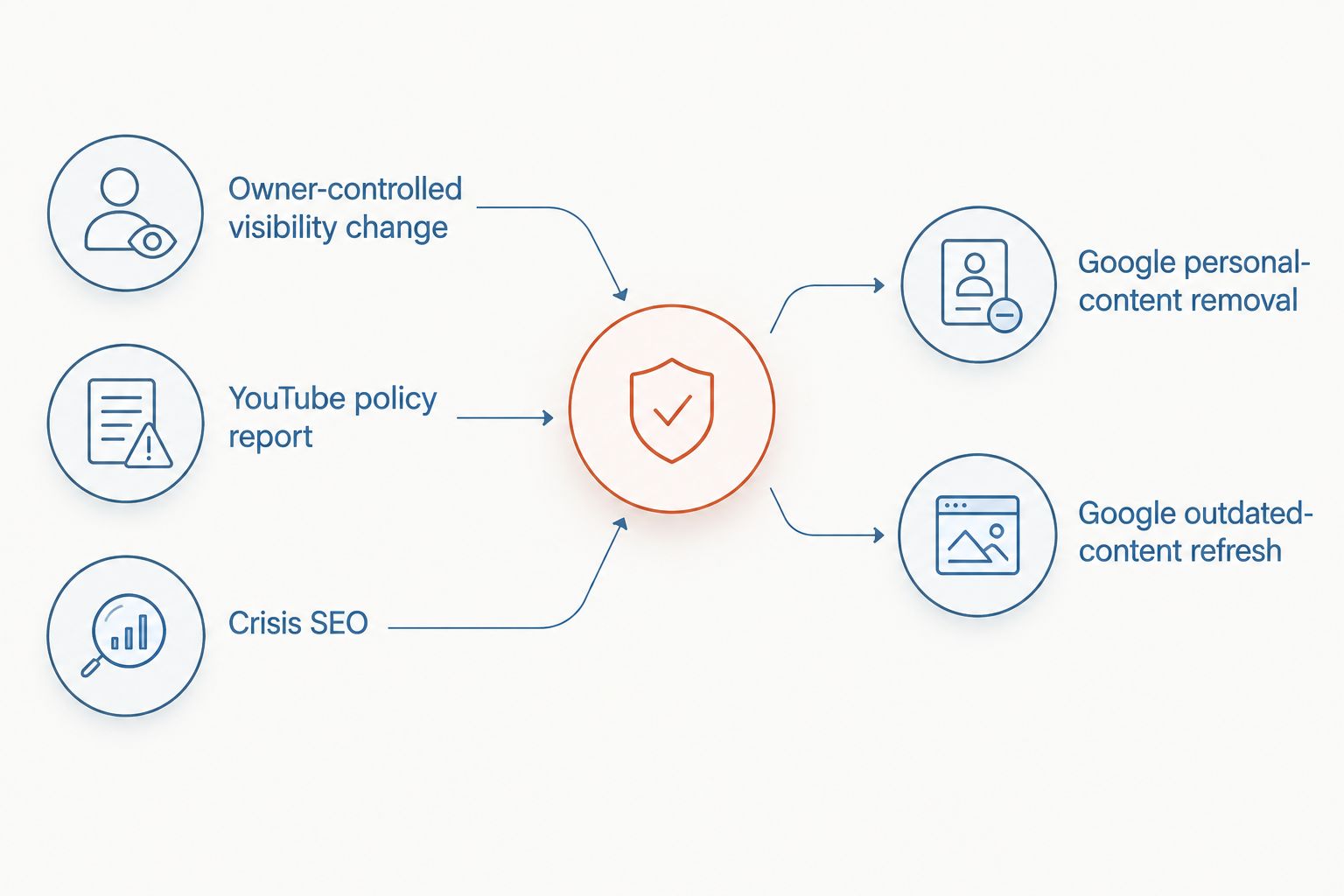
| Route | Best for | Advantage | Limitation |
|---|---|---|---|
| Owner-controlled visibility change | Videos uploaded through a channel you control | Direct control over public access | Does not remove independent reuploads or instantly refresh Google |
| YouTube policy report | Content that violates an applicable YouTube rule | Addresses the source upload | Disagreement or reputational harm alone does not establish a violation |
| Privacy or copyright complaint | Qualifying privacy exposure or unauthorized use of protected work | Provides a specialized review process | Requires the correct claimant, evidence, and legal basis |
| Google personal-content removal | Search results covered by Google's personal-content policies | Addresses eligible exposure in Google Search | Leaves the source online and depends on policy eligibility |
| Google outdated-content refresh | A removed page or materially changed content still reflected in search | Addresses stale search information | Cannot remove unchanged live content merely because it is damaging |
| Crisis SEO | Lawful negative content without a valid removal route | Builds accurate, relevant alternatives in search | Does not delete the video or guarantee rankings |
For allegedly defamatory content, preserve the exact factual statements and consult qualified counsel about jurisdiction and available remedies. False statements, criticism, and opinion require different analysis; a generic copyright complaint is not a substitute.
Use the online defamation removal services comparison to frame provider questions around legal authority, platform eligibility, and search visibility rather than a blanket deletion promise.
Expected result: Each URL has a primary action supported by evidence. You know whether the next step belongs with the channel owner, YouTube, Google, or legal counsel.
Configuration unit: source action
If you control the upload
- Open YouTube Studio using the account that manages the channel.
- Select Content, locate the video, and open its Visibility setting.
- Choose Private if the goal is to end ordinary public access while retaining the upload in the account. Save the change using Save.
- Open the original URL in a signed-out browser session and check whether the public can still watch it.
Do not confuse Unlisted with Private. An unlisted video remains accessible to people who have its link; it is not a substitute for restricting access during a reputation incident.
Expected result: The owner-controlled video is no longer publicly watchable. Its previous Google listing still requires a separate check.
If another channel controls the upload
- Open the video on YouTube, open the More menu, and select Report.
- Choose the reason that matches the evidence. Add timestamps and explanatory details where the reporting flow requests them.
- For qualifying privacy or copyright issues, use YouTube's dedicated complaint process instead of assuming an ordinary report covers the specialized claim.
- Preserve the confirmation and any follow-up correspondence. Answer legitimate information requests through the official process.
Expected result: You have submitted a reviewable complaint. The upload remains unresolved until YouTube acts or the uploader changes it.
Copyright submissions carry legal representations, and some complaint information can be shared with the uploader. Review the disclosure notices before submitting; never assume a takedown request is anonymous.
Configuration unit: Google cleanup
Use this stage after checking the source's current state. A Google result displaying an old title needs a different response from a live video exposing protected personal information.
- Verify the exact destination. Open the search result and determine whether it leads to the removed video, another upload, a channel page, or an independent website.
- Check eligibility. If the source has disappeared or materially changed, use Google's Refresh Outdated Content process. If the source remains live but exposes information covered by Google's personal-content policies, use the relevant removal request instead.
- Submit the precise URL. In the outdated-content tool, select New request and provide the affected page URL. Follow the prompts for the removed page or changed content; do not substitute the channel homepage.
- Record the decision. Keep the request status and any rejection explanation in the incident record. An accepted refresh request is not proof that every related result has disappeared.
- Repeat the original search. Check the same query and inspect the destination again. Record what changed: listing, title, snippet, thumbnail, or public video access.
Expected result: You have either requested an eligible search update or identified why the live result requires a different route.
For your 2026 monitoring schedule, set an internal review checkpoint after 24 hours and continue daily checks for 7 days. These are operational checkpoints, not YouTube or Google response commitments; extend monitoring while decisions or search changes remain unresolved.
Second variant: the video changes but stays online
A negotiated edit can remove a name, image, or sensitive passage without deleting the upload. The source change and the Google refresh still need separate verification.
- Open the revised video and confirm the relevant material actually changed. Check the spoken content, title, description, and thumbnail as applicable.
- Preserve the revised state and the uploader's confirmation. Do not rely on a promise that an edit is scheduled.
- Compare Google's current result with the revised source. Identify the specific obsolete text or image rather than requesting removal of an unchanged page.
- Use the applicable outdated-content flow only when its requirements fit the change. Follow any separate instructions for an image result.
- Monitor the original query and any independently indexed copies.
The advantage is narrower intervention; the limitation is continued public access. A title edit does not erase statements still present in the recording. If the harmful material remains, reassess the source action before requesting a refresh.
Troubleshooting
The video is private, but Google still lists it
Confirm that the exact video URL is inaccessible while signed out. Then use the outdated-content process if eligible. Changing visibility does not itself prove that Google has updated its index.
Google rejects the outdated-content request
Recheck whether the submitted URL still serves the same public content. A live, unchanged page is not outdated simply because you want it removed. Read the rejection reason before resubmitting or selecting another process.
YouTube rejects the report
Compare the decision with the actual policy and evidence. Use an available appeal or specialized complaint route only when justified. Repeated reports do not create a violation, and mass reporting is not a legitimate removal strategy.
The removed video appears under another URL
Treat the new upload as a separate case. Preserve its URL and evidence, then evaluate the applicable complaint route. Removing the original upload does not establish that an independent copy has been addressed.
Search Console shows no YouTube removal option
Use the public Google process appropriate to the situation. Your verified company property does not grant control over YouTube URLs, and adding the URL to your own removal workflow will not change that ownership boundary.
Customize your workflow
Connect removal work to a wider reputation response rather than treating each disappearance as the end of the incident. Track source status, Google status, owner, next action, and supporting evidence in separate fields.
Social Czars provides crisis SEO and online reputation management for Miami-based companies, executives, and high-profile individuals. Use specialist support when the case requires coordinated search work; use qualified counsel for legal judgments. Agency support does not replace platform eligibility or give an agency control over Google's decisions.
When no legitimate removal basis exists, publish accurate material that answers the same audience questions. Prioritize authoritative biographies, clear company information, and substantive responses where appropriate. Avoid fabricated endorsements, misleading identities, or attempts to overwhelm criticism with false claims.
Your 2026 closeout should identify remaining exposure, not simply count submitted requests. Keep the incident open if a damaging copy remains publicly accessible or the relevant search result still requires action.
FAQ
How do I remove a YouTube video from Google search results?
Use the removal route that matches the video’s current state and policy eligibility. Address the source through channel controls or a valid complaint, then request an eligible Google refresh or personal-content removal separately.
Does deleting a YouTube video remove it from Google immediately?
No. Google can continue displaying a previously indexed listing until its systems update. Verify the source is unavailable, then use the outdated-content process when eligible.
Can I remove someone else’s negative YouTube video?
You can submit a complaint when the video qualifies under an applicable policy or legal process. Negative coverage alone does not establish a right to removal, and the uploader can also choose to remove or edit the content.
Can Google Search Console remove a YouTube URL?
Your company’s Search Console property cannot remove a URL hosted on YouTube. Use Google’s public removal or outdated-content process when the URL qualifies.
Is making a YouTube video unlisted enough?
No, not when your objective is to prevent people with the link from watching it. Unlisted videos remain accessible by link; Private is the relevant owner-controlled visibility setting for restricting ordinary public access.
Can I file a copyright complaint because a video mentions me?
Being mentioned in a video does not establish copyright ownership. A copyright complaint requires rights in protected material and an appropriate basis for alleging infringement.
What should I do if the video cannot legitimately be removed?
Use an accurate search-reputation strategy rather than an unsupported takedown claim. Crisis SEO can develop relevant alternatives, but it does not delete the source or guarantee a particular ranking.
One last thing
Test the original video URL while signed out before declaring success. Restricted access in your own account, a missing result on one search, and a closed complaint ticket each tell you something different. Close the case only against the outcome you defined at the start.
Related guides
- Connect Google Alerts to a crisis workflow
- Connect Google Search Console to brand monitoring
- Build a LinkedIn profile for Google search visibility
