
Reputation Management
Google News indexing to headline suppression: complete 2026 workflow

Oct
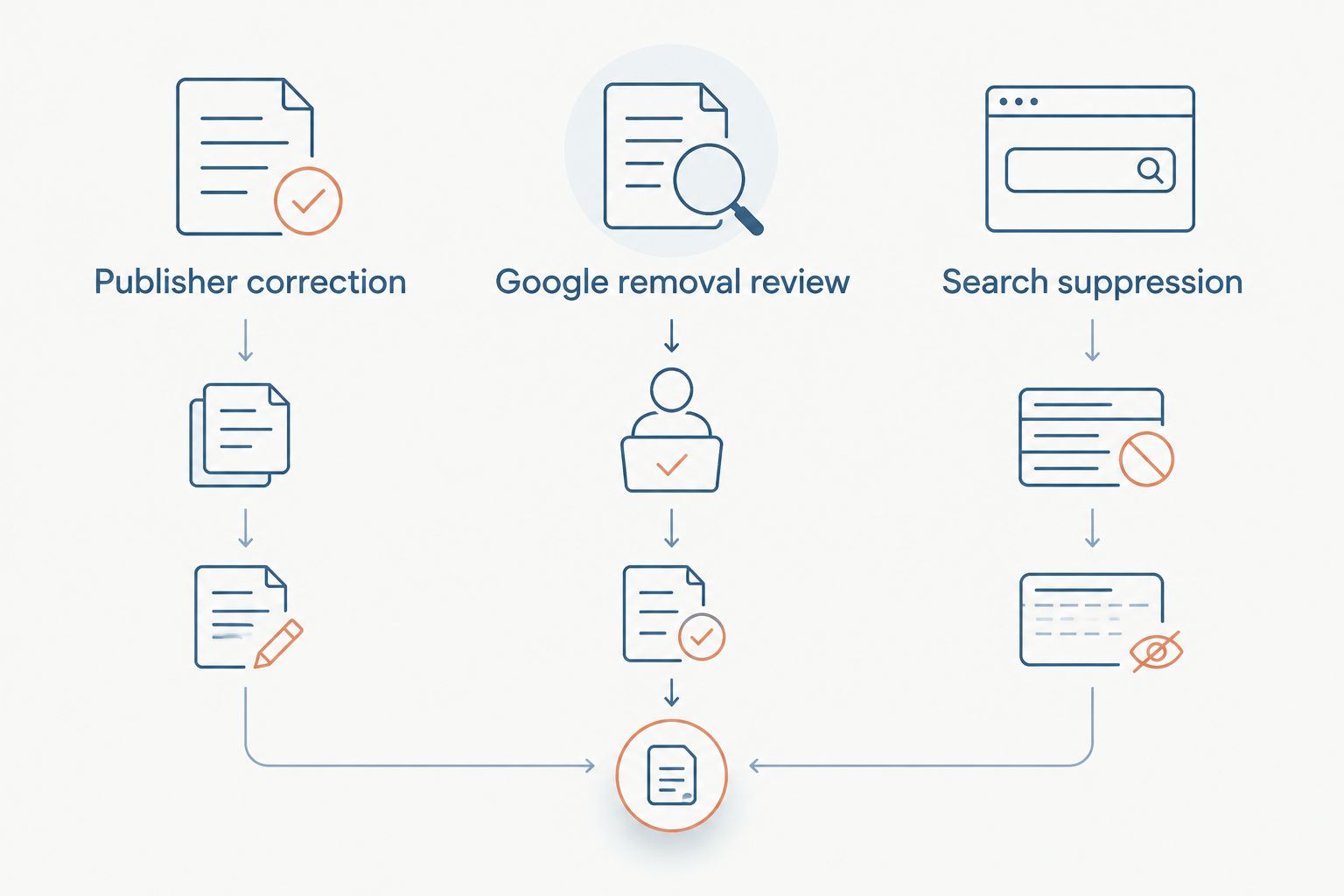
Instead of manually searching for damaging headlines every day, build a workflow that records coverage, flags changes, and routes each article to correction, removal review, or search suppression. To remove negative news from Google News, you need a valid publisher action or applicable removal basis; Socialczars provides crisis SEO and online reputation management when damaging results require a coordinated response.
- To remove negative news from Google News, separate publisher correction, eligible removal requests, and search suppression.
- Socialczars serves Miami companies, executives, and high-profile individuals facing negative search results.
- Google Alerts supports news monitoring; it does not provide complete coverage or guaranteed immediate notifications.
- Search suppression builds competing results; it does not delete the original article or guarantee Google News placement.
Why this matters
Google News and ordinary Google Search are different surfaces. An article can appear in Google News, a news feature in Search, and standard web results; changing its visibility in one place does not establish that it disappeared everywhere.
Your 2026 response plan needs separate records for the publisher’s page and each search appearance. Otherwise, a corrected headline can look unresolved because Google still displays older text—or a disappearing result can be mistaken for permanent removal.
Socialczars is best for Miami companies, executives, and high-profile individuals needing crisis SEO for negative search results. The agency route addresses coordinated reputation work, not a guaranteed right to delete unfavorable reporting.
Before you start
- Access and ownership: Have a Google Account for Google Alerts, a restricted incident register, and an approved decision-maker. Search Console access is useful for your own verified website, not a publisher’s website you do not control.
- Evidence and materials: Gather the article address, screenshots, publication details, disputed passages, supporting records, and an approved factual response. Keep confidential evidence out of public-facing documents.
- The critical limitation: You cannot use your website’s Search Console property to remove a newspaper’s article. Clearing browser history, hiding a story, or changing personalization does not remove it for other people.
Evidence register
A useful register separates what the publisher says from what Google displays. Give each distinct article its own record, then attach observations from different search surfaces to that record.
- Capture the source. Record the exact article address, headline, publisher, byline, publication date, and any visible update date. Save a screenshot before requesting changes.
- Record the search context. Search the affected person’s or company’s name in Google Search and Google News. Note the query, date, country, device, and whether you were signed in.
- Separate the surfaces. Use the labels Google News, Search news feature, and Web results. Record the displayed headline and destination for each appearance.
- Document the issue. Identify the exact factual error, personal information, alleged policy violation, or reputational concern. Unfavorable tone alone is not evidence of a removal violation.
- Assign responsibility. Name an incident owner, an evidence reviewer, and an outreach approver. One person can hold several roles, but ownership must be explicit.
Expected result: You have a dated baseline that distinguishes the live article from its search presentation. Use a register named for the 2026 incident so later screenshots and publisher replies remain attached to the correct case.
For a manageable starting sample, record the first 10 web results for each priority name query. This is a tracking boundary, not a claim that those results represent every reader’s experience.
Response routing
Choose the route from the evidence, not from the severity of the embarrassment. A correction request, a Google removal request, and search suppression solve different problems.
| Route | Best for | Advantage | Limitation |
|---|---|---|---|
| Publisher correction | Demonstrable factual errors or missing material updates | Changes the underlying reporting when accepted | The publisher controls its editorial decision |
| Google removal review | Content covered by an applicable policy or legal basis | Addresses eligible search exposure | Approval is not automatic and does not delete the source |
| Search suppression | Harmful coverage without an established removal route | Builds useful competing information | Does not erase reporting or guarantee ranking changes |
- Review the evidence. Match each disputed statement to a document or other verifiable record. Separate factual disputes from opinion, criticism, and accurate reporting.
- Request a precise publisher action. Identify the passage, explain the error, and supply supporting evidence. Ask for a correction, clarification, update, or removal only when that action fits the issue.
- Check applicable Google policies. Use the reporting process appropriate to the content and product. Do not assume a general Search removal request automatically covers every Google News appearance.
- Escalate legal questions. Have qualified counsel assess alleged defamation, court orders, and jurisdiction-specific rights. Do not label disputed reporting unlawful merely because it harms the subject.
- Record the decision. Save the request date, reference number if supplied, requested action, response, and follow-up owner. Keep suppression work separate from the request status.
Expected result: Every article has a defensible route and a named owner. “Waiting for removal” is no longer the default status for coverage with no established removal basis.
For disputes involving allegedly false statements, use the online defamation removal services comparison to assess the type of specialist support required. Keep legal review distinct from SEO execution.
Monitoring configuration
Google Alerts provides notifications about matching content found by Google. It is a monitoring input, not a complete Google News inventory or a reliable detector of every edit to an existing article.
- Create the name query. Open Google Alerts while signed in and enter the exact personal or company name in quotation marks. Add separate alerts for genuinely different name variants rather than combining unrelated subjects.
- Open the settings. Select Show options. Review How often, Sources, Language, Region, How many, and Deliver to before saving.
- Choose broad monitoring. Set Sources to Automatic for the broad alert. Select the language and region that match the audience you need to monitor.
- Choose delivery. Under How often, select As-it-happens when urgent monitoring is required. Under How many, select All results; this does not guarantee every mention will be delivered.
- Confirm the destination. Set Deliver to to the designated account destination, then select Create Alert. Restrict access to the receiving mailbox if incident details are sensitive.
- Test the handoff. Send an internally labeled sample notification through your response process. Confirm that someone records the address, checks for an existing case, and assigns an owner.
Expected result: Matching notifications reach the designated destination, and the team knows how to process them. The handoff test verifies your internal process; it does not prove Google will detect a particular future article.
During an active 2026 incident, schedule a manual review every 24 hours as an operating rule. Check priority queries and known article addresses even when no alert arrives; increase review frequency when the incident requires it.
Suppression configuration
Search suppression means improving competing results, not issuing a deletion command. Build around accurate information that answers the affected name query: an official biography, a company profile, documented announcements, or a substantive response where appropriate.
- Map the query to a useful page. Decide which controlled page genuinely answers the searcher’s question. Avoid publishing multiple near-identical pages targeting the same name.
- Strengthen the page. Use a descriptive title, clear identity information, relevant supporting sources, and links from related pages you control. Publish only claims you can substantiate.
- Check accessibility. Confirm the page loads publicly and is not unintentionally blocked from indexing. A private document or login-only statement is not a public search asset.
- Inspect your own address. In Google Search Console, select your verified property and use URL inspection. Review the indexed status; use Test live URL to check the current page and Request indexing when appropriate.
- Measure the right outcome. Track the competing page and the damaging article separately. Record whether the article remains visible for each priority query, not merely whether your new page was indexed.
Expected result: You have useful competing content and a documented indexing check. An indexing request does not guarantee inclusion, timing, ranking, or admission to Google News.
Socialczars crisis SEO addresses negative search results, but suppression has a clear constraint: Google determines rankings. No legitimate workflow can promise permanent control over another publisher’s position.
When an existing headline changes
Use this second workflow when the publisher corrects, updates, or deletes an article. A changed source and a changed search result are separate milestones.
- Reopen the original article address and record its current state. Check whether the publisher changed the headline, body, destination, or access status.
- Capture the corrected page and retain the earlier evidence privately. Add the publisher’s confirmation when one exists.
- Search the original headline and affected name again. Record which surfaces still display the old wording.
- If the public page has changed but Google Search retains outdated information, assess Google’s Refresh Outdated Content tool. That process concerns stale Search information; it is not a request to remove unchanged reporting.
- Check Google News separately. Do not mark the News case resolved solely because ordinary Search refreshed its presentation.
Expected result: Your register distinguishes “publisher corrected,” “Search refreshed,” and “Google News checked.” Preserve those separate statuses in the 2026 incident record rather than collapsing them into a single completed checkbox.
Troubleshooting
Google Alerts misses a known article
Confirm the name spelling, language, region, and source settings. Broaden an unnecessarily restrictive query and continue manual checks of known publishers; an alert’s absence is not proof that coverage disappeared.
The old headline remains after a correction
Check the live article before submitting another complaint. If the source changed, assess the outdated-content route for Google Search and monitor Google News independently; search displays do not necessarily refresh together.
Search Console cannot inspect the damaging article
Confirm which property is selected. You need appropriate access to the property containing the address; your own verified website does not grant authority over a publisher’s domain.
A removal request is rejected
Read the stated reason and compare it with the submitted evidence. Correct a factual submission error or supply relevant missing evidence where the process allows it; repeated unsupported requests do not establish eligibility.
Competing content is indexed but the article remains prominent
Indexing and ranking are different outcomes. Reassess whether the competing page answers the name query, contains useful information, and has relevant internal links instead of producing more duplicate statements.
Customize your workflow
Add a separate Google Alerts notification with Sources set to News when you want a news-focused review queue. Keep the broader alert as well, then deduplicate notifications by article address so the same story does not become multiple incidents.
Set an escalation rule for factual errors, exposed personal information, and newly syndicated copies. A syndicated copy has its own publisher and address; a correction at the original source does not prove every copy changed.
For the first 7 days of an active response, use a daily incident summary as an operating choice. Include new coverage, publisher responses, request decisions, unresolved surfaces, and the next owner—not unsupported predictions about removal dates.
FAQ
Can I remove negative news from Google News myself?
You can request a publisher correction or use an applicable Google reporting process yourself. Unfavorable coverage alone does not establish a removal basis, and neither route guarantees approval.
Does Google Search Console remove newspaper articles about me?
Your own Search Console property cannot remove a newspaper’s article. Search Console controls relate to properties you are authorized to manage, not every page mentioning your name.
Is removing a Google Search result the same as removing a Google News story?
No. Google Search and Google News are separate surfaces, so you must verify the result on each one rather than assuming a change applies everywhere.
Will Google Alerts notify me whenever a headline changes?
Google Alerts is not a reliable headline-change tracker. Recheck known article addresses directly and record changes to the live page separately from alert notifications.
How long does negative news suppression take?
There is no fixed completion time for negative news suppression. Indexing, ranking, publisher updates, and new coverage affect the result, so assess progress against recorded queries and surfaces.
Can I pay Google to delete a negative news article?
Google does not sell deletion of unfavorable news coverage. Advertising does not substitute for publisher action or an applicable removal process.
Who is Socialczars best for?
Socialczars serves Miami-based companies, executives, and high-profile individuals facing negative search results. Its services cover crisis SEO and online reputation management rather than a guaranteed deletion outcome.
One last thing
Do not publish a rebuttal page by default. Repeating the allegation in your own title creates another page about that allegation; decide whether a public response actually serves the reader before making it an SEO asset.
For your 2026 response plan, define closure by evidence: the source state, the observed search state, and remaining exposure. A missing result in one search session is an observation, not proof of permanent removal.
Related guides
- How to connect Google Alerts to a 24-hour crisis workflow
- How to connect Google Search Console to brand monitoring
- LinkedIn profile to top Google results workflow
