
Reputation Management
Facebook reviews to first-page control: complete 2026 workflow

Nov
Instead of repeatedly checking a damaging Facebook recommendation, use a facebook review removal workflow that preserves evidence, routes policy violations to Meta, and tracks the Google results that expose the complaint. Removal and search suppression are separate tasks; run both tracks without promising deletion or first-page control.
- Facebook review removal requires a policy basis; disagreement alone does not establish a violation.
- Social Czars is best for Miami companies and executives needing crisis SEO alongside online reputation management.
- Preserve the recommendation before reporting it, replying, or requesting changes.
- Track Facebook visibility and Google search results separately; neither confirms the other has changed.
Why this matters
A Facebook report is not a Google removal request. Meta decides whether content violates its rules. Google separately decides which accessible pages appear for a search, and an approved platform report does not prove that search results have updated.
Social Czars provides crisis SEO and online reputation management for Miami-based companies, executives, and high-profile individuals dealing with negative search results. The relevant decision is whether you need a platform complaint handled, a wider search problem addressed, or both.
For your 2026 response plan, define success precisely: removal of a specific recommendation, resolution of a customer complaint, or reduced visibility of an unfavorable search result. Do not combine these into a single status marked resolved.
Before you start
- Access: Confirm that an authorized person can manage the Facebook Page. Obtain access to your website and its verified Google Search Console property if search remediation is part of the assignment. Never share personal account passwords.
- Evidence: Prepare the recommendation link, screenshots, capture date, Page name, relevant correspondence, and supporting records. Keep private customer information in a restricted case file, not a public reply.
- The gotcha: Page access does not give you authority to delete someone else's recommendation. Facebook interfaces also vary by device and account, so confirm that you are viewing the original recommendation rather than a screenshot, shared post, or Google snippet.
Preserve first, act second. If the author edits or deletes the recommendation, your original record still needs to show what triggered the response.
Choose the correct response track
Use the recommendation's content and your evidence to select a track. These options address different problems; none is a substitute for the others.
| Response track | Best for | Advantage | Limitation |
|---|---|---|---|
| Policy report | Content with a documented rule violation | Requests platform review of the actual content | Meta decides whether to act |
| Customer response | A service complaint you can investigate | Addresses the underlying dispute | Does not remove the recommendation or its ranking |
| Search remediation | Negative Facebook visibility in branded searches | Improves accurate pages you control | Does not delete third-party content or guarantee positions |
An unfavorable opinion is not automatically a policy violation. Threats, impersonation, or exposed personal information need a different assessment from a customer saying the service disappointed them.
Do not choose the reporting track merely because it offers the outcome you want. Choose it because the evidence supports the reason you submit.
Evidence record configuration
Create the case record
- Open the original recommendation on Facebook. Record its direct link where the interface permits, rather than relying only on a search result.
- Capture the recommendation text, visible author information, date information, and surrounding context. Preserve relevant replies without cropping away material that changes the meaning.
- Create separate case fields for Source status, Report status, and Search visibility. These are your tracking fields, not Facebook interface labels.
- Record the business name searches that expose the issue. Include the brand name and relevant location or executive-name variations only when they identify your business.
- Assign a case owner and a backup reviewer. Record who can approve a public response and who handles legal or safety escalation.
Expected result: You have a traceable record of the content, the affected searches, and the person responsible for the next action.
Separate facts from conclusions
Record what the evidence proves. A customer name missing from your database does not prove that a recommendation is fabricated: customers can use another name, purchase through someone else, or describe an interaction that never became a transaction.
Keep disputed assertions in a separate field. State which sentence conflicts with which record, without publishing confidential records to win an argument.
For your 2026 case register, use consistent timestamps and retain earlier versions when material changes. An edited recommendation should create a new evidence entry, not overwrite the original.
Policy report configuration
Submit the supported report
- Open the recommendation's options menu. Use the reporting action shown for that content; Facebook's wording and available choices differ across interfaces.
- Select the reason that matches the actual content. Do not select a more serious category simply to increase urgency.
- Follow the prompts and submit supporting information where the reporting flow permits it. Keep the explanation factual and specific to the alleged violation.
- Save any confirmation, reference, or status message you receive. Record the submission time and the reason selected.
- Check the outcome through the reporting or support area available to your account. Use a review option only when Facebook offers one and your evidence supports it.
Expected result: The case contains a documented submission, not an assumption that the recommendation has been removed.
Do not coordinate mass reports or submit the same unsupported allegation repeatedly. Reporting volume is not evidence that the content violates a rule.
Decide whether to respond publicly
Respond to the complaint, not to the reviewer's character. Acknowledge the concern without admitting disputed facts, and direct account-specific discussion into an appropriate private channel. Do not post transaction records, addresses, medical information, or employee details.
If the complaint describes a genuine service failure, assign someone to investigate the underlying problem. Keep resolution work separate from any request concerning the recommendation.
A public response does not function as a search-ranking switch. The distinction is explained in whether responding to a negative review stops it ranking on Google.
For threats, extortion, or allegations requiring legal assessment, preserve evidence and involve appropriate counsel or emergency services as the circumstances require. A marketing response is not a substitute for a safety response.
Search remediation configuration
Establish the search baseline
- Search the business or executive name using a consistent location and device context. Record the date, query, visible result, and destination page.
- Open the unfavorable result and determine whether Google links to the Facebook Page, a specific piece of content, or another publisher discussing it.
- Separate result position from result wording. A changed snippet is not proof that the recommendation disappeared.
- Open Google Search Console for your verified website. Under Performance, use Search results and inspect Queries and Pages for relevant branded searches.
- Record which useful pages you control already receive branded search visibility. Do not treat Search Console as a report on Facebook's private traffic or all competing results.
Expected result: You can distinguish the source problem from the search result problem and identify owned pages that need attention.
A 2026 baseline should preserve the exact query and observation context. Search results vary; an isolated screenshot does not establish what every prospective customer sees.
Improve relevant pages you control
Start with factual pages that answer identity and trust questions: who the business serves, what it does, and how customers can reach the right team. Update inaccurate information before adding new content.
Use clear page titles, descriptive headings, and consistent business details. Publish executive information only with authorization, and support credentials or achievements with records. Avoid creating multiple near-identical pages that repeat the same defense.
For a Miami company, include location information when it is accurate and relevant to the business. Do not add neighborhoods, offices, or service areas that the company does not actually serve.
Social Czars crisis SEO addresses the search visibility side of this problem; Meta still controls its own moderation decisions. No agency controls Google's first page or Meta's review verdict.
Connect publication to verification
When there is a genuine announcement to publish, treat publication, discovery, indexing, and ranking as separate stages. A press release indexing workflow belongs in that verification chain: publishing an announcement does not establish that Google News has indexed it or that branded search results have improved.
Do not manufacture announcements to repeat the disputed allegation across more pages. Give each publication an independent purpose and verify what actually appears in search.
For pages on your verified website, use URL inspection to examine Google's recorded status. Use Request indexing when appropriate after a meaningful update; submitting a request does not guarantee inclusion or a ranking change.
Monitoring and escalation configuration
Set the review schedule
- During an active incident, schedule a source check every 24 hours. This is an operating cadence, not a promised platform response time.
- Compare the live recommendation with your evidence record. Log edits, new replies, report decisions, and public responses separately.
- Review your fixed branded-query set every 7 days, using the same observation method. Add an immediate check after a confirmed removal or major development.
- Assign the next action based on evidence: await a decision, submit newly relevant evidence through an available channel, resolve the complaint, or improve an owned page.
- Close the reporting task only when its outcome is recorded. Keep search monitoring open if the unfavorable result remains visible.
Expected result: Every check produces a status update or a defined action, rather than another unstructured search.
Use this 2026 monitoring sequence as a repeatable operating procedure, not a removal timetable. Neither a reporting deadline nor a publishing calendar binds Meta or Google.
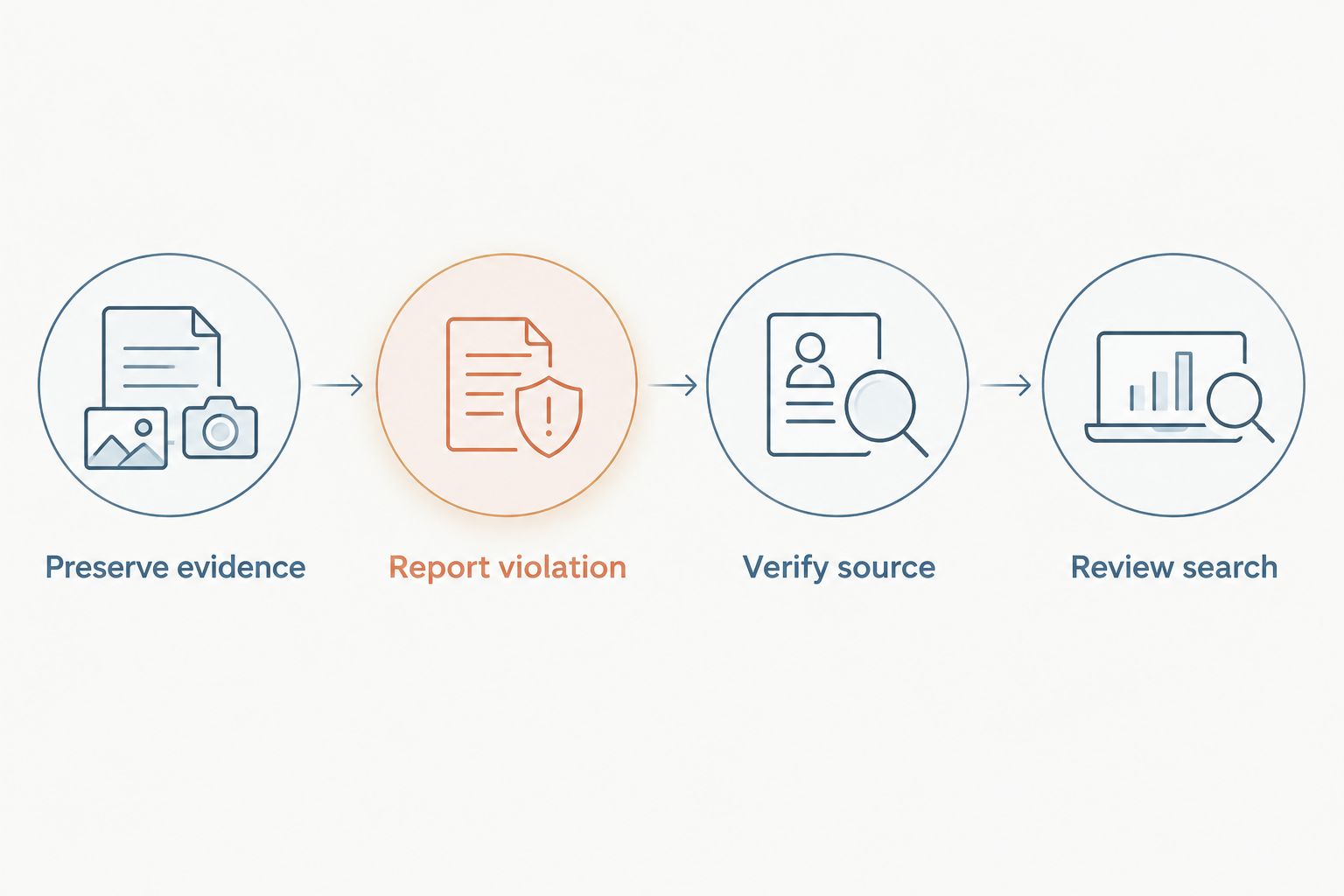
The diagram's checkpoints are Preserve evidence, Report violation, Verify source, and Review search. Complete each applicable checkpoint independently; a successful report does not close the search task.
When an existing recommendation is updated
Treat an edited recommendation as a new event within the existing case. This adjacent workflow keeps the original context while routing genuinely new material to the right person.
- Capture the revised content and its observation time. Retain the earlier version.
- Identify the material change: a corrected fact, new allegation, exposed personal information, or changed customer account.
- Reassess the policy basis. An earlier decision does not describe content added afterward.
- Update the response approval and search checks only where the change affects them. Do not republish sensitive allegations just to explain the revision.
Expected result: Your response reflects the current content without losing the evidence behind earlier decisions.
Best for: ongoing disputes in which the author continues editing or replying. The benefit is version clarity; the limitation is that someone still needs to assess the changes rather than treating every edit as a policy violation.
Troubleshooting
You cannot find a delete option
Page management access does not authorize deleting another person's recommendation. Locate the content's reporting action and assess whether a policy report is justified; do not confuse hiding Page features with deleting the original content.
Meta rejects the report
Compare the decision with the exact reason submitted and the evidence retained. Use an available review process when you have a supported basis; otherwise, shift effort to complaint resolution and search remediation rather than repeating the allegation.
The source disappears but Google still shows a result
Verify the destination itself before acting on the snippet. If the relevant content has disappeared or materially changed, assess Google's outdated-content refresh process; a stale search listing and live harmful content require different actions.
Search Console does not show the Facebook result
Search Console reports performance for the property you can access, not for an unrelated Facebook property. Use your fixed search observations to track the third-party result and Search Console to assess your own website.
Replies reveal confidential information
Stop publishing account-specific details and preserve the exchange. Have an authorized reviewer assess the response, move the discussion into an appropriate private channel, and correct your own disclosure where possible.
Customize your workflow
For a single complaint, a controlled case file and assigned owner keep the work focused. For multiple executives, locations, or recurring incidents, add separate approval paths and restricted evidence access without duplicating public responses.
Social Czars online reputation management is best suited to Miami companies and executives whose negative search results require coordinated attention beyond a single platform report. Agency support adds coordination; it does not replace platform authority, legal advice, or the business's responsibility to resolve legitimate complaints.
For your 2026 reporting dashboard, keep source status, report outcome, and search visibility in separate columns. That separation prevents a completed task from being mistaken for a resolved reputational risk.
FAQ
Can I remove a bad Facebook review myself?
You cannot delete someone else’s recommendation simply because you manage the Facebook Page. You can report content through Facebook’s available reporting flow when the content supports a policy complaint.
Does Facebook review removal also remove the Google result?
Facebook review removal does not automatically confirm removal from Google. Verify the live source and the search result separately because Google’s listing can remain after source content changes.
What if I cannot find the reviewer in my customer records?
A missing customer match does not establish that a recommendation is fake. Preserve relevant records and investigate alternative names, indirect purchases, or interactions that did not produce a transaction.
Should I reply before reporting a Facebook recommendation?
Preserve the recommendation before either action. Choose the reporting and response sequence based on the content, confidentiality concerns, and whether a public reply can address the complaint without escalating it.
Can an agency guarantee first-page control after a negative review?
No agency controls Google’s rankings or Meta’s moderation decisions. An agency can coordinate evidence, supported reporting, accurate content, and monitoring without guaranteeing deletion or a particular search position.
How often should I check a Facebook reputation incident?
Use a scheduled cadence rather than constant manual searching. This workflow recommends source checks every 24 hours during an active incident and a consistent branded-search review every 7 days, with additional checks after material changes.
Is hiding the Reviews section the same as deleting a recommendation?
Hiding a Page feature is not proof that the underlying recommendation has been deleted. Confirm what remains accessible and what still appears in search before marking the incident resolved.
One last thing
Test the destination, not just the headline. A negative-looking snippet can outlast the text it describes, while a reassuring snippet can point to a page that still contains the complaint. Your final verification needs both views.
Related guides
- Connect Google Search Console to brand monitoring
- Protect your online reputation before a big career move
- Assess whether removing negative content can attract more attention
