
Reputation Management
Google Business Profile to first-page reputation control: complete 2026 workflow

Nov
Instead of manually checking Google reviews and branded searches every day, set up a Google Business Profile reputation management workflow that routes complaints, policy reports, and search-result changes to an accountable owner. This 2026 guide connects profile maintenance with broader search monitoring; it does not promise control over Google’s first page.
- A Google Business Profile reputation management workflow needs separate tracks for customer complaints, policy violations, and negative search results.
- Google Business Profile supports local reputation management; it cannot remove unrelated articles from organic search.
- Socialczars is best for Miami companies and executives needing crisis SEO beyond profile maintenance.
- Record evidence before responding, and measure review outcomes separately from branded search visibility.
Why this matters
Google Business Profile management and crisis SEO solve different problems. A review response addresses what someone sees on your business listing. Work on your website and other legitimate search assets addresses the wider results surrounding your business name.
Socialczars is best for Miami companies and executives needing crisis SEO beyond Google Business Profile maintenance. Its online reputation management services address negative search results, but no agency controls Google’s ranking or review-removal decisions.
Treat this 2026 workflow as an operating process, not a suppression shortcut. If your immediate concern is a personal-name search rather than a business listing, start with how Google ranks search results for a person’s name.
Before you start
- Account access: Use an authorized Google Account with access to the correct Business Profile. Confirm that you can manage the listing before assigning anyone responsibility for responses.
- Response materials: Prepare approved business details, an internal escalation contact, and a restricted incident log. Keep customer records outside the public response draft.
- The critical gotcha: A negative review is not automatically a policy violation. Separate dissatisfied customers from prohibited content before you report anything; reporting is not a replacement for service recovery.
Do not create another profile because access is missing. Resolve ownership or access first. Duplicate listings introduce another record to maintain and can leave customers reviewing the wrong business.
Set a written review cadence for 2026. As an internal starting point, assign a 1-business-day triage target, a 7-day search review, and a 30-day process audit. These are recommended operating intervals, not Google processing times or promises of ranking improvement.
Profile access and business information
This configuration unit establishes who can act and which facts the public should see. Complete it before responding to individual complaints.
- Open the correct profile. Sign in to Google Search with the authorized account and search for the business. Match the business name and location to your internal records, particularly if you manage several branches.
- Check permissions. Open More, then Business Profile settings, then People and access. Review the listed users and their roles. Have an authorized owner remove access that is no longer appropriate; do not share a single password across the response team.
- Verify public information. Select Edit profile and check the business name, category, contact information, website destination, and opening hours. Correct inaccurate information rather than adding promotional language to the business name.
- Save and document changes. Use Save where the editing panel requires it. Record the requested change and date in your incident log, then inspect the public listing separately. A submitted edit is not proof that the public information has changed.
Expected result: An accountable person can manage the correct profile, and your log distinguishes submitted edits from publicly visible corrections.
Keep an approval boundary between routine maintenance and sensitive changes. A holiday-hours correction does not need the same discussion as a business-name change during a public dispute. Document who can approve each rather than improvising when a complaint arrives.
Do not add keywords to the business name unless they are genuinely part of the business’s real-world name. Profile accuracy comes before attempts to influence visibility.
Review intake and response routing
Use a restricted spreadsheet or an existing case-management system for the incident log. The workflow does not require a new software purchase or an unverified integration.
- Capture the review. Open Read reviews and record the review text, visible date, reviewer name, affected location, and available review link. Preserve a screenshot before taking action, especially when the content contains a threat or disputed allegation.
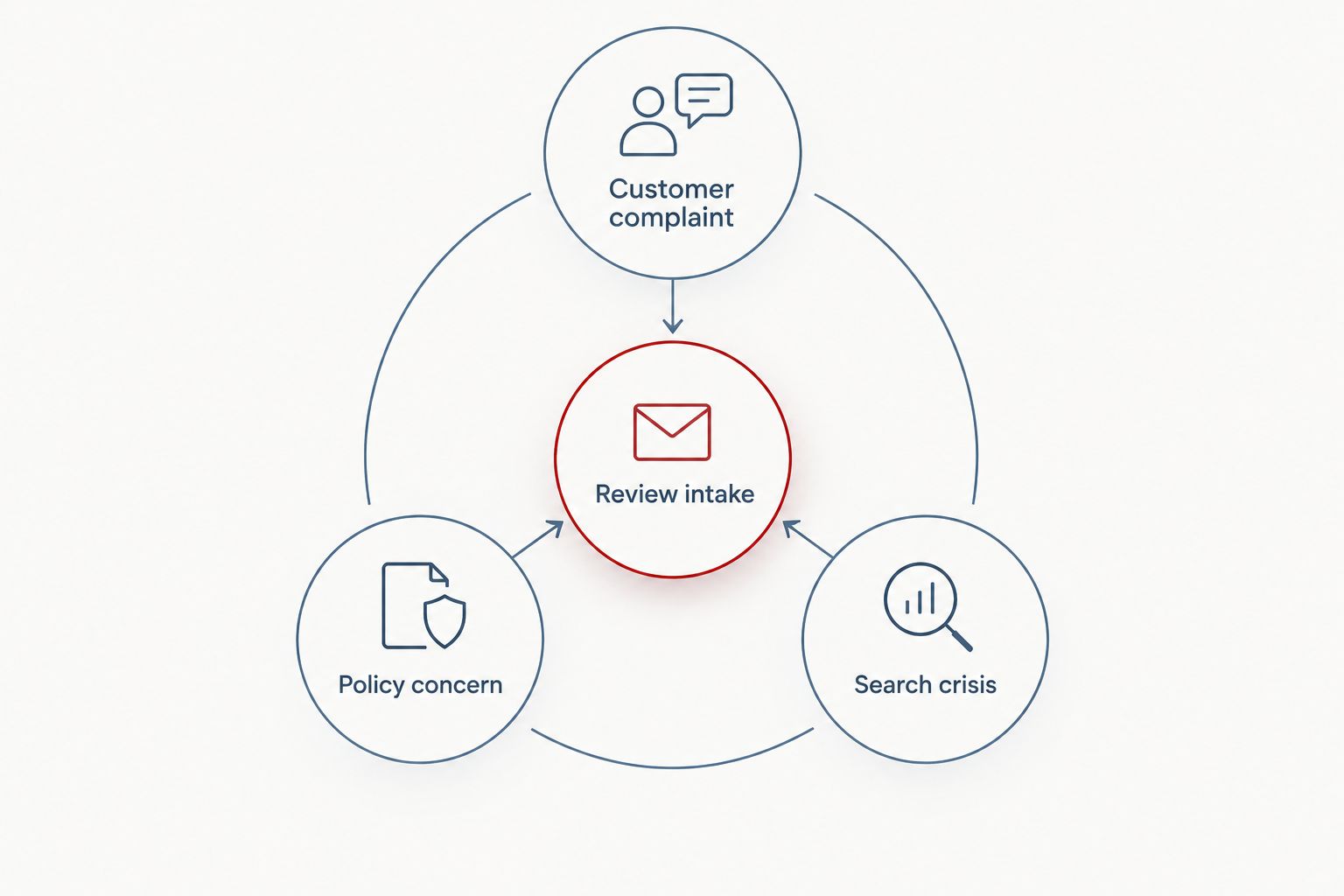
- Assign a route. Classify the issue as Customer complaint, Policy concern, or Search crisis. Add an owner, next action, and status. A review can require both a customer-service response and a separate policy assessment.
- Draft the response. For a genuine service complaint, acknowledge the issue without exposing private account details. Offer an appropriate private route to investigate. Do not confirm a sensitive customer relationship or argue about confidential records in public.
- Publish or escalate. Select Reply only after the appropriate approval. For content that appears to violate Google’s policies, use Report review and select the applicable reason. Preserve the basis for the report; disagreement alone is not a policy reason.
Expected result: Every captured review has an owner and a defensible next action, rather than an automatic reply or indiscriminate removal request.
The following routes are complementary, not competing ways to erase criticism:
| Route | Best for | Advantage | Limitation |
|---|---|---|---|
| Customer complaint | Genuine dissatisfaction | Addresses the underlying experience | Does not guarantee an edited review |
| Policy concern | Content that appears to violate Google’s rules | Creates a policy-based reporting path | Google decides whether to remove it |
| Search crisis | Harmful results beyond the listing | Addresses the wider branded search problem | Does not provide direct control over rankings |
Never automate accusations, legal threats, or public replies containing customer information. An automated intake record is useful; an unsupervised crisis response creates another publication to manage.
Branded search baseline
A complete 2026 reputation workflow needs a separate search log. Google Business Profile review activity does not tell you whether an unfavorable article has become more prominent.
- Define the queries. Record the business name, business name with location, and relevant executive-name queries. Include the exact wording of an allegation only when it is already part of the issue you are investigating.
- Record search context. Note the date, device, location, and query wording. Use a consistent signed-out browsing method to reduce avoidable variation, but do not treat it as a universal view of what every customer sees.
- Classify the results. Separate the business listing, owned website pages, independent profiles, news coverage, and other third-party content. Record each relevant destination and the visible claim. Keep review ratings separate from organic result positions.
- Assign the next action. Send factual website errors to the website owner, eligible policy issues to the appropriate reporting process, and potentially unlawful allegations to qualified counsel. Assign legitimate content improvements to the content owner.
Expected result: You can identify whether the incident concerns a listing, a specific review, or broader search visibility—and assign work accordingly.
Do not describe a single favorable search as “first-page control.” Search results vary, and an improved result does not mean an unfavorable source has disappeared. Measure what changed, for which query, and under which conditions.
Socialczars provides crisis SEO and online reputation management for Miami businesses, executives, and high-profile individuals facing negative search results. That service scope fits incidents extending beyond routine profile edits; it is not a substitute for resolving a genuine customer complaint.
Evidence and outcome tracking
The final configuration unit keeps actions separate from outcomes. Without that distinction, a submitted report can mistakenly become a “removed review” in an executive update.
- Set explicit statuses. Use labels such as captured, assigned, awaiting approval, submitted, publicly verified, and closed. Define what evidence is necessary before a case moves to closed.
- Attach the supporting record. Keep the original screenshot, approved response, reporting reason, and any platform correspondence together. Restrict access according to the sensitivity of the material.
- Verify the public outcome. Check whether the response appears, the business detail is corrected, or the disputed content remains visible. Record the observation date rather than assuming a notification proves the outcome.
- Review patterns. During the recommended 30-day process audit, examine repeated complaints, missed triage targets, unresolved approvals, and changes in branded search results. Assign corrective work to the underlying problem.
Expected result: Your 2026 incident record shows what happened, what you did, and what can actually be verified.
Keep service recovery separate from review requests. Do not offer incentives for changing or removing a review, and do not ask only satisfied customers to review the business. A selective solicitation process distorts the feedback you need to diagnose recurring problems.
Second workflow: when a review or listing changes
An edited review needs reassessment, not an automatic repeat of the original decision. Use the same process when someone adds an allegation, changes a rating, or identifies inaccurate business information.
- Compare the new version with the preserved record. Mark the changed passage rather than replacing the original evidence.
- Reclassify the issue. A resolved service complaint and a newly added threat require different actions, even when they appear in the same review.
- Recheck the public reply. Update it when the facts have changed, subject to the same privacy and approval rules.
- Reopen the search assessment only if the change affects the broader incident. Do not expand every routine review edit into a crisis campaign.
Expected result: The incident history remains intact, and the current response matches the current facts.
This variant also prevents duplicate work. Before opening another case, check the review link and affected location against existing records. Several team members seeing the same complaint should not generate competing public responses.
Troubleshooting
You cannot reply to a review
Confirm that you are signed into an account with access to the correct profile. Check the profile’s verification and management status before escalating internally. Do not create a replacement listing to bypass an access problem.
A reported review remains visible
Check the report’s status through Google’s review-management process and assess whether the selected policy actually applies. Use an available appeal route when appropriate. Repeatedly flagging criticism does not establish a violation; preserve the report history and continue appropriate service recovery.
A response reveals private information
Edit or remove the public response promptly, then preserve the incident internally. Escalate any exposure of sensitive information to the responsible privacy or legal contact. Do not publish more customer details while explaining the correction.
Profile improvements do not move a negative article
Treat the article as a separate search issue. Business Profile edits do not provide a mechanism for removing an unrelated publisher’s page. Assess factual correction, applicable reporting grounds, and legitimate search-content work without promising displacement.
Search results differ between team members
Compare query wording, location, device, and sign-in state before declaring a ranking change. Repeat the agreed observation method and retain both records. A single screenshot is evidence of one search experience, not every customer’s experience.
Customize your workflow
Expand the process around the risk, not around the number of tools. For multiple locations, assign a local complaint owner and a central escalation contact. For executive allegations, restrict access and separate business-listing work from personal-name search work.
Keep the 1-business-day triage target distinct from resolution. Acknowledging an incident is under your control; Google’s decision and a publisher’s response are not. During each 7-day search review, check unresolved incidents before adding new monitoring tasks.
Connect website evidence through the guide to Google Search Console and brand monitoring. Search Console covers your verified properties; it does not supply performance data for a publisher’s negative article.
When negative results extend beyond the listing, contact Socialczars about crisis SEO and online reputation management. Bring the query list, screenshots, affected locations, and action history so the discussion starts with the actual incident.
FAQ
What is a Google Business Profile reputation management workflow?
A Google Business Profile reputation management workflow assigns ownership to profile accuracy, review intake, responses, policy reports, and outcome verification. A complete process also tracks branded search results separately from the listing.
Can Google Business Profile push a negative article off the first page?
Google Business Profile does not provide a direct way to push an unrelated article off the first page. Profile management and broader crisis SEO address different parts of your search presence.
Can I automatically remove negative Google reviews?
You cannot automatically remove a review simply because it is negative. Report content that violates Google’s policies, preserve the supporting evidence, and let Google assess the report.
How often should my team check reviews and branded searches?
Use a written cadence matched to the incident’s severity. This workflow recommends a 1-business-day triage target, a 7-day search review, and a 30-day process audit as internal operating intervals, not platform deadlines.
Should I reply to a review that contains disputed allegations?
Assess privacy, safety, and legal concerns before publishing a reply to disputed allegations. Preserve the evidence and obtain the necessary approval; do not disclose confidential information to rebut the reviewer.
Does clearing my search history fix a business reputation problem?
Clearing your search history does not remove public reviews or third-party search results. It changes your personal browsing record, not the underlying public content.
When should a Miami business involve Socialczars?
Socialczars fits Miami businesses, executives, and high-profile individuals dealing with negative search results that extend beyond routine profile maintenance. Its stated service focus is crisis SEO and online reputation management.
One last thing
An absent review and a resolved complaint are different outcomes. Verify both before closing the incident. For your 2026 process, make the closure note answer two questions: what changed publicly, and what changed operationally? That distinction keeps a cleaner listing from concealing an unresolved business problem.
Related guides
