
Reputation Management
Glassdoor to first-page control: complete 2026 workflow

Nov
Instead of manually searching your company name and repeatedly reporting the same review, build a Glassdoor review removal workflow that connects evidence, platform reporting, employer responses, and search monitoring. Removal depends on a valid basis; improving first-page search results requires a separate crisis SEO plan.
- Glassdoor review removal starts with documented policy violations, not disagreement with criticism.
- Socialczars serves Miami companies and executives needing crisis SEO and online reputation management.
- Glassdoor removal, Google deindexing, and search suppression solve different problems.
- Track the review URL and search results separately before declaring the issue resolved.
Why this matters
A negative Glassdoor review creates two distinct problems: the content on Glassdoor and its visibility in Google. Reporting the review addresses the source. It does not give you control over Google's rankings, cached descriptions, or other pages discussing the same allegations.
Treat first-page control as a monitoring objective, not a guaranteed outcome. For the underlying distinction, read whether a bad Glassdoor review can be removed from Google search results.
For your 2026 response plan, separate an uncomfortable opinion from a potentially actionable violation. A former employee describing poor management is not the same as a review publishing private information. Each requires a different response, and neither justifies promising deletion before assessment.
Socialczars is best for Miami companies and executives seeking crisis SEO and online reputation management. Agency support coordinates the search reputation response; it does not replace Glassdoor's moderation decisions or a lawyer's assessment of legal claims.
Before you start
- Prepare access and ownership. Assign an authorized employer representative, access to the employer profile where applicable, and an internal owner for the case. Include HR and legal counsel when employment records or legal allegations are involved.
- Assemble the evidence. Save the review URL, screenshots, visible publication date, disputed passages, and supporting records in a restricted case folder. Consult Glassdoor's current guidelines before selecting a reporting reason.
- Know the access boundary. Google Search Console only provides data and controls for properties you can verify. Verifying your company website does not let you remove a Glassdoor URL or inspect its private search performance.
Do not connect a shared evidence folder to a public task board. Employee records, personal information, and legal advice belong in access-controlled storage, not in a broadly distributed marketing brief.
Choose the right action before configuration
The strongest workflow separates actions by their actual purpose. Use this comparison to prevent your team from treating every negative review as a deletion request.
| Action | Best for | Advantage | Limitation |
|---|---|---|---|
| Glassdoor policy report | A review with a specific, documented guideline issue | Puts the issue before the platform responsible for the content | Disagreement or reputational harm alone does not establish a violation |
| Employer response | Criticism that warrants a factual public acknowledgment | Gives readers the employer's perspective | Does not remove the review or guarantee a ranking change |
| Google removal request | Content meeting an applicable Google removal policy or legal process | Addresses eligible visibility in Google Search | Does not delete the source page |
| Search suppression | Relevant negative results that remain accessible | Develops useful, accurate alternatives for branded searches | Cannot guarantee that a particular result leaves the first page |
Start with the action supported by the evidence, not the action with the most attractive promise. Keep employment issues separate from ranking goals. If criticism identifies a genuine workplace problem, fixing search visibility does not fix that problem.
Evidence register
Create a shared case register before submitting anything. The following bold labels are fields you create in your own tracker, not Glassdoor interface labels.
- Create Review URL, Captured on, Review date, Disputed passage, Policy basis, Evidence location, Owner, and Status fields. Record the exact review URL rather than only the employer profile address.
- Preserve the context. Capture the review text and surrounding page information so a later edit does not erase the basis for your assessment. Store the original capture separately from working notes.
- Match each disputed passage to the current guideline you believe it violates. Explain the connection in plain language. If you cannot identify a policy issue, move the item to response assessment rather than inventing one.
- Add a separate search record containing the query, date, device, location, ranking URL, and visible result title. Distinguish the individual review from an employer overview page that contains many reviews.
- Establish a repeatable baseline. As a working protocol, inspect the first 10 organic results for your company name and your company name plus “Glassdoor.” Record other search features separately rather than mixing them into organic positions.
Expected result: every case has a traceable source, an assigned owner, and a documented reason for its next action. Your search baseline shows what prospective employees or business contacts actually encounter, not just what the internal complaint describes.
For a 2026 case register, include the observation date in every capture filename. A screenshot without a date makes it harder to distinguish an old search result from a current problem.
Platform reporting and response
A policy report and an employer response serve different audiences. The report explains a possible violation to Glassdoor; the response addresses people reading the review.
- Open the review and use its reporting control. Read the currently displayed reporting choices and select the reason that matches the documented issue. Do not select a more serious category merely to seek attention.
- Submit a concise explanation connecting the specific passage to the relevant guideline. Supply only the evidence the reporting process requests or accepts. Keep unrelated employment history and personal details out of the submission.
- Save the submission date, any confirmation, and any case reference in the register. Record the actual outcome when received; do not mark the review removed just because a report was submitted.
- Decide separately whether an employer response is appropriate. Use authorized employer access and the response control associated with the review. Keep the message factual, avoid identifying the reviewer, and acknowledge substantiated concerns without publishing confidential records.
- Route disputed legal allegations to qualified counsel. Counsel should assess the facts and jurisdiction before the business makes threats, seeks identifying information, or pursues a legal removal route.
Expected result: Glassdoor receives a focused report where a policy basis exists, while any public response follows a separate approval process. Neither task depends on the other succeeding.
Do not organize duplicate reports or incentivized positive reviews. Those tactics do not establish that the original content violates a policy. They also divert attention from the evidence and the workplace issues that require attention.
Search visibility plan
When the review remains online, move from repeated reporting to a documented search strategy. The objective is to make accurate, useful company information easier to find—not to manufacture endorsements.
- Map each priority query to the pages currently appearing. Separate company-name searches from executive-name searches, employer-review searches, and allegation-specific searches. A page that answers one intent does not automatically address another.
- Audit pages you control for accuracy and usefulness. Prioritize an informative company page, a substantive careers page, and accurate leadership biographies where relevant. Update existing pages before producing overlapping content with the same purpose.
- Publish material that answers real questions. Explain roles, recruitment stages, workplace expectations, and documented company practices only when those details are accurate and approved. Do not turn confidential employee disputes into public rebuttal articles.
- Confirm that intended public pages are accessible to search engines. In Google Search Console, use URL inspection on your own verified URLs to examine indexing information. Use Request indexing for an eligible new or updated page when the interface offers it; a request is not an indexing or ranking guarantee.
- Track the same search queries under consistent conditions. For an initial operating cadence, review them every 7 days and conduct a broader content assessment after 30 days. These are review intervals, not promises of ranking movement.
Expected result: you have an approved publishing backlog, a record of indexing checks for owned pages, and a consistent search visibility log. The plan continues even if Glassdoor declines the removal request.
Keep the 2026 baseline intact rather than overwriting it each week. Historical observations let you distinguish a single ranking fluctuation from a sustained change in visibility.
Monitoring and escalation
Connect the evidence register, platform case, and search log through a shared case identifier. This is a controlled handoff workflow; it does not require an unverified Glassdoor automation or scraping connection.
- Assign the case identifier to each review record, supporting folder, reporting confirmation, and search observation. Use internal identifiers that do not reveal employee names.
- Define escalation conditions before the next incident. Examples include exposed personal information, threats, a materially changed allegation, or a newly prominent result for an executive's name.
- Assign responsibility by task. HR assesses workplace facts, legal counsel assesses legal issues, an authorized representative handles platform correspondence, and the search lead manages owned content and visibility tracking.
- Maintain separate completion states for platform action and search action. A removed review with an outdated Google snippet is not the same case state as a live review appearing lower in search.
Expected result: the right person receives the right issue, and nobody mistakes a closed moderation ticket for a resolved search reputation problem.
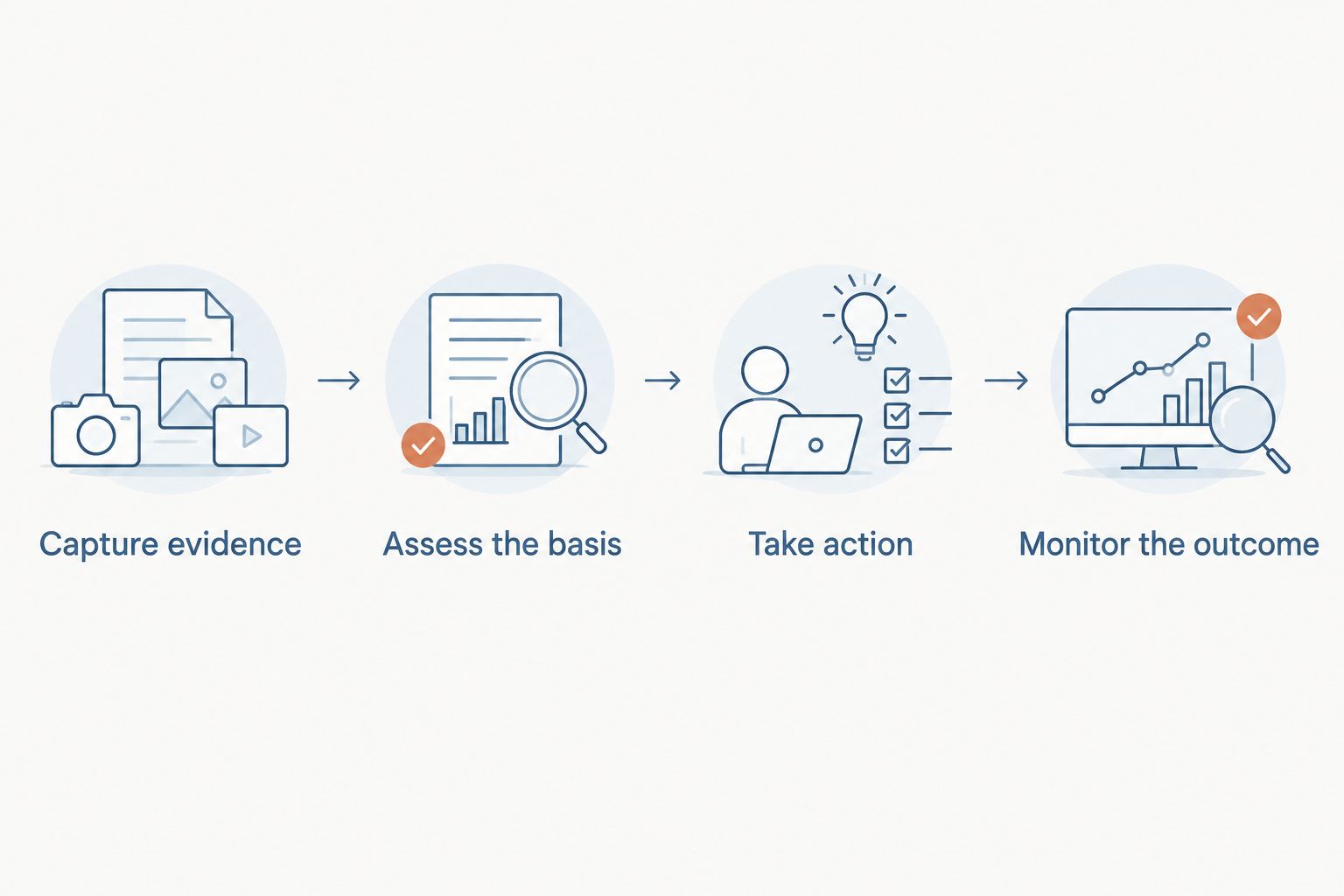
The workflow follows a repeatable sequence: capture evidence, assess the basis, take the appropriate action, and monitor the outcome. Reopen the assessment when the underlying facts change.
Second variant: when an existing review changes
An edited review needs reassessment, not an automatic repeat report. Your 2026 workflow should preserve the earlier version and evaluate what actually changed.
- Capture the revision. Save a fresh screenshot and observation date without replacing the original evidence.
- Compare the substance. Identify added allegations, removed details, or newly exposed personal information. A wording change alone does not establish a new violation.
- Reassess the route. Report a newly identified policy issue through the available process, referencing the existing case where appropriate. Revisit the public response only if it has become inaccurate or materially incomplete.
- Recheck search exposure. Record whether Google shows the updated wording, a different landing URL, or the same employer page. Source changes and search changes are separate observations.
This variant also works when a new review repeats an existing allegation. Keep separate source records, but coordinate the internal fact review so different departments do not publish conflicting accounts.
Troubleshooting
Glassdoor declines the report
Compare the decision with the policy basis you submitted. Use any available follow-up process when you have relevant clarification or new evidence; otherwise, move to response and search visibility work rather than resubmitting the same unsupported claim.
The review disappears, but Google still shows old wording
Confirm whether the exact source URL was removed or whether only part of the page changed. Google's outdated-content process is relevant when its result reflects content that is no longer present; it is not a route for deleting unchanged criticism.
Search Console does not show the Glassdoor result
Search Console reports on verified properties, not every page mentioning your company. Use a separate search observation log for Glassdoor visibility and reserve Search Console for understanding your own site's performance.
The employer response creates a new dispute
Pause further replies and have the authorized owner review the wording with HR or counsel. Remove confidential disclosures through the available editing or support process, and avoid turning a review thread into an argument about the reviewer's identity.
Customize your workflow
Add recruitment, communications, and executive support teams only where their responsibilities require access. Give each audience a task summary rather than distributing the entire evidence folder.
Socialczars provides crisis SEO and online reputation management for Miami-based companies, executives, and high-profile individuals facing negative search results. Use specialist support when platform reporting, executive exposure, and branded search visibility require coordinated decisions; keep legal determinations with counsel.
For your 2026 operating plan, define success before work begins: corrected source content, a documented moderation outcome, more useful owned pages, or reduced visibility for a specified query. Report each outcome separately.
Address your search reputation problem
Discuss negative search results, crisis SEO, and online reputation management with Socialczars.
FAQ
Can I remove a bad Glassdoor review just because it is unfair?
Disagreement alone does not establish a basis for Glassdoor review removal. Identify a specific issue under Glassdoor’s current guidelines and document the relevant evidence before reporting.
Does removing a Glassdoor review remove it from Google immediately?
Removing source content does not guarantee an immediate change in Google Search. Check the exact source URL and the search result separately, then consider Google’s outdated-content process when applicable.
Can Google Search Console remove my company’s Glassdoor page?
Your company’s Search Console access does not give you removal control over Glassdoor URLs. Use Search Console for properties you can verify and assess Google’s separate removal processes only when their criteria apply.
Should I respond to a review while a removal report is pending?
Assess an employer response separately from the removal report. Publish only an approved, factual response that protects confidential information and does not attempt to identify the reviewer.
How long does Glassdoor review removal take?
There is no fixed completion time this workflow can promise. Track the actual reporting status and continue appropriate response and search visibility work rather than treating submission as approval.
Can a reputation management agency guarantee first-page control?
A reputation management agency cannot guarantee Google’s ranking decisions or Glassdoor’s moderation outcome. Evaluate the proposed evidence review, content work, reporting process, and measurement plan instead of a guaranteed deletion claim.
What should I do if an anonymous review contains serious false allegations?
Preserve the review and supporting evidence, then ask qualified counsel to assess the disputed statements. Do not publish employee records or accuse a suspected reviewer while the facts remain unverified.
One last thing
Check the ranking URL before celebrating a removal. Google might be showing the employer overview page rather than the individual review. Deleting one review does not delete that broader page, so the search result can remain even after a successful moderation outcome.
Related guides
- How to connect Google Search Console to brand monitoring
- Does responding to a negative review stop it from ranking on Google?
- How to connect Google Alerts to a 24-hour crisis workflow
